
Case study / Browser + game engine experiment
What if a Godot world could use real HTML?
Chrome's HTML-in-Canvas experiment gives canvas applications a new kind of source: live DOM. Quest Signal connects that unfinished browser capability to Godot, turning three real HTML interfaces into interactive surfaces inside a playable 3D scene.
Real DOM · WebGL textures · Godot gameplay · one bidirectional bridge
Added to GoogleChromeLabs’ Awesome HTML-in-Canvas ecosystem demos through a contribution merged on 28 July 2026. The list curates third-party demos. Its disclaimer states that inclusion does not constitute an endorsement.
The gap Google is trying to close
Canvas, WebGL, and WebGPU let developers control every pixel, but they normally flatten interface content into graphics. Text may still look like text while the browser no longer knows that it can be selected, searched, translated, focused, or exposed as a structured interface.
HTML-in-Canvas is a WICG proposal being tested in Chrome to close that gap. It lets the browser lay out real HTML for a canvas and lets the canvas draw that content into 2D, WebGL, or WebGPU output. The DOM remains the source of meaning and interaction; the canvas decides how the result appears.
What HTML-in-Canvas makes possible
HTML as a render source
Use the browser's HTML and CSS layout engine for rich text, controls, and structured content, then paint the result into a canvas or GPU texture.
Browser behavior stays available
Keep the underlying DOM for selection, clipboard actions, Find, focus, language information, and assistive technologies instead of simulating them in a shader.
GPU composition becomes possible
Place HTML on 3D geometry, then combine it with perspective, depth, animation, shaders, lighting, and the rest of a canvas renderer.
This is not a screenshot pasted over the game. The same DOM subtree is both the browser-owned interface and the source painted into the GPU texture.
Why combine it with Godot?
Godot already knows how to build a world: cameras, meshes, depth, animation, input, collisions, shaders, and physics. The browser already knows how to build an interface: typography, document structure, selection, language, forms, and accessibility semantics. A Godot Web export can potentially let each side keep doing the job it does best.
That changes an in-world screen from decorative pixels into a working web surface. Terminals can contain selectable logs. Books and maps can use responsive HTML. Control panels can use native buttons and inputs. Dialogue, dashboards, and creator tools can retain web semantics while still existing in the scene's depth and perspective.
The proof
Quest Signal turns the proposal into gameplay
We built a third-person Godot scene with three independent HTML panels projected onto world-space meshes. The player can walk around them as 3D objects, but can also interact with them as web content.
- Select and copy SECTOR 7-C in the DOM to complete a Godot mission.
- Search the Spanish transmission with browser Find while preserving its language metadata.
- Click a native HTML button to spawn six Godot rigid bodies in the scene.
- Receive the live Godot body count back inside an HTML status region.
The goal is deliberately narrow: prove that one surface can be a Godot texture, a browser interface, and a gameplay control at the same time.
Try the proof
The API is still experimental. The live demo is registered for Chrome's HTML-in-Canvas Origin Trial through Chrome 154, so supported Chrome builds can run it without changing browser settings. If the trial is unavailable, enable chrome://flags/#canvas-draw-element, relaunch the browser, and start the export. Other browsers receive an explicit unsupported message rather than a fake replacement UI.
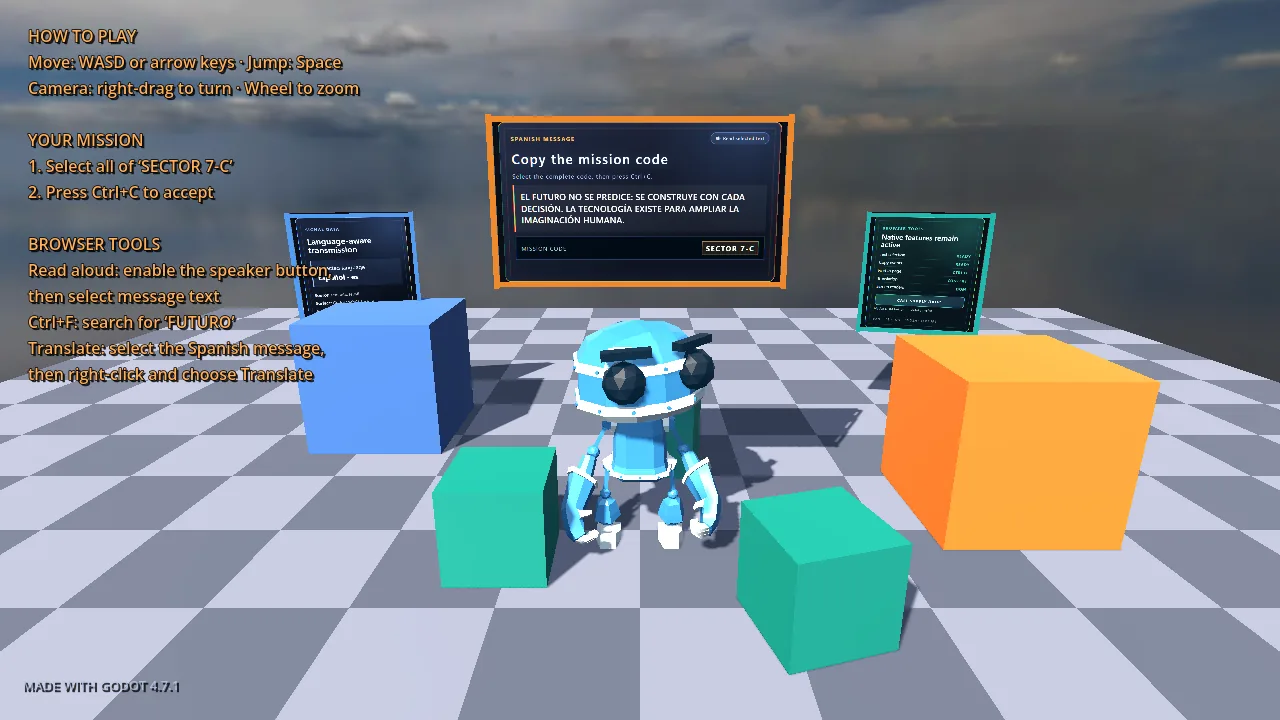
Playable HTML-in-Canvas proof
Quest Signal
Move through the Godot scene, interact with the three browser-owned panels, copy SECTOR 7-C, and trigger game physics from the native Call Supply Drop button.
Loads only after launch. Requires WebAssembly and WebGL 2.
HTML transcript
- Mission panel: select and copy the complete SECTOR 7-C code to change the quest state in Godot.
- Signal panel: search or select a Spanish transmission whose source DOM is marked with lang=es.
- Tools panel: press the native Call Supply Drop button to create physics bodies in Godot and report their count back to HTML.
Fallback coverage
- The poster shows the real playable scene before the large WebAssembly export is requested.
- The transcript explains the three interactions when the experimental API is unavailable.
- The unsupported-browser path identifies the required Chromium feature instead of pretending the bridge is running.
How the browser becomes a Godot texture
A custom Godot web shell places three semantic panels marked with drawable below <canvas layoutsubtree>. Chromium lays out and paints each panel. texElementSubImage2D() then uploads that painted result directly into a texture Godot already owns.
DOM subtree
  → canvas paint event
  → texElementSubImage2D()
  → Godot-owned WebGLTexture
  → ShaderMaterial on a world-space quad
When a panel changes, requestPaint() schedules another canvas paint. Only the affected texture needs to change. The primary path does not encode screenshots or read pixels back through the CPU.
Feature detection keeps older implementations working through texElementImage2D(). The geometry bridge also retains the legacy two-argument getElementTransform() path while Chromium transitions to the new transform model. The Origin Trial still expires on October 20, 2026.
The browser also has to know where the panel moved
Rendering the pixels is only half the bridge. Godot projects each panel through the active camera. updateElementGeometry() applies that projection in canvas CSS coordinates so browser hit testing and accessibility bounds follow the visible quad. That is why a click or text selection can land on a surface with perspective while the camera is moving.
The projection includes Godot's viewport stretch and letterbox offsets before conversion to canvas CSS coordinates, so resizing the window preserves alignment.
Quest Signal synchronizes more often while the player or camera moves and backs off while idle. DOM focus also pauses character and camera input so one action is not interpreted as both webpage interaction and gameplay.
The proof has to work in both directions
Copying SECTOR 7-C starts as a real browser clipboard event. JavaScript sends the selected payload to GDScript, and Godot accepts the mission. The native Call Supply Drop button crosses the same boundary to create six rigid bodies with collisions and shadows.
The return path matters just as much: Godot sends the number of active physics bodies back to the DOM, where the HTML panel updates a live status region. The interface is therefore not passive content; it participates in the game loop.
Why keeping the DOM matters
The same source that becomes a Godot texture still contains headings, buttons, focusable text, live-region semantics, and lang="es" on the Spanish transmission. We do not have to reconstruct that meaning in a second, invisible interface after rendering the scene.
That is a stronger foundation for accessible web games, not an automatic accessibility guarantee. Screen-reader behavior remains configuration-specific, and the prototype is not presented as a WCAG conformance claim.
What this prototype proves
The meaningful evidence is behavioral: browser actions change the game, the game changes the browser interface, and the three DOM panels remain aligned with their moving meshes. The captured test run established the following narrow result.
| Check | Recorded result |
|---|---|
| Godot export | 4.7.1 stable, release, Compatibility renderer |
| Browser | Chrome 150.0.7871.129, CanvasDrawElement enabled |
| Texture bridge | 3/3 panels initialized; every recorded GL error was 0 |
| Scene state | TRANSMISSION_ACTIVE |
| Mission copy | SECTOR 7-C accepted from the mission panel |
| Supply drop | 1 request completed with 6 active Godot physics bodies |
| Browser console | No uncaught errors in the captured startup path |
| Viewport | 1280×720 at device scale 1 |
What it proves — and what it does not
Quest Signal proves that a Godot Web scene can use live semantic HTML as interactive world-space textures and exchange real gameplay events with that DOM. It does not prove production stability, cross-browser support, universal accessibility, or that arbitrary cross-origin web content can safely become a texture.
HTML-in-Canvas remains an early Chrome experiment and a living proposal. Its API may change, privacy-sensitive content is restricted, and performance depends on how much DOM content changes and how often it is painted. This is evidence for a direction, not a production dependency recommendation.