
Meta Quest VR / 2026-06-04 / 8 min read
Quest VRC: 60 fps or 72 fps? The official docs still conflict
Meta's official Quest guidance still says both 60 and 72 fps. Here is why 72 is the conservative pre-submit target, and what to verify.
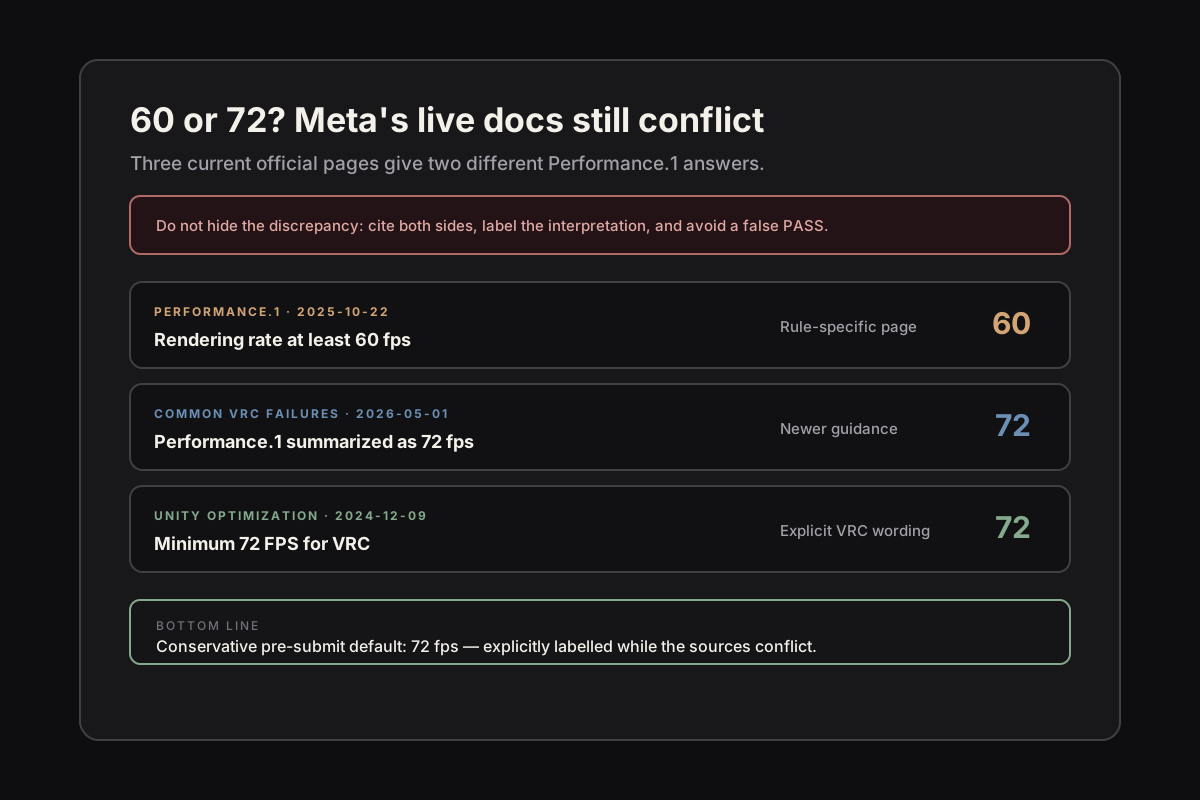
The short answer
As of June 4, 2026, Meta's official Quest documentation contains a live conflict. VRC.Quest.Performance.1, updated October 22, 2025, says apps must maintain a rendering rate of at least 60 fps. Common VRC failures, updated May 1, 2026, describes Performance.1 as requiring graphics at 72 frames per second. The Unity Basic Optimization Workflow, updated December 9, 2024, also says all Quest apps require a minimum of 72 FPS for VRC.
The safe operational answer is therefore 72 fps, because it is the stricter interpretation and avoids passing a build that satisfies only the 60 fps wording. But accuracy matters: 72 is a conservative pre-submit default while the sources conflict, not a requirement Meta has clearly reconciled across its documentation.
That distinction is the point. A readiness tool should preserve the citations and label the conservative interpretation, so a team can see both what the official sources say and why the stricter threshold was applied.
The conflict, source by source
Performance.1 is the rule-specific page. It separates rendering rate from allowed refresh rates and sets the normal rendering-rate criterion at a minimum of 60 fps. Its expected-result section also evaluates extended periods below 60 fps, with separate language for Application SpaceWarp.
The Common VRC failures resource links back to Performance.1 but summarizes the required frame rate as 72 fps. It is newer than the Performance.1 page, yet the linked rule page still says 60. The Unity optimization workflow is older than both and explicitly describes 72 FPS as the minimum for satisfying VRC requirements.
Those dates do not resolve the discrepancy. All three pages remain live, and the most specific rule page still disagrees with the two 72 fps sources. Treating either number as the only official answer hides evidence a developer can verify for themselves.
Rendering rate vs refresh rate does not resolve it
Rendering rate is the work your application genuinely completes each second. Refresh rate is how often the display updates. Selecting a 72 Hz mode does not by itself prove that the app consistently renders 72 frames per second.
That distinction is useful, but it does not make the documentation conflict disappear. Performance.1 explicitly discusses both rendering rate and allowed refresh rates, while still setting the rendering criterion at 60 fps. Meanwhile, Common VRC failures attributes 72 fps directly to Performance.1, and the Unity workflow calls 72 the VRC minimum.
Application SpaceWarp is another distinct path with separate language in Performance.1. Verify the exact path you intend to submit rather than assuming the normal-rendering conservative default or a remembered SpaceWarp threshold automatically applies.
Why the conservative target is 72
When official sources conflict, a pre-submit gate should avoid the interpretation most likely to create a false PASS. A build sustaining 72 fps satisfies both the ≥60 wording and the stricter 72 guidance. A build sustaining 60–71 fps satisfies only one side of the live conflict.
For the normal rendering path, use 72 fps as a labelled conflicting-docs conservative default. That gives a frame budget of about 13.9 milliseconds instead of 16.6 milliseconds at 60 fps. Keep the source state and interpretation visible in the report rather than presenting the threshold as settled fact.
This is not legalistic caution for its own sake. A conservative gate exists to find the avoidable risk before submission while remaining honest about what it knows, what conflicts, and which interpretation it applied.
How to verify before you submit
The number that matters is the one your build produces on a real headset, not the one in a doc. The tool that already reports it is OVR Metrics: capture a session on-device and read the app's frame rate and stale-frame behaviour over a representative run, not a two-second glance at a menu.
The trap is treating a clean editor profile or a short capture as proof. Submission performance is about sustained behaviour — five minutes in, warm, in the heaviest scene — because a frame rate that passes cold can fail once the device heats up. Capture long enough to see the floor under load.
If the measured rendering rate holds the floor across the paths a reviewer will exercise, the avoidable Performance rejection is off the table. If it does not, you have found it before the reviewer did — which is the entire point of checking.
The avoidable rejection
A Performance rejection over a frame-rate threshold is the most avoidable kind: a measurable number against published guidance, found by anyone who measures the right number on the right device. The expensive version is discovering during review that the team targeted 60 while other live Meta guidance expected 72, or that a clean cold run fell below budget once the headset warmed up.
That is the class of failure QuestReady is built to catch. It maps a versioned VRC ruleset against on-device OVR Metrics, preserves source provenance, labels conflicting-docs conservative interpretations, and returns one honest coverage-aware verdict before you submit — locally, with nothing uploaded.