
Godot pathfinding / 2026-06-27 / 12 min read
Verified as of Godot 4.7 stable docs and Godot 4.7-stable proof workspace on 2026-06-27
TileMap to Navigation Grid in Godot
Build an AStarGrid2D from a Godot TileMapLayer using get_used_rect(), tile custom data, and set_point_solid(). Verified in Godot 4.7.
The tilemap is painted. The grid is not.
You painted a level in TileMapLayer. The walls are there. The water is there. The little bridge that only your game rules understand is there too.
If you came here searching for TileMap, use TileMapLayer in Godot 4.x; the old TileMap node has been deprecated since Godot 4.3.
Then you ask AStarGrid2D for a path and it walks straight through the scenery like nothing happened.
That is not a Godot bug. It is a missing bridge.
TileMapLayer stores your painted cells. AStarGrid2D stores a separate grid of pathfinding points. A navigation layer on a tile map belongs to Godot's navigation system, not to AStarGrid2D. If you want a grid pathfinder to respect the level you painted, you have to build that grid from the tile data.
Building a Pac-Man-style maze chase? This page turns the maze TileMapLayer into the grid; the complete small maze-chase starter connects that grid to buffered movement, pursuer policies, tunnels, and reservations, while the shared-field theory lives in the Dijkstra maps guide.
This article is that bridge.
The short answer
To build an AStarGrid2D from a TileMapLayer, set grid.region = tile_layer.get_used_rect(), match grid.cell_size to the TileSet tile size, call grid.update() once, then mark blocked cells with set_point_solid().
TileMapLayer cell coordinates can stay as AStarGrid2D point IDs. You usually do not need to normalize the map to (0, 0).
The basic pipeline is deliberately small:
- Read the used rectangle from a
TileMapLayer. - Create an
AStarGrid2Dwith the same region and tile size. - Decide which cells are solid.
- Write those cells with
set_point_solid(). - Ask for a path using tile coordinates as point IDs.
The negative-origin check
The important part is that you do not need to normalize the tile map to (0, 0).
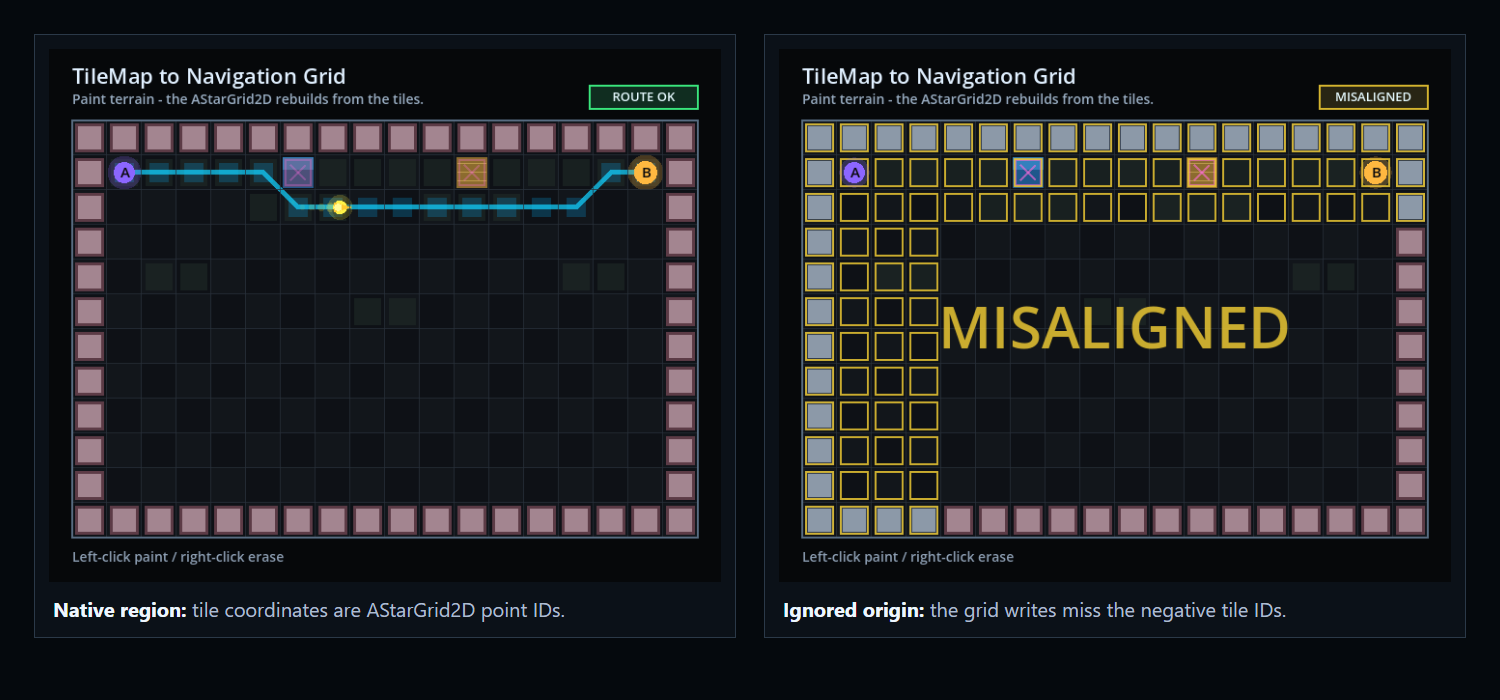
I verified this in Godot 4.7 with a deliberately awkward map. AStarGrid2D accepted the negative region origin, accepted set_point_solid(Vector2i(-4, -3)), and returned paths using native negative point IDs.
That one detail removes a lot of coordinate bookkeeping. The local verification artifact for this article is available as tilemap-to-navigation-grid-verification.json. It is a correctness proof with pass/fail cases, not a performance benchmark.
The minimal build step
Here is the shape of the build step. The two quiet decisions are grid.region = tile_layer.get_used_rect() and using tile coordinates directly as point IDs.
Do not normalize unless you have to
A common instinct is to normalize the used rectangle to (0, 0). That gives the grid point IDs from (0, 0) to (width - 1, height - 1), while the tile map still has cells from used_rect.position to used_rect.end.
Every path request now needs translation. Every debug overlay needs translation. Every click-to-cell edit needs translation. And eventually one of those conversions gets missed.
The cleaner version is just this:
The offset is a different problem
The grid's cell_size should match the TileSet tile size. The offset controls where the point sits inside the cell when converting between grid IDs and positions. For a normal square tile grid, center the point:
Keep point IDs and world positions separate
The origin belongs in grid.region. The intra-cell center belongs in grid.offset.
If your TileMapLayer node itself is moved, scaled, or nested under a transformed parent, include that transform when converting cell IDs to world positions. The grid point ID can still be the tile cell. The drawn position is where transforms enter the picture.
For an untransformed layer, tile_layer.map_to_local(cell) should agree with an AStarGrid2D point position when grid.offset = cell_size / 2.
That gives the center of one cell. A 2x2 or rectangular unit needs the center of its complete footprint; the multi-tile movement guide derives that offset and keeps the anchor authoritative.
Deciding walkability
The grid does not care why a point is solid. It only needs a boolean. The question is where that boolean comes from.
| Source | Best for | Pitfall |
|---|---|---|
| Custom data | Gameplay walkability rules: water, bridges, terrain types, movement profiles | Needs TileSet discipline; every relevant tile should define the rule |
| Physics layer | Prototypes where collision and movement mean the same thing | Collision is often not navigation; projectiles, cover, placement, and units may need different rules |
| Atlas IDs | Tiny prototypes where one tile art asset maps to one rule | Brittle when art changes or multiple tiles share the same movement behavior |
Custom data is usually the game rule
For most game rules, custom data is the best source. In the TileSet, add a custom data layer such as walkable: bool, then each tile decides its gameplay meaning. The focused version of that rule lives in TileMapLayer custom data for walkability in Godot.
Water can be non-walkable without needing collision. A bridge can be walkable even if it has collision for some other system. For the numeric sibling of this import, use TileMapLayer custom data for movement costs; it owns typed cost layers, untouched float defaults, terrain IDs, and the validated weight handoff.
Physics and atlas IDs are narrower tools
Physics-derived walkability can work when collision means cannot walk here. It is convenient for prototypes, but it is easy to over-trust. Collision is not always navigation. A tile may have collision for projectiles, placement, cover, selection, or visual reasons.
Atlas IDs can also work for tiny prototypes where the art and the rule are genuinely the same thing. They get brittle once tile art changes or several tiles share the same movement behavior.
Empty cells are a design choice
get_used_rect() gives you the rectangle that encloses used cells. Inside that rectangle, some cells may be empty.
For an authored dungeon, empty may mean solid void. For an overworld map, empty may mean open ground. Pick the policy explicitly. Do not let null tile data become accidental pathfinding behavior.
Call update() for shape, not for every solid cell
AStarGrid2D.update() rebuilds the grid after shape-related properties change. Use it after setting the region, cell size, offset, diagonal mode, and similar grid-shape configuration.
Then write solidity. Do not call update() again after every set_point_solid().
Solidity is point data. The grid shape did not change. Calling update() repeatedly there is the kind of small waste that hides in beginner code until the map gets bigger. This is the same point-data boundary used in the tower-defense path validation proof.
Put the conversion in one helper
In a real project, put this conversion in one small helper instead of spreading it across your scene script. The downloadable proof workspace includes a fuller version with skipped-cell reporting, point-write counts, custom-data mode, physics-layer mode, and empty-cell policy.
Asking for a path
Once the grid is built, path requests are simple. Because the region kept the TileMapLayer origin, start and goal are tile coordinates.
The path returned by get_id_path() is also a list of tile coordinates. If you need world positions for drawing or movement, convert with the layer transform.
Runtime changes
If the tile map changes at runtime, rebuild the affected navigation data. For a small map, rebuilding the whole AStarGrid2D is often fine. That is exactly what the demo does: you paint terrain, the grid rebuilds, and the walker reroutes.
Once the authored grid is initialized, the runtime AStarGrid2D update contract shows how to change doors, blockers, and temporary costs without rebuilding structure, and how to replay point layers after a real resize. The broader dynamic-blocker guide covers which cached routes to invalidate and when to queue their repaths.
PathForge is built around that kind of work: dynamic blockers, movement ranges, editor diagnostics, and dirty navigation updates for games where movement is part of the design, not a decorative line on the floor.
What the proof demo shows
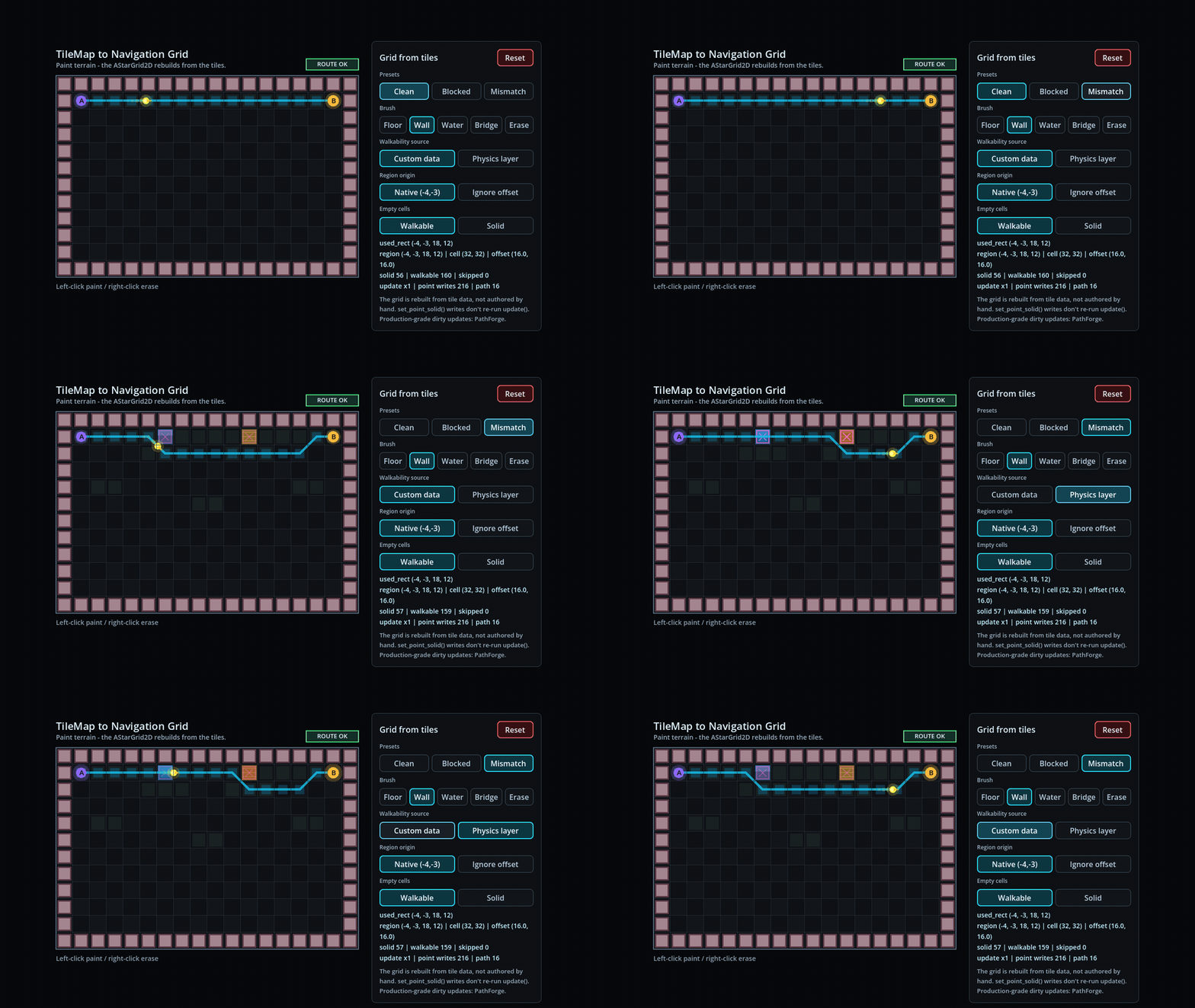
The interactive demo for this article is deliberately small. It is a paint sandbox, not a benchmark.
Measurement-gap: the published artifact is a correctness verification harness, not a timing dataset. Add Dataset schema only after reproducible performance captures exist.
The default Mismatch preset has water and bridge tiles outlined in magenta. Switch between Custom data and Physics layer and the derived grid changes. Switch from Native (-4,-3) to Ignore offset and the demo stamps MISALIGNED across the board.
- A painted
TileMapLayercan be converted into anAStarGrid2D. get_used_rect()can be used directly as the grid region.- Negative tile coordinates can remain native grid point IDs.
- Custom-data walkability and physics-layer walkability can disagree.
set_point_solid()writes point data after one shapeupdate().
The offset still
The offset issue does not read well in motion, so the proof package captures it as a separate still. The left side keeps the native region. The right side ignores the origin and shows the misaligned result.
Common failure modes
These are the boring ones to check before rewriting the pathfinder.
The grid starts at zero, the tile map does not
Symptom: the path appears shifted, skipped, or empty when the map has negative coordinates or a non-zero used rectangle.
Fix: use the used rectangle as the grid region: grid.region = tile_layer.get_used_rect().
The path ignores walls
Symptom: get_id_path() returns a route through blocked tiles.
Fix: make sure you call set_point_solid() after grid.update(), and make sure your walkability rule reads the correct tile data.
Physics and custom data disagree
Symptom: physics-layer mode and custom-data mode produce different routes.
Fix: decide which source represents gameplay. If collision and movement are not the same rule, use custom data for movement.
Empty cells behave strangely
Symptom: paths cut through holes in the authored map, or refuse to use unpainted ground.
Fix: choose an empty-cell policy. Make it visible in code.
update() is inside the cell loop
Symptom: rebuilding is slower than it needs to be, or point data disappears after you write it.
Fix: configure shape, call update() once, then write point solidity.
Frequently asked questions
Does TileMapLayer have built-in pathfinding?
TileMapLayer can participate in Godot's navigation system through navigation layers and NavigationServer2D. That is separate from AStarGrid2D. If you want AStarGrid2D to use tile data, build the grid manually from the tile map.
How do I build an AStarGrid2D from a TileMapLayer?
Create a new AStarGrid2D, set region to tile_layer.get_used_rect(), set cell_size from the TileSet tile size, set offset to half a cell, call update(), then iterate the used rectangle and write blocked cells with set_point_solid().
Do I need to normalize TileMapLayer coordinates to zero?
No, not for the normal case. The proof for this article verifies that AStarGrid2D.region can keep a negative origin in Godot 4.7. That means TileMapLayer cell coordinates can be used directly as AStarGrid2D point IDs.
Why does my AStarGrid2D not line up with my tilemap?
The usual cause is mixing coordinate systems. Keep grid.region equal to tile_layer.get_used_rect(), use tile coordinates as point IDs, and only use offset to center points inside cells. If the TileMapLayer node is transformed, include that transform when converting cells to world positions.
Should walkability come from physics or custom data?
Use custom data when movement is a gameplay rule. Use physics only if collision and movement mean the same thing in your project. They often start the same and then diverge.
When should the TileMapLayer import call AStarGrid2D.update()?
Set region, cell size, and offset first, call update() once, then write TileMapLayer solidity with set_point_solid(). Later point edits do not need another update(); the runtime AStarGrid2D update guide covers doors, costs, and structural replay.