
Godot pathfinding / 2026-06-29 / 8 min read
Verified as of Godot 4.7 stable docs checked on 2026-06-29
TileMapLayer Custom Data for Walkability in Godot
Use a Godot TileSet custom data layer as the AStarGrid2D walkability source: read TileData, handle empty cells, and avoid navigation-layer confusion.
The grid needs a rule
Your AStarGrid2D does not know that a wall tile is blocked.
It does not know that water is blocked for a ground unit, that a bridge is walkable even if it has collision, or that empty cells should be treated as solid void in this one level. AStarGrid2D only knows about grid points. If a point should be blocked, you have to write that point with set_point_solid().
The clean source for that decision is usually a TileSet custom data layer.
The short answer
Use a TileSet custom data layer named walkable, with type bool. Paint that value on the tiles in your TileSet. Then read the tile data from your TileMapLayer and convert it into AStarGrid2D solid points.
Set up a walkable custom data layer
In the TileSet editor, add a custom data layer and make the movement rule explicit.
- Open the
TileSetused by yourTileMapLayer. - Add a custom data layer.
- Name it
walkable. - Set its type to
bool. - Select each movement-relevant tile and set its
walkablevalue deliberately.
| Tile | <code>walkable</code> |
|---|---|
| Floor | true |
| Wall | false |
| Water | false for ground units |
| Bridge | true |
Read TileData from TileMapLayer
The normal read path is small: get the cell's TileData, handle the empty-cell case, then read the custom data value.
If the cell is empty, or if the placed cell does not resolve to atlas tile data, data can be null. Decide what that means for your game. In many authored dungeon or tactics maps, empty means solid void.
The has_custom_data trap
TileData.has_custom_data("walkable") checks whether a custom data layer with that name exists. It is not a per-cell "did I paint this value?" check.
For pathfinding code, handle data == null first, then read the custom data value. If your game needs a stricter audit, validate the TileSet setup separately instead of hiding that check inside every cell read.
Where the rule plugs in
Keep the full grid construction in TileMap to Navigation Grid in Godot. This article owns the walkability rule, so the important handoff is the line that converts custom data into point solidity.
In the grid-building step, configure grid.region, grid.cell_size, grid.offset, and call the one shape update(). Then apply the walkability rule.
Call update() for shape, not every solid cell
Call grid.update() after the grid shape is configured. Then write point solidity.
Do not call update() after every set_point_solid() write. update() is for shape changes such as region, cell_size, offset, and cell shape. Solid points are point data.
Why not use physics collision?
Physics-derived walkability can work in a prototype where "has collision" and "cannot walk here" are the same rule.
That stops being true quickly. A tile can have collision because projectiles should hit it. Another tile can have collision because it is cover. A bridge can have collision for placement, selection, or decoration while still being walkable. Water can have no collision at all while still being blocked for ground units.
Physics is a useful system, but it is not the same thing as movement design.
Why not use atlas coordinates?
Atlas IDs are tempting because they are visible in code.
Atlas IDs are brittle
Hard-coded atlas coordinates are fine for a tiny throwaway prototype. They are brittle for production content.
Art changes. Tiles get reorganized. Several visual tiles may share the same movement rule. One tile may get an alternate version later. If your pathfinding rule is tied to atlas coordinates, every art cleanup becomes a gameplay risk.
Custom data keeps the rule attached to the tile definition, not to a hard-coded coordinate in your script.
Beyond one boolean
Start with walkable: bool. It is the clearest rule and it maps directly to AStarGrid2D.set_point_solid().
Once the project grows, custom data can carry richer movement rules.
| Custom data field | Type | Meaning |
|---|---|---|
walkable | bool | Can a normal ground unit stand here? |
swimmable | bool | Can swimming units use this tile? |
flyable | bool | Can flying units pass through this tile? |
movement_mask | int | Bitmask for multiple movement profiles |
requires_faction | String | Gate a tile by team or owner |
Walkability is not movement cost
Keep this boundary clean. This page is about "can I enter this cell?" Movement cost is a separate question. A mud tile may be walkable but expensive. Use TileMapLayer custom data for movement costs to author and validate the numeric layer, then weighted terrain pathfinding in Godot for route-choice and heuristic semantics.
Use a separate custom data field for cost, such as movement_cost or the value you eventually map into weight_scale. Do not make one field answer both questions.
Cache the layer id in hot loops
Name-based custom data reads are clear and are the right first version.
Use a cached id when the loop is hot
If you are rebuilding a large grid often, cache the custom data layer id once and use get_custom_data_by_layer_id() in the cell-read helper.
Runtime walkability, light version
Custom data is best treated as authored tile definition data. Every placed instance of the same tile shares the same custom data value unless you use an alternative tile or a runtime override.
For runtime changes, keep the model simple.
- If the terrain really changed, swap the tile or alternative tile with
set_cell(), then rewrite the affected grid point. - If a temporary blocker changed, keep that blocker state outside the
TileSetand updateAStarGrid2Dpoint data directly. - If you need advanced per-cell tile data overrides, Godot exposes
_tile_data_runtime_update(), but that is a heavierTileMapLayerworkflow and should stay out of this article.
What the reused proof demo shows
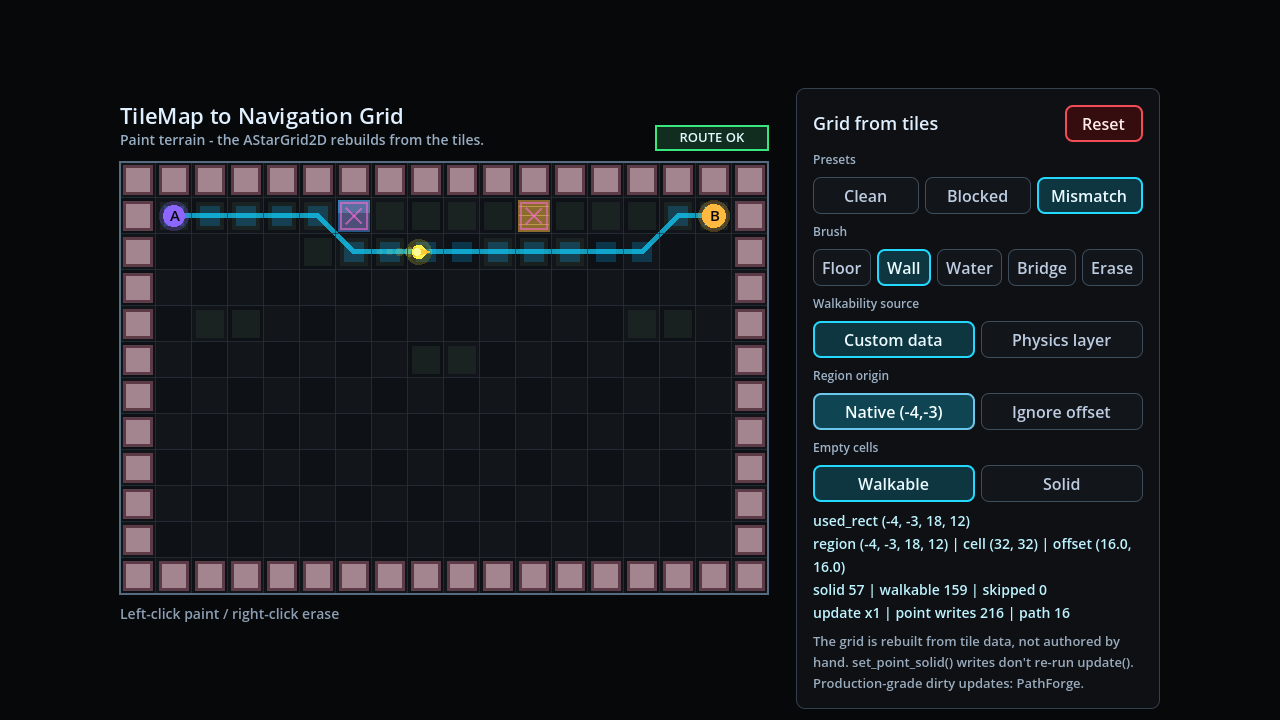
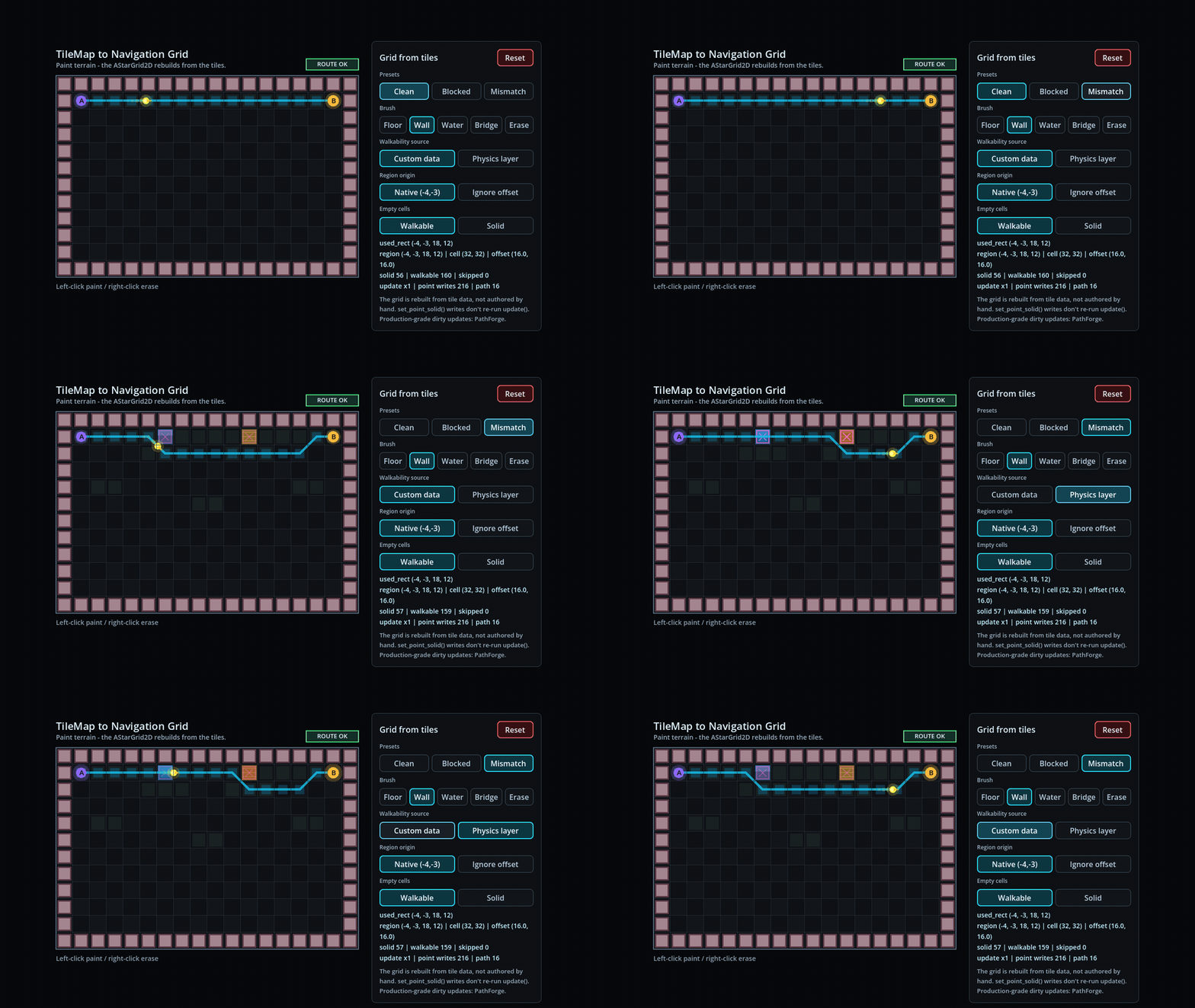
This article does not need a new demo. The TileMap to Navigation Grid proof already shows the important case: custom-data walkability and physics-layer walkability can disagree.
Open the TileMap to Navigation Grid demo and toggle the source. A new custom-data visualizer would only slow the cadence without adding a new technical claim.
Measurement-gap: this article does not publish a new benchmark dataset. The reused artifact is a correctness proof for the walkability source, not a timing claim.
- The map is painted with
TileMapLayer. - The grid is derived from tile data.
- The demo can switch between custom-data walkability and physics-layer walkability.
- Water and bridge tiles show why those two rules are not the same.
- The verification JSON records the expected solid cells and disagreement cases.
Common failure modes
These are the boring checks that catch most broken TileMapLayer walkability setups.
The path ignores walls
You probably built the grid shape but did not write point solidity after grid.update().
Fix: call set_point_solid(cell, true) for blocked cells after the shape setup.
Empty cells behave strangely
get_cell_tile_data(cell) can return null. If you do not choose a policy, empty cells become accidental behavior.
Fix: decide whether empty cells are solid or walkable and make that branch explicit.
Every floor tile is blocked
The walkable custom data value may be missing, defaulting in the wrong direction, or assigned only on some tile variants.
Fix: audit the TileSet and set the walkable value deliberately on every movement-relevant tile and alternative tile.
A runtime blocker changed but paths did not
The TileSet custom data is only the authored base rule. A new tower, door, or temporary obstacle must also update the grid point state.
Fix: rewrite affected cells with set_point_solid() or use a dedicated runtime blocker system.
Frequently asked questions
Should I use a Navigation Layer or a Custom Data Layer for walkability?
Use a custom data layer for AStarGrid2D or custom grid pathfinding. Navigation layers are for Godot's navigation server workflow, not for automatically feeding solid cells into AStarGrid2D.
How do I read a tile's custom data in Godot 4?
Call tile_layer.get_cell_tile_data(cell) to get TileData, handle the null case, then call data.get_custom_data("walkable").
Why is my custom data null or missing?
The cell may be empty, the layer name may be wrong, or the tile may not be the tile variant you edited. Handle data == null separately from custom data lookup.
Is custom data per placed cell?
Treat custom data as TileSet tile-definition data. Placed instances of the same tile share the value unless you use an alternative tile or a runtime override.
Is get_custom_data("walkable") slow?
It is fine for clear code and normal builds. For hot loops, cache the layer id with TileSet.get_custom_data_layer_by_name("walkable") and use get_custom_data_by_layer_id(id).
Should walkability and movement cost be the same field?
No. Walkability answers whether a cell can be entered. Cost answers how expensive it is. Keep walkable: bool separate from fields such as movement_cost or weight_scale.