
Godot pathfinding / 2026-06-10 / 10 min read
Verified as of Godot 4.6.2 / PathForge verification workspace
Why is my path failing in Godot? Nine boring causes to check first
Godot returned an empty path? Check coordinates, bounds, solid starts, stale grid data, sync timing, clearance, region gaps, and weights first.
The direct answer
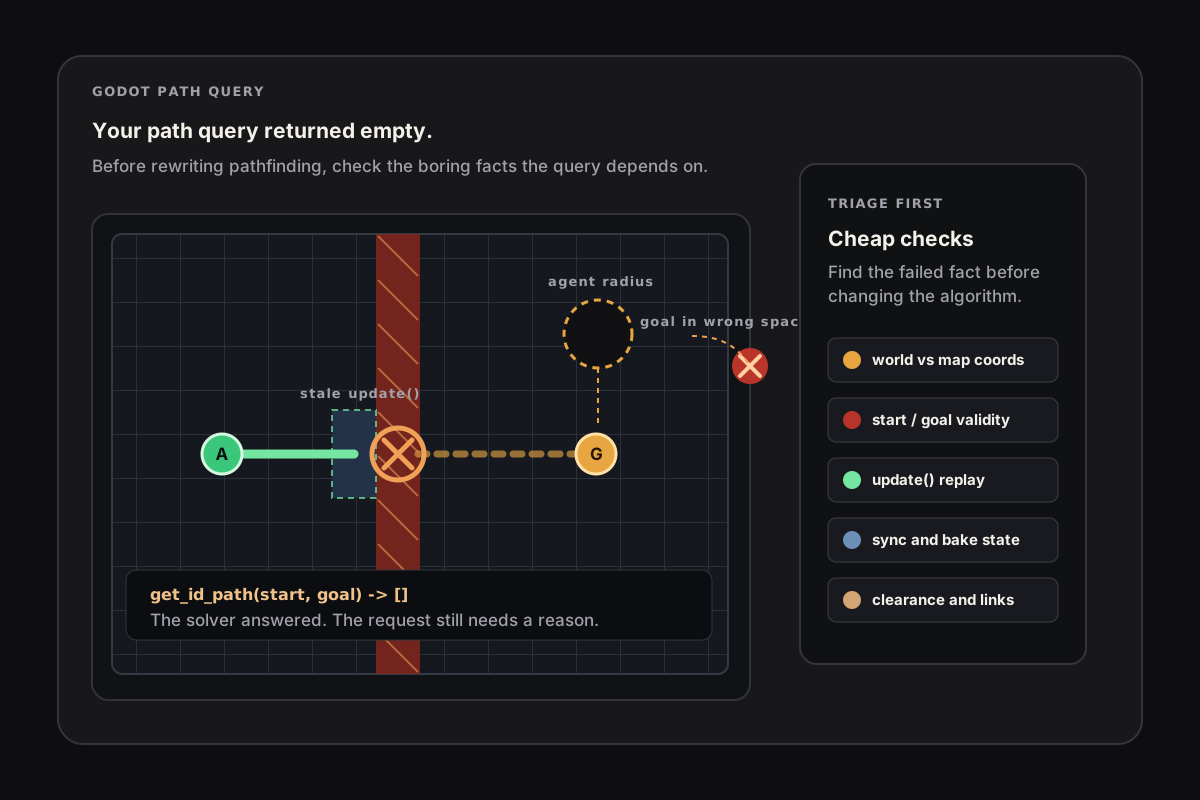
When Godot pathfinding returns an empty path, the cause is usually an invalid request or stale navigation data, not a broken solver. Before rewriting your pathfinding, check nine boring causes: coordinates in the wrong space, endpoints outside the grid or navmesh, a solid start cell, a query that ran before the navigation map synchronized, an AStarGrid2D.update() call that erased obstacle data, diagonal rules, agent size, disconnected regions, and weights that are being ignored.
Pathfinding bugs are rarely exotic. They are clerical. This page is the checklist for working through them in the order that finds the culprit fastest.
If you want those checks wired into a live scene, the navigation debug panel article shows the runtime version: counters first, endpoint snap second, path query last.
If you want the deeper diagnostic-system framing, link this article with Pathfinding failure modes in Godot: why no path is not enough. That page owns the reason-code vocabulary; this page is the first triage pass. And if the path comes back fine but the body stalls mid-route — corners, repath loops, avoidance shoves — that's the stuck diagnosis guide, not an empty-path problem.
First, know which system returned nothing
Godot has two separate navigation stacks, and they fail differently. AStarGrid2D is a grid API you configure and query directly. Failures are about cells: solidity, bounds, weights, grid state, and coordinate conversion.
NavigationServer2D, NavigationRegion2D, and NavigationAgent2D are server-backed navmesh workflows. Failures are about maps: synchronization, baking, region connectivity, navigation layers, links, and the agent radius used at bake time. For the full API model behind those checks, use NavigationServer2D in Godot 4: the complete guide.
If you created AStarGrid2D or wrote set_point_solid(), you are on the grid. If you have a NavigationAgent2D node, a NavigationRegion2D, or a server map RID, you are on the server. Debug the right stack before changing any algorithm. If the map query works but the body is still not moving, switch to NavigationAgent2D setup and common gotchas.
1. You are feeding world pixels into a cell API
The symptom: paths start from the wrong cell, end one tile off, or come back empty for cells that look obviously walkable. The cause: AStarGrid2D and TileMapLayer speak in cell coordinates, while gameplay code usually speaks in world pixels.
The conversion chain has three spaces, not two: world, the layer's local space, and map cells. Skipping to_local() works only until the TileMapLayer is moved, scaled, or nested under a transformed parent. If your grid does not line up with your tilemap at all, first check the TileMap to navigation grid setup: region origin, cell IDs, and offset.
2. The start or goal is outside the map
On the grid, any query touching a cell outside region is invalid. Check it directly before querying, and treat a dirty grid as a setup failure instead of lumping it together with no path.
On the navmesh side the equivalent is a target that is not on any region: clicks in the void, spawn points inside walls, or a marker on the wrong navigation layer. Compare the intended target with the closest navigation point and owner region before blaming routing.
3. The start cell is solid
The symptom is memorable: get_id_path() returns [] even when start == goal. If the start point is solid, AStarGrid2D has nowhere legal to begin. This often happens when an occupancy pass writes an obstacle onto the agent's own cell. Visual case: ASTARGRID_START_SOLID.
Quick check: grid.is_point_solid(start) before the query. The full treatment of solid-start and goal validation, including reason codes and the cost argument, lives in the failure modes article.
One quiet variant: the Godot docs mark get_point_path() as not thread-safe. If a path only fails under threaded load, reproduce it single-threaded before inventing a geometry explanation.
5. You changed grid shape, then update() erased your map
This is the high-value footgun. AStarGrid2D.update() is required after changing grid shape: region, cell_size, offset, or cell_shape. It is not required after set_point_solid(), fill_solid_region(), or weight changes.
For the full API table behind that rule, see the AStarGrid2D complete reference for Godot 4. For the implementation workflow — including clean-versus-dirty behavior, runtime blocker ownership, and replay — use the runtime AStarGrid2D update guide.
The catch is the shape-change update. After changing region, cell_size, offset, or cell_shape, the required update() clears point data: solid flags and weights. The new Godot 4.7 receipt also verifies the nuance worth keeping: a clean update() without a shape change preserves point data, so do not overstate this as every update wipes.
The fix is structural, not a one-liner. The grid must never be the only owner of obstacle data. Keep a source of truth you can replay after shape updates. Visual case: ASTARGRID_POINT_DATA_RESET.
6. Diagonal rules do not match what you see
Sometimes the path is not failing. It is legal under rules you forgot you chose. diagonal_mode decides whether a path may cut a corner between solid cells. DIAGONAL_MODE_ALWAYS can let agents slide through diagonal gaps a human would call a wall; DIAGONAL_MODE_ONLY_IF_NO_OBSTACLES can make a route impossible that looks open on screen.
If a path only fails in tight corner geometry, or visually clips through corners, inspect the grid's actual diagonal mode before debugging anything else.
7. The corridor is real, but your agent does not fit
The symptom: small units route through a gap, large units get no path, and the map looks fine because for a one-cell agent it is fine. Visual case: INSUFFICIENT_CLEARANCE.
On a navmesh, this is decided at bake time. Baking shrinks the walkable polygon inward by NavigationPolygon.agent_radius, so a corridor narrower than the baked agent profile can disappear from the mesh. The PathForge baked-radius proof uses the same source geometry with a 44 px gap: agent_radius = 8 keeps start and goal connected, while agent_radius = 24 splits them into disconnected baked polygons. The proof JSON is available at the navmesh radius verification artifact.
On the grid, the equivalent concept is clearance, and the detailed version belongs to multi-size agents in Godot. For triage, the check is the same on both stacks: does the path work for a smaller agent? If yes, it is a fit problem, not a generic connectivity problem.
8. Two islands have no bridge
Both areas path fine internally; nothing paths between them. Navigation regions merge when their edges exactly overlap, or when edges are nearly parallel and within the map's edge_connection_margin. Partially overlapping polygons are the trap: close enough to look connected in the editor, wrong enough not to merge reliably.
Turn on visible navigation and look at where the regions actually end. Raise edge_connection_margin if the gap is a layout artifact. Add a NavigationLink2D if the gap is real and you want traversal anyway: jumps, doors, teleports, or scripted transitions.
9. The path is legal but ignores your terrain costs
You set weight_scale on swamp cells, and agents stride straight through the swamp. The likely cause is one property: jumping_enabled. It enables Jump Point Search, and JPS assumes a uniform-cost grid, so Godot disables weight consideration while it is on.
The rule is simple: jumping_enabled and weight_scale are mutually exclusive. Pick speed or terrain costs per grid. If you need both, that is a custom-search question, not a configuration tweak.
For the complete route-choice contract — safe weights, returned-route cost math, sub-1.0 heuristics, diagonal policy, and per-unit grids — continue with Weighted Terrain Pathfinding in Godot.
What this checklist deliberately skips
Some adjacent problems already have an owner in the corpus. Dynamic blockers that fail to invalidate paths belong to dynamic blockers in Godot. NavigationObstacle2D not blocking paths is covered in the failure modes article. First-frame sync and grid-vs-navmesh tradeoffs are covered in grid or navmesh in Godot.
The whole family of the path is fine but the agent never arrives problems, such as target_reached not firing or agents circling the goal with avoidance enabled, is arrival behavior. That deserves its own article rather than a paragraph here.
When the checklist is not enough
If you reach the bottom and the query still fails, you are past triage and into diagnostics. At that point the failed query needs to tell you which assumption broke instead of handing you another empty array.
That is the diagnostic-first direction PathForge is being built around. The Failure-Mode Museum keeps interactive versions of the cases above, so you can compare your project's behavior against known-broken examples without turning the article body into a hard sell.
Proof artifacts for this article
This post ships with a runnable Godot 4.6 mini project and narrow verification JSON from the PathForge workspace. The demo zip includes the update-wipe proof scene, the baked navmesh agent-radius scene, the verification scripts, and smoke checks.
The attached dataset is deliberately narrow evidence for this article: a local Godot 4.6.2 verification run, not a broad PathForge performance claim. That distinction matters more than the table looking impressive.
Frequently asked questions
What does "NavigationServer map query failed because it was made before first map synchronization" mean?
The navigation map has not completed its first synchronized iteration, so the first path query returns empty with that warning. Defer setup, await a physics frame, or check NavigationServer2D.map_get_iteration_id(map) before the first query.
Where should I troubleshoot an AStarGrid2D terrain-weight problem?
Start by turning jumping_enabled off, because Godot ignores weight_scale while jumping is enabled. For safe weights, returned-route cost math, sub-1.0 heuristics, diagonal policy, and per-unit profile grids, continue with Weighted Terrain Pathfinding in Godot.
Why did all my solid cells reset in AStarGrid2D?
A shape-changing AStarGrid2D.update() clears point data, including solidity and weight_scale. It is required after changing region, cell_size, offset, or cell_shape, so keep obstacle data in your own structure and replay it after those updates.
Why is there no path through a gap my agent should fit through?
On a navmesh, baking shrinks walkable polygons by the baked NavigationPolygon.agent_radius, so narrow corridors can disappear at bake time. On a grid, large agents need clearance checks. Verify the corridor exists for the agent size you are actually querying with.