
Unity architecture / 2026-05-12 / 9 min read
Updated 2026-06-05
How I structure Unity projects that outgrow MonoBehaviour scripts
A boundary-first approach for Unity projects after the inspector stops being a filing system — separating data, logic, and scene wiring so code keeps scaling.
The pressure point
Most Unity projects begin honestly: a few MonoBehaviour scripts, direct references in the inspector, and enough serialized state to feel productive. This is not a crime. It is how prototypes learn to walk.
The invoice arrives later. A save system wants to know about inventory. Inventory wants to know about UI. UI wants to know about audio. Audio has somehow met the quest manager. Nobody remembers introducing them.
The first boundary I add is not a framework. Frameworks are where simple problems go to acquire a mailing address. The first boundary is a habit: scene scripts coordinate, domain code decides, and data is explicit enough that future changes do not require archaeology.
Where MonoBehaviour sits in the Unity API
Before deciding what leaves a MonoBehaviour, it helps to be precise about what one is. In the Unity API, MonoBehaviour is the base class your scripts inherit from to become attachable to a GameObject. It sits at the end of a short chain — Object, then Component, then Behaviour, then MonoBehaviour — and each link adds something: a Component can be attached to a GameObject, a Behaviour can be enabled or disabled, and a MonoBehaviour gets the lifecycle callbacks and coroutine support most Unity code is built around. So when a team asks what a Unity MonoBehaviour is, or searches older phrases like Unity3D MonoBehaviour and MonoBehaviour Unity, the practical answer is the same: it is the engine-facing boundary, not the default home for every rule.
That inheritance is the whole point and the whole trap. The MonoBehaviour API is what lets a class hear Awake, Start, Update, OnEnable, and OnTriggerEnter, reach other components with GetComponent, and run coroutines tied to the scene. It is also what binds the class to a GameObject that must exist, in a scene that must be loaded, before any of its code can run. Anything that genuinely needs that binding belongs in a MonoBehaviour. Anything that does not is paying the tax for no reason.
If you want the lifecycle broken down callback by callback, that is its own topic — see what a MonoBehaviour actually is. Here the question is narrower: which parts of that API are earning their place in this class.
The MonoBehaviour API that earns its place
In practice only a slice of the MonoBehaviour API does scene-bound work. Serialized fields that wire prefabs in the inspector, OnEnable and OnDisable that subscribe and unsubscribe from events, the physics and input callbacks that react to the engine, and coroutines that wait across frames — these need to be on a MonoBehaviour because they are about the scene and the frame loop.
The rest is usually there by reflex. A MonoBehaviour that calculates upgrade costs, holds inventory rules, or decides whether a quest is complete is using none of the API it inherited; it just happened to be the file that was open. That is the signal to move the logic into plain C#, which the next sections cover. A blunt test: if a method never touches a Unity type and never waits for a frame, the MonoBehaviour API is not earning its keep there.
The rule of three layers
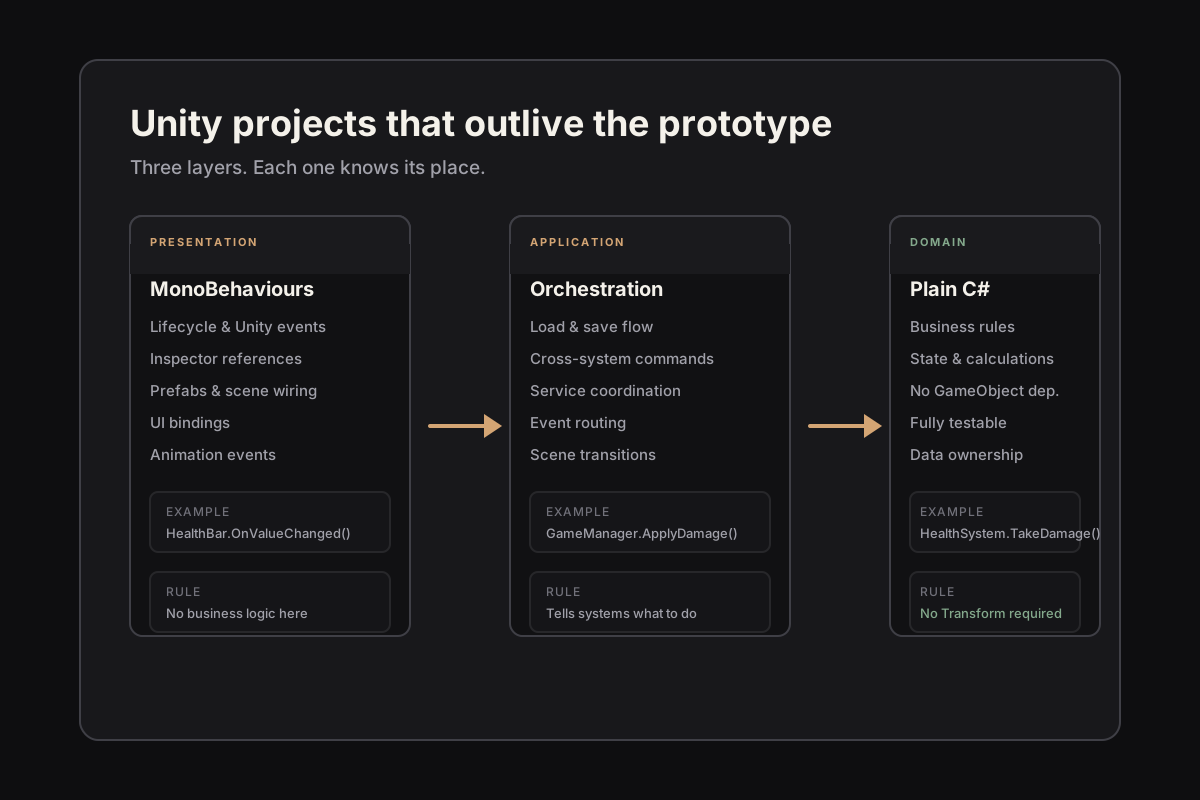
For small and medium Unity projects, I usually start with three layers: presentation, application, and domain. Presentation is MonoBehaviours, prefabs, animation events, UI bindings, and anything that smells like Unity lifecycle. Application is orchestration: load this, save that, tell these three systems to do one useful thing. Domain is the plain C# part that answers questions and enforces rules.
This sounds formal until you use it. A health bar is presentation. Taking damage is domain. Applying damage because a projectile hit a target is application. The point is not academic purity. The point is knowing where to put the next line of code when you are tired and the scene view is full of helpful little icons.
What stays in MonoBehaviour
MonoBehaviours are good at being attached to GameObjects. Let them be good at that. They should own serialized references, subscribe and unsubscribe to events, translate Unity callbacks into commands, and update visuals from state. They should not quietly become the tax authority, weather service, and judicial system of your game.
A MonoBehaviour method like OnTriggerEnter can detect the collision and build a small command: this actor touched that pickup. The rule for whether the pickup can be collected belongs somewhere else. That somewhere else should be testable without spawning a cube and apologizing to the physics engine.
What moves into plain C#
The parts that move into plain C# are usually the parts with memory: inventory rules, upgrade calculations, dialogue state, resource costs, cooldowns, unlock conditions, save snapshots, scoring, and AI decisions that do not need a Transform every five seconds.
Plain C# is not automatically clean. You can write a magnificent disaster without inheriting from MonoBehaviour. But it does remove a few temptations. You cannot drag a dependency into a field and call it architecture. You have to pass the thing in, name it, and admit what the object needs.
Data is the quiet boundary
ScriptableObjects are useful when they describe authored data: item definitions, enemy archetypes, tuning values, level metadata, configuration profiles. They become less useful when they start storing live session state because it was convenient at 2 a.m. Convenience is how ghosts enter the asset database.
I prefer a boring split: ScriptableObjects define things, runtime objects remember things. A SwordDefinition can say base damage is 12. A PlayerInventoryState can say the player owns one rusty sword with durability 8. The difference looks small until you try to debug why every new game starts with yesterday's damage values.
The working split
I keep MonoBehaviours close to Unity concerns: lifecycle, serialized references, scene wiring, and presentation. The logic that can be expressed without a GameObject moves into plain C# classes or small services with narrow inputs and outputs.
That gives the project a slower, sturdier rhythm. You can test more of the important behavior, replace scene wiring without rewriting rules, and keep the editor useful without letting it become the constitution.
The minimum useful checklist
When a Unity project starts to sprawl, I ask five questions. Can this rule run without a scene? Does this class know about more systems than its name suggests? Is this serialized field configuration or hidden state? Can I explain the data flow from input to result in one minute? If I delete this prefab, does the game lose a behavior rule or only a presentation?
These questions are deliberately plain. Architecture does not need to begin with a diagram that looks like an airport. It can begin with fewer surprises per script.
The test
A useful structure survives a tired afternoon. If a bug report forces me to open five unrelated scripts before I understand the flow, the boundaries are still too vague. If I can follow the data, the command, and the result in one pass, the project is aging well. Low bar, surprisingly rare.
The goal is not to make Unity feel like a backend service. The goal is to keep Unity good at what Unity is good at: iteration, scenes, visuals, tooling, and direct manipulation. The rest of the code should stop hiding behind GameObjects just because the inspector is friendly.