
Unity fundamentals / 2026-06-04 / 7 min read
What is a MonoBehaviour in Unity?
A MonoBehaviour is the base class that lets Unity attach a C# script to a GameObject and call it each frame. What it is, its lifecycle, and when to skip it.
The short answer
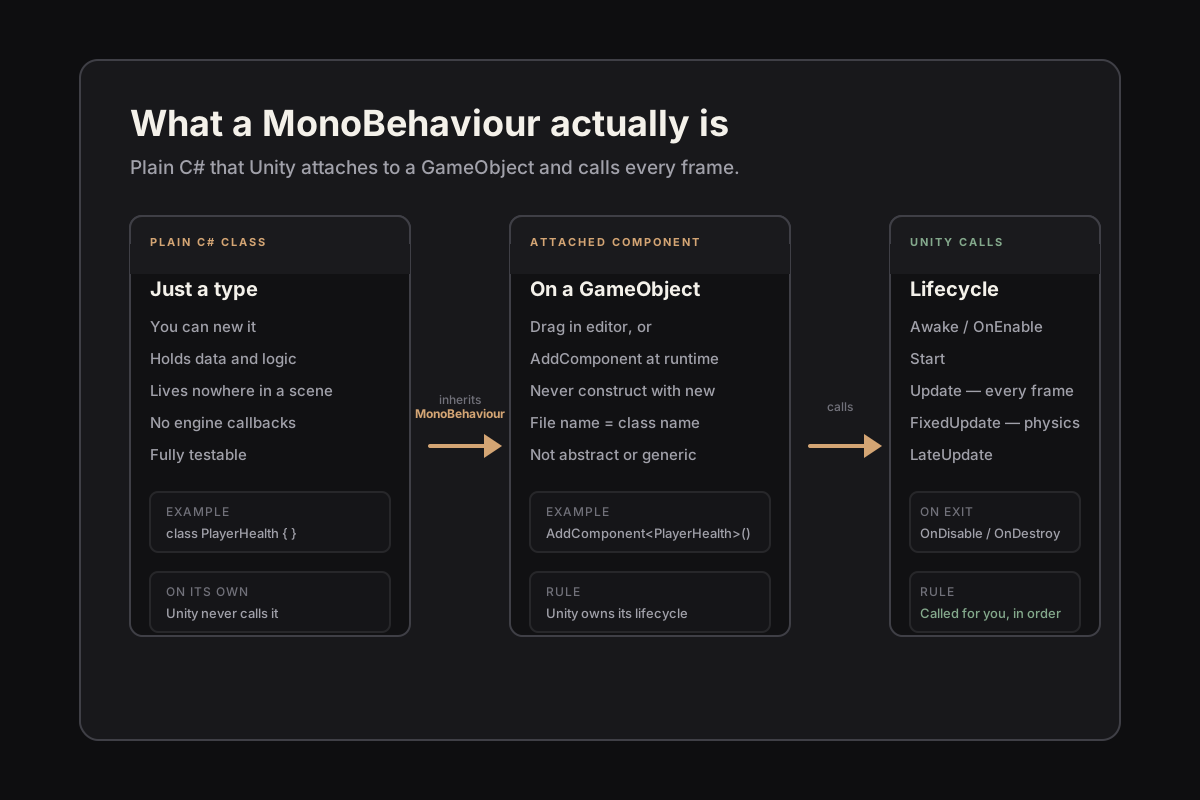
A MonoBehaviour is the base class Unity gives you for scripts that live on a GameObject. When your C# class inherits from it, that class becomes a component: something you can drop onto an object in a scene, enable and disable, and — most importantly — something Unity will call at the right moments without you ever writing a main loop.
That last part is the whole point. You do not run a Unity game the way you run a console program, with a Main method that starts at the top and ends at the bottom. Unity owns the loop. A MonoBehaviour is how your code gets invited into that loop: you write methods with specific names, and the engine calls them when the matching thing happens.
So the honest one-line definition is this. A MonoBehaviour is the contract between your code and Unity's runtime — the thing that says attach me to this object, and call me when the game starts, every frame, on every physics step, and when I am destroyed.
A component, not a program
Unity is built on a component model. A GameObject on its own is almost nothing — a name, a Transform, a position in the scene. It does things because of the components attached to it: a Renderer draws it, a Collider gives it a shape, and your MonoBehaviour gives it behaviour. The object is the noun; the components are the verbs.
This is why you never write new PlayerHealth() for a MonoBehaviour. You do not construct it; you attach it. In the editor you drag the script onto a GameObject, or at runtime you call gameObject.AddComponent<PlayerHealth>(). Unity creates the instance, binds it to that object, and takes over its lifecycle. Calling the constructor yourself produces an object attached to nothing that never receives a single engine callback — which is the source of a lot of early confusion.
The mental shift is to stop thinking of a script as a program and start thinking of it as a part bolted onto a thing. The script does not own its own existence. The GameObject does.
The lifecycle: how Unity calls your code
Because Unity owns the loop, the useful thing a MonoBehaviour gives you is a set of named methods the engine calls at known moments. You do not register them or implement an interface; you declare a method with the expected name and Unity finds it. The ones you will use constantly:
Awake runs once when the object loads, before anything else — wire up references here. OnEnable runs every time the object becomes active. Start runs once, just before the first frame the object is active for. Update runs once per rendered frame, where most gameplay logic lives. FixedUpdate runs on the physics clock at a fixed rate, which is where forces and physics belong. LateUpdate runs after every Update, which is why cameras that follow a target usually live there. OnDisable and OnDestroy run on the way out, for cleanup.
A skeleton, in roughly the order Unity calls them:
The rules that trip people up
A few constraints catch nearly everyone at the start. The script's file name must match the class name exactly, including case: a PlayerHealth class has to live in PlayerHealth.cs. Get this wrong and Unity refuses to attach the script and tells you so — and the name is only one of three causes, all covered in how to fix “no MonoBehaviour scripts in the file”.
The class must actually inherit from MonoBehaviour to be attachable, and it cannot be abstract or generic. You cannot instantiate it with new. And a MonoBehaviour is a Unity object with real overhead, so a scene with thousands of them each doing a little work in Update is a performance pattern you will eventually have to unwind.
None of these are arbitrary. They all follow from the same fact: Unity, not you, is in charge of creating and calling these objects. The rules are the engine protecting assumptions it depends on.
When you do not need a MonoBehaviour
The most useful thing to learn early is that not everything should be a MonoBehaviour. The base class buys you attachment and lifecycle callbacks. If a piece of code needs neither — a damage calculation, an inventory model, a save format, a graph algorithm — it does not belong on a GameObject. It belongs in a plain C# class you can construct, test, and reason about without a scene running.
For data that should live as a project asset rather than scene state, Unity gives you ScriptableObject instead: configuration, item definitions, tuning tables. And the moment your gameplay logic is large enough that the Inspector stops being a filing system, the question stops being what is a MonoBehaviour and becomes how little of my code needs to be one — which is an architecture decision of its own.
A good rule for the first while: reach for MonoBehaviour when the code has to be attached to something in the scene or react to the frame. For everything else, prefer a plain class. Your future self, trying to test that code, will thank you.
The mental model worth keeping
Strip away the detail and a MonoBehaviour is one idea: it is how plain C# becomes a citizen of Unity's runtime. Inherit the base class, attach the component to a GameObject, and the engine will call your named methods at the right moments for the life of that object.
Hold onto that and most of the early confusion dissolves. You stop writing programs and start writing parts. You place code by when it should run. And you learn to ask, for each new script, whether it truly needs to be a component at all — the first habit that separates a tidy Unity project from one that fights you later.