
Godot VFX / 2026-07-27 / 10 min read
Updated 2026-08-05 · Verified as of Godot 4.7.1 stable
Godot Hit Effect Not Following the Node? Fix Five VFX Drift Bugs
Fix Godot hit effects that stay behind, slide across a mesh, stretch under scale, trail the wrong way, or jitter after the receiving Node3D moves.
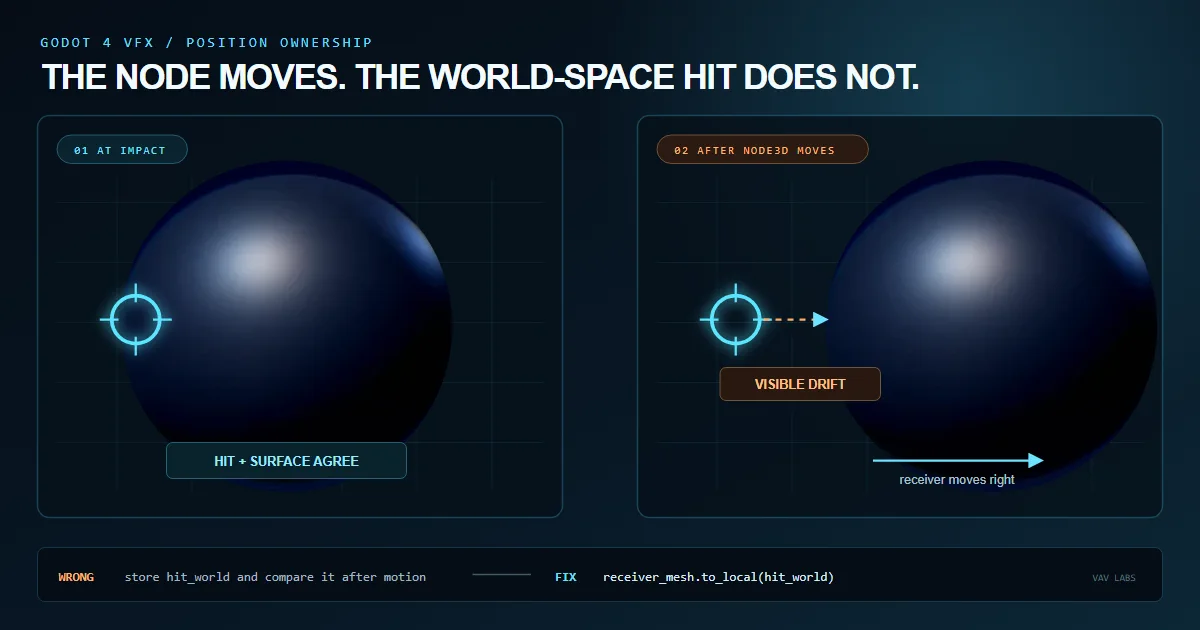
The fast diagnosis: move the receiver after the hit
If a Godot hit effect looks correct on a static object but slides, stays behind, or rotates away after the object moves, treat it as a coordinate-space bug first. The event point and the rendered surface are probably being compared in different spaces, or the position was stored in a space owned by the wrong object.
Strip the effect down before changing shader math. Spawn one bright, wide marker with a long lifetime, then translate and rotate the receiving Node3D. A static screenshot hides the bug; motion identifies who currently owns the anchor. If the mesh leaves the mark behind, the mark is world-owned. If it follows with the wrong offset, it was converted against the wrong node. If it follows but changes shape, the remaining problem is scale rather than position.
This article starts from those visible symptoms. The companion local space vs world space guide for Godot 4 explains the complete coordinate model once you know which boundary is failing.
Proof scope and measurement-gap: the downloadable scene and its 10-check receipt reproduce object-owned versus world-owned anchors, a nested-mesh owner mismatch, and point-versus-direction conversion. They do not simulate particle-trail history, quantify far-origin precision, or publish frame-time measurements.
Symptom 1: the impact stays behind when the Node3D moves
Physics queries, ray casts and weapon code usually report a collision point in world space. That is correct at the gameplay boundary. It becomes a bug when an object-owned mark stores that world position while the enemy, prop or other receiver continues moving. The level owns the stored point, so the receiving mesh naturally moves away from it.
For an impact VFX that must stay painted onto the receiver, convert once when the event enters the effect system. Call to_local() on the same MeshInstance3D whose material renders the mark. Store the result with a name such as hit_local, and make the shader compare it with a local surface position. Do not reconvert the same anchor every frame; its local coordinates are already attached to the mesh.
World space is not inherently wrong. It is correct for a shockwave, decal, scorch mark or explosion that belongs to the level. The fix is to match the storage space to the intended lifetime behaviour, not to convert every effect to local space automatically.
Symptom 2: the hit follows, but appears offset on a nested mesh
A conversion can use the right method and still use the wrong node. Imagine Enemy/EffectController/SurfacePivot/ReceiverMesh. Converting the world hit through EffectController.to_local() produces controller-local coordinates. The shader material on ReceiverMesh begins with mesh-local vertex coordinates. Those spaces differ whenever the pivot or mesh has its own position, rotation, or scale.
The reliable boundary is the consumer. Convert against the MeshInstance3D that owns the material, not whichever ancestor happens to own the script. If a controller must store the data, keep a typed reference to the mesh and document that the buffer contains mesh-local anchors.
This also explains effects that work until an artist adjusts a child pivot in the editor. The script did not suddenly become random; the hierarchy exposed an unnamed parent-space assumption that was always present.
| Value | Space it describes | Safe comparison |
|---|---|---|
| RayCast3D collision point | World space | Another world-space point |
| controller.to_local(hit_world) | Controller local space | Controller-local data |
| receiver_mesh.to_local(hit_world) | Receiver mesh local space | Model-space shader surface |
| Fragment VERTEX by default | View space | Another view-space point |
Symptom 3: the ring follows correctly but stretches under scale
Once a hit anchor and the shield surface share local space, translation and rotation usually work. Scale introduces a different decision: a local-space radius is measured in model units. Non-uniform scale can turn a circular distance field into an ellipse, while differently sized enemies can produce visibly different world-size impacts from the same weapon.
Choose whether radius belongs to the object or to the game world. Object-relative rings should remain local and scale with the mesh. A weapon-owned radius such as exactly half a metre should use a local anchor for attachment, transform that anchor back through MODEL_MATRIX, and measure the final distance against a world-space surface position.
That hybrid is useful for moving barriers and scalable impact systems: the hit remains attached when the receiver moves, but projectile power still maps to a consistent size across small and large targets.
Symptom 4: particles stay behind, or the trail bends with the emitter
Surface response and particles do not need the same owner. A surface ripple normally follows the receiving mesh, while sparks should often inherit their spawn transform and remain in the world. If old sparks rotate when the character turns, or a trail bends after the emitter moves, the particle coordinate choice is probably wrong.
On GPUParticles3D, local_coords = true makes existing particles move and rotate with the emitter and its parents. Use it for an attached aura, a contained energy volume or particles that are part of the force field surface. With local_coords = false, emitted particles use global coordinates and do not follow later emitter movement. That is normally the better behaviour for impact sparks, muzzle smoke and exhaust left behind a moving object.
Debug the particle layer independently from the shader. Temporarily hide the surface response, emit a few slow particles, then move and rotate the parent. Matching particle settings to the surface shader by habit can produce a correct ripple and an obviously wrong spark trail from the same hit.
- Attached aura or energy cage: start with
local_coords = true. - Impact sparks or smoke left at the collision: start with
local_coords = false. - Test parent rotation as well as translation; rotation reveals bent trails quickly.
- Treat surface marks and emitted particles as two effects with separate ownership.
Symptom 5: the effect rotates incorrectly or jitters far from the origin
Positions, directions and normals cannot share one conversion helper. A position includes translation; a direction does not. Calling to_local() on a velocity or surface normal treats it like a point displaced from the world origin. The mark may sit in the right place but its directional sweep, distortion or particle launch vector rotates around the wrong pivot.
Transform an ordinary direction with the inverse global basis and normalize it. Normals under non-uniform scale need normal-matrix treatment. In a spatial shader, Godot provides MODEL_NORMAL_MATRIX for that case. Keep suffixes such as _world and _local on both positions and directions so a later refactor does not erase the distinction.
A separate precision symptom appears far from Vector3.ZERO. Large world-space coordinates leave fewer useful floating-point bits for a small ripple or thin ring. Prefer local-relative math when the effect belongs to an object. When a shader must move between model and view space, Godot notes that the combined MODELVIEW_MATRIX is better suited than separate transforms when floating-point issues arise far from the world origin.
A ten-minute regression scene for Godot impact VFX
Keep a small test scene beside the finished effect. Use one receiver with a nested mesh, one ray or scripted hit point, one exaggerated marker and a toggle for particles. The scene should translate, rotate, apply uniform scale, apply non-uniform scale and jump to a large world coordinate. That sequence catches more space bugs than polishing the effect inside a static hero shot.
Add overlapping hits only after one marker is stable. Multi-hit buffers can hide a bad anchor because several rings, flashes and fades overlap. Once the boundary is correct, restore the real impact VFX and verify rapid projectiles, sustained beam contact and positional audio as separate layers.
If you need a complete working reference instead of building the whole buffer and response stack yourself, the Holo Shield energy shield shader for Godot 4 accepts a world-space contact point, owns the conversion and layers multiple projectile and beam reactions across spherical or custom holographic barriers.
- Spawn one long-lived hit marker on the receiver.
- Translate and rotate the receiver and its parent separately.
- Change the child mesh pivot to expose parent-space assumptions.
- Test uniform and non-uniform scale.
- Switch particle local coordinates and observe already-emitted particles.
- Move the scene far from the origin if the production game supports large worlds.
- Restore overlapping hits only after the single marker passes every motion test.
Frequently asked questions
Why does my Godot hit effect stay behind when the object moves?
The hit is probably stored as a world-space point even though the mark belongs to the moving object. Convert the collision point with to_local() on the MeshInstance3D that renders the effect, then compare it with a local surface position.
Why is a Godot impact effect offset on a child mesh?
The point may have been converted into controller or parent space rather than the child mesh's local space. Convert against the MeshInstance3D whose material consumes the anchor.
Why does a shader ring stretch when the Node3D is scaled?
Local-space distance uses scaled model units. Keep it local when the ring should scale with the object, or transform the local anchor to world space and measure a world-space radius for a constant physical size.
Should Godot impact particles use local coordinates?
Use local coordinates when existing particles should follow the emitter and its parents. Disable local coordinates when emitted sparks, smoke or trails should remain in the world after the emitter moves.