
Godot VFX / 2026-07-27 / 14 min read
Updated 2026-08-05 · Verified as of Godot 4.7.1 stable
How to Make an Energy Shield in Godot 4
Build a reactive energy shield in Godot 4 with a holographic shader, local-space impacts, multiple hits, sustained beams, particles, and positional audio.
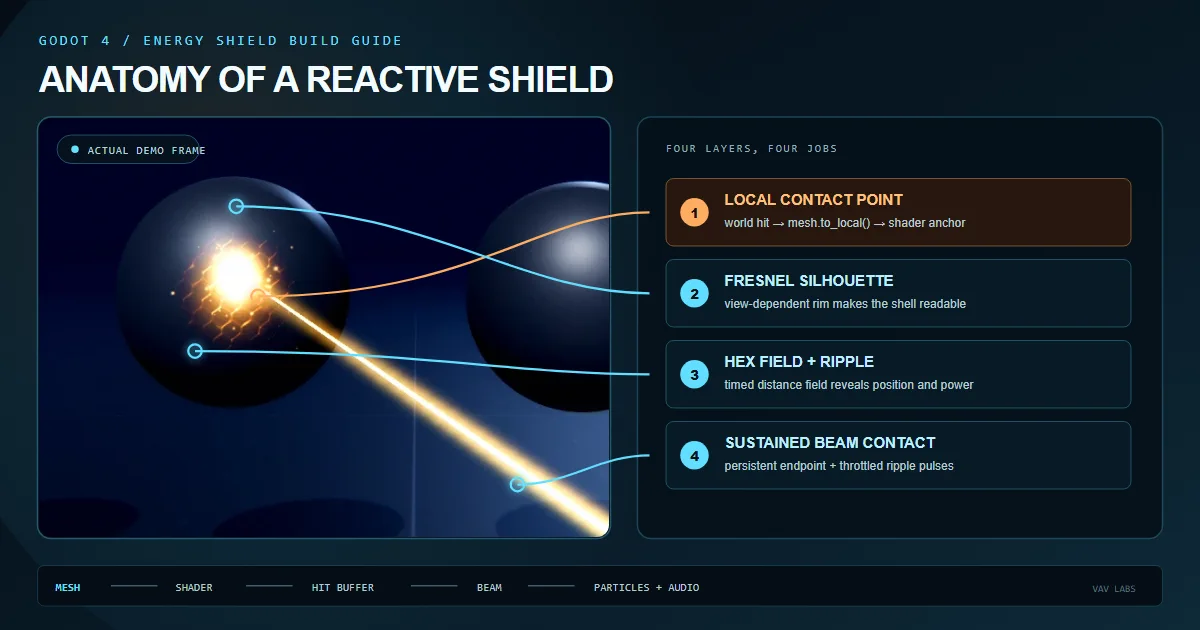
What a complete Godot energy shield needs
A convincing energy shield is not one glow colour on a transparent sphere. The visual has to explain three states: the field exists before contact, the contact has a precise position and power, and the response fades without erasing other recent hits. Once beams, particles and sound are added, those layers must still agree on the same collision point.
This guide builds that system from the outside in. The starter version uses a closed 3D shell, a holographic spatial shader, a GDScript controller with one public hit method, a fixed multi-impact buffer, sustained beam contact, world-owned sparks and positional audio. Damage and health stay in gameplay code; the shield owns only presentation.
The result can be a spherical energy shield, a planar force field, a barrier around a vehicle or a custom shell around a boss. The mesh changes, but the contract stays the same: gameplay reports a world-space hit and the effect converts, stores and renders the response.
| Layer | Godot owner | Responsibility |
|---|---|---|
| Shield surface | MeshInstance3D + ShaderMaterial | Field, rim, texture and impact rings |
| Hit controller | Node3D script | World-to-local conversion and active-hit buffer |
| Collision | Area3D or physics body | Reports contact position to gameplay |
| Impact particles | GPUParticles3D | Sparks or fragments emitted at contact |
| Impact audio | AudioStreamPlayer3D | One-shot and sustained spatial sound |
| Damage | Your combat system | Health, factions, cooldowns and weapon rules |
1. Build a separate shell mesh and collision surface
Create a Node3D called EnergyShield. Add a MeshInstance3D as the visible field and an Area3D or physics body with a matching CollisionShape3D. Keep the shell slightly outside the protected model so the transparent surface does not fight the hull, character or environment at nearly identical depth.
For the first pass, use a SphereMesh with enough radial segments to keep the silhouette smooth. Reverse faces are not required if the shader uses cull_disabled. A custom barrier also works, but begin with a closed mesh whose local origin and scale are easy to reason about.
The collision layer is a gameplay decision. Some projects ray-cast against the shield directly; others hit the protected body, then ask the shield to display the response. Either approach is fine as long as the visual API receives the final world-space contact point. Do not let the shader become responsible for deciding damage.
- EnergyShield — Node3D with the presentation controller.
- ShieldMesh — MeshInstance3D with a unique ShaderMaterial instance.
- ShieldArea — Area3D or another collision owner chosen by the combat architecture.
- CollisionShape3D — sphere, box, convex shape or custom approximation matching the field.
- ImpactPool — optional pooled particles and AudioStreamPlayer3D nodes.
2. Make the transparent holographic shield shader
A starter force field needs a readable rim before it needs noise. Fresnel response brightens the silhouette where the view direction becomes perpendicular to the surface normal. That single term makes a transparent shell read as volume instead of tinted glass floating in front of the model.
The shader below combines a Fresnel rim with a tiled field texture. Use a hex grid, scan pattern or soft noise texture with seamless edges. The material is unshaded so the field colour remains stable under very different scene lights; remove unshaded if the shield should participate in the project's lighting model.
Transparent materials create overdraw, and additive blending can become white quickly. Keep base alpha low, reserve the highest emission for contact, and test the shield in the darkest and brightest production environments before tuning small details.
3. Give gameplay one world-space hit method
Weapons and physics should not know how the shader stores impact anchors. Give them one method such as register_hit(hit_world, power). The controller converts the collision point into the local space of the exact MeshInstance3D that renders the effect, then sends a clearly named local value to the material.
Duplicate the ShaderMaterial for each shield instance. Godot resources can be shared: changing a uniform on one shared material can make several enemies display the same hit. Assigning a duplicated material in _ready() keeps runtime buffers independent.
The coordinate boundary is the part most likely to fail when the receiver starts moving. The detailed local space vs world space guide explains model, parent, world and view space; the important rule here is to convert against the consuming mesh once, when the hit enters the VFX system.
Proof scope and measurement-gap: the downloadable scene checks that coordinate boundary, a bounded local-hit buffer, and the shader parameter flow in Godot 4.7.1. Its public 10-check verification receipt is correctness evidence, not a GPU timing dataset; it does not measure transparent overdraw, particles, audio, or sustained-beam cost.
4. Draw a contact flash and expanding ripple
The vertex stage already saves VERTEX into surface_local. The fragment stage can now measure distance from each surface point to the local hit anchor. A narrow smoothstep band becomes a ring; a second falloff becomes the contact flash.
Drive the radius and fade from GDScript with a normalized age from zero to one. Keep the position local for attachment. Decide separately whether the radius should scale with the object or remain a constant world size. A starter shield normally uses local units because the response should scale with the shell.
If the ring stays behind, appears offset on a nested mesh or stretches unexpectedly, use the five hit-effect drift diagnostics before adding more noise. Visual complexity hides a bad anchor; it does not repair one.
5. Keep multiple projectile impacts visible
A single uniform proves the effect, but it fails under real combat: every new projectile replaces the previous position. Use a small fixed buffer containing local position, age and power. Insert new hits at the front, update ages every frame and discard entries after their lifetime.
The shader loop must have a compile-time maximum. Eight active hits are enough for many games; a dense sustained-beam showcase may need more. Increasing the limit adds fragment work across every visible pixel of the transparent shell, so choose the smallest number that preserves the intended rhythm.
Upload positions as PackedVector3Array and ages or powers as PackedFloat32Array. On the shader side, declare const int MAX_HITS = 8 plus aligned uniform vec3 hit_positions_local[MAX_HITS], uniform float hit_ages[MAX_HITS] and uniform float hit_powers[MAX_HITS] arrays. Keep every index aligned and break when i >= hit_count, avoiding work for empty slots.
6. Treat a sustained beam as repeated contact
A beam is not one projectile with a longer particle. It has an endpoint that moves across the surface, a contact flare that should remain present, repeated ripple energy and audio that starts and stops cleanly. Update the rendered beam endpoint every frame, but throttle expensive hit registration to a deliberate cadence such as eight to twelve pulses per second.
Keep continuous state separate from the historical hit buffer. A beam_contact_local uniform can drive a persistent flare while the timed pulses add rings to the ordinary impact array. When contact ends, fade the flare and stop the looped sound instead of inserting one oversized final hit.
Ray-cast from the weapon or camera according to the game's aiming model. The shield should receive the resolved world contact point and strength; it should not own target selection, faction rules or damage ticks.
7. Add impact particles and positional audio
The shader makes the surface react; particles make contact break away from it. Spawn a pooled GPUParticles3D at the world hit position and orient it from the contact normal when available. Impact sparks usually need local_coords = false so emitted particles remain where they were created after the shield moves. An attached electrical aura may need local coordinates instead.
Use AudioStreamPlayer3D for one-shot impacts and separate players for looped beam contact. Randomize between a small, curated set of impact sounds and apply modest pitch variation. Power should influence loudness and layer choice, not only shader brightness, so a weak projectile and a charged shot feel like different events.
Pool short-lived particle and audio nodes if combat can generate bursts. The visual shader may accept eight hits while twenty projectiles arrive in one frame; allocation and playback policy should fail gracefully without blocking the gameplay event.
- Surface shader: object-owned ripple, flash and field distortion.
- Impact sparks: normally world-owned after emission.
- One-shot audio: positioned at the current world contact point.
- Beam loop: starts on contact, follows the endpoint and fades on release.
- Pooling: caps transient nodes independently from the shader hit count.
8. Adapt the system to barriers and custom shield meshes
The same controller can drive a sphere, capsule, planar gate or authored shell as long as the shader and GDScript agree on the consuming mesh's local space. Give custom meshes clean normals and enough tessellation for the silhouette. UV-based field textures need usable UVs; a triplanar field avoids seams but costs more shader work.
Match the collision shape closely enough that the reported world point appears on the visible field. A cheap convex approximation may be fine for a fast game, while a large planar force field can use a simple box. Do not use the visible transparent material as an excuse for an unnecessarily complex collision mesh.
Test movement, nested parents, uniform and non-uniform scale. Confirm that every runtime instance owns its material and hit arrays. Then profile the real combat camera: transparent overdraw, active-hit loop size, particle fill rate and stacked emission are more important than the cost of one isolated hero shield.
| Requirement | Starter choice | When to upgrade |
|---|---|---|
| Field coordinates | Mesh UV | Triplanar mapping when seams are visible |
| Collision | Sphere, box or convex shape | More accurate shape only when gameplay needs it |
| Impact radius | Local model units | World-size hybrid when weapons need fixed metres |
| Material | Duplicate per instance | Shared base resources with instance-local uniforms |
| Active hits | Eight | Raise only after profiling the production camera |
Build the starter or use the complete system
The tutorial version is enough to understand and build a clean reactive shield: field shader, public hit boundary, local anchor, expanding ripple, multi-impact buffer, beam cadence, particles and audio ownership. From here, polish means better textures, response curves, pooling, presets, debug controls and production testing rather than a different architecture.
If you want those layers already integrated and fully editable, Holo Shield is the complete energy shield shader for Godot 4: spherical and planar demos, up to 24 visible impacts per shield, sustained beam contact, custom-mesh support, pooled impact VFX, positional audio and full shader plus GDScript source.
Whichever route you choose, keep the gameplay contract small. Weapons send a world position and power. The energy shield owns how that event becomes light, motion and sound. That boundary is what lets the same effect survive different weapons, enemies and combat architectures.
Frequently asked questions
How do I make an energy shield in Godot 4?
Create a closed MeshInstance3D shell, apply a transparent spatial shader with Fresnel emission, accept world-space collision points through GDScript, convert them with the mesh's to_local(), and draw timed impact ripples around those local anchors.
How do I show multiple hits on a Godot shield shader?
Store a fixed-size array of local hit positions, normalized ages, and powers. Upload aligned packed arrays to the ShaderMaterial and loop only to hit_count inside a compile-time maximum.
Can a Godot force field shader work on custom meshes?
Yes. Convert hits against the MeshInstance3D that owns the material, provide usable UVs or triplanar mapping, and pair the visible shell with an appropriate 3D collision shape.
Should shield impact particles use local coordinates?
Impact sparks normally use global coordinates so emitted particles remain in the world after the shield moves. Attached field particles or an aura may use local coordinates so the complete volume follows the receiver.
Does this energy shield shader work with sustained beams?
Use a persistent local contact point for the beam flare and register ordinary ripple hits at a throttled cadence. Keep beam endpoint rendering, damage ticks, ripple pulses, and looped audio as separate responsibilities.