
Godot VFX / 2026-07-27 / 12 min read
Updated 2026-08-05 · Verified as of Godot 4.7.1 stable
Local Space vs World Space Effects in Godot 4
Learn when Godot VFX should follow a node or remain in the world, how to convert hit positions safely, and why shield ripples, particles, and trails drift.
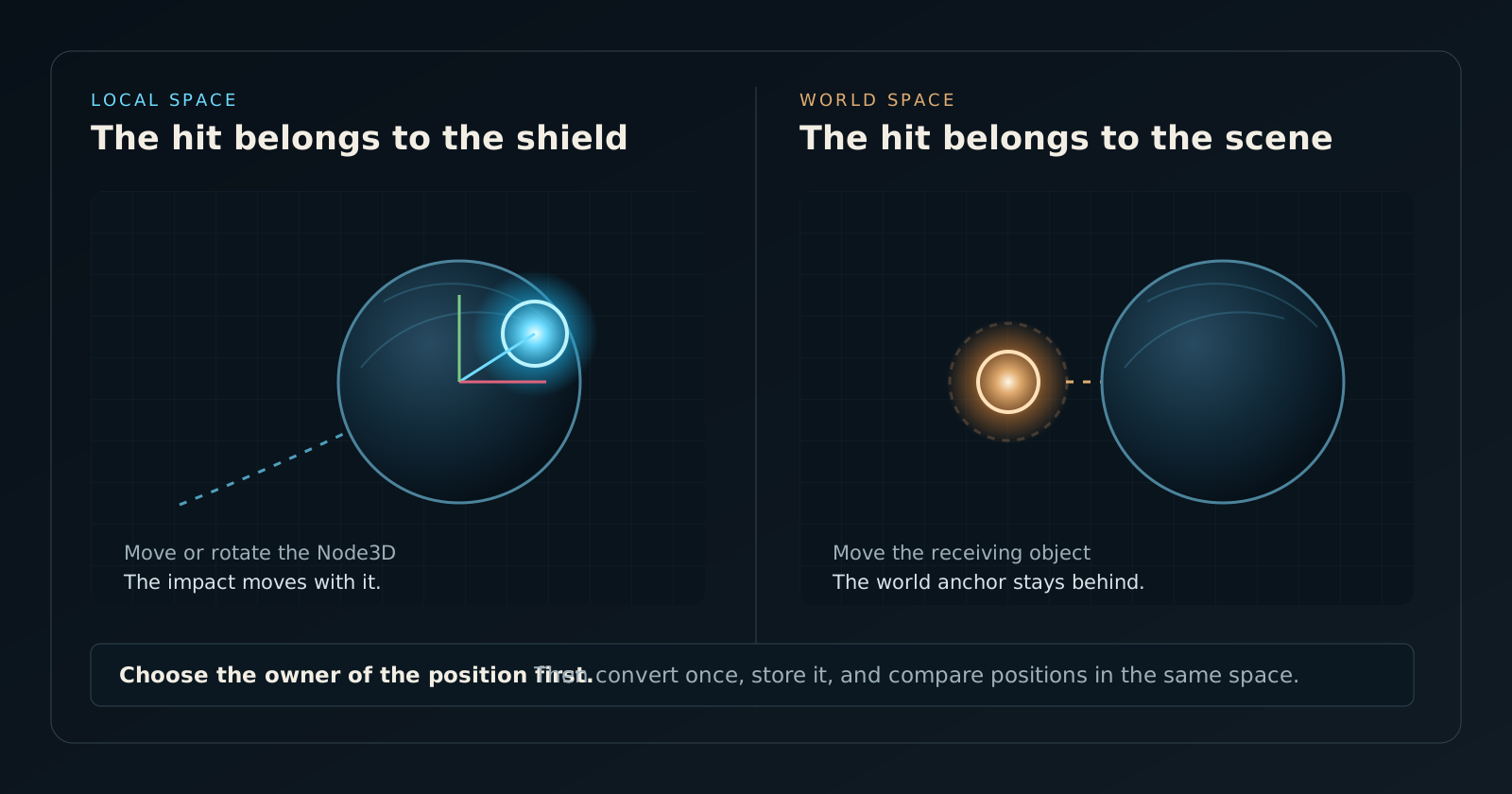
The short answer: choose who owns the position
Use local space when an effect belongs to an object and must follow that object as it moves or rotates. Use world space when the effect belongs to the level and should remain where the event happened. A shield impact normally belongs to the shield. A shockwave expanding from a fixed explosion point normally belongs to the world.
Most Godot VFX drift bugs are not shader-math bugs. They are ownership bugs. The collision system reports a point in world space, the shader evaluates a surface position in local or view space, and the code subtracts them because both happen to be Vector3 values. The result looks correct while the object is still, then slides, rotates away, or changes size as soon as the receiving node moves.
The rule is simple: convert once at a named boundary, store the position in the space that owns it, and compare it only with positions in that same space. The rest of this guide applies that rule to spatial shaders, shield impacts, particles, trails, and effects that need a constant world-space radius.
Local, parent, world, view, and screen are different spaces
A Node3D has a local transform relative to its parent and a global_transform relative to the world. Godot's documentation calls the coordinate system attached to the node its object-local coordinate system. Parent space is not automatically world space: nested ships, weapons, sockets, and effect containers can add several transforms between a mesh and the scene root.
Spatial shaders add two more spaces. At the start of vertex(), VERTEX is in model space, which is the shader name for the mesh's local space. Godot then transforms it to view space for fragment(). Screen-space effects work after projection and use screen UV or depth instead. These values may all contain three numbers, but they do not describe the same point.
Do not begin by asking which matrix looks right. Begin by asking what should happen after the object moves. That behavioral answer determines the space.
Proof scope and measurement-gap: the downloadable scene makes local and world ownership visible and its 10-check receipt verifies the transform boundary in Godot 4.7.1. It is a correctness harness, not a rendering benchmark; no GPU time, transparent-overdraw, or device-comparison Dataset is claimed.
| Effect | Position owner | Useful Godot control |
|---|---|---|
| Impact ring on a moving shield | Shield local space | Node3D.to_local() |
| Explosion shockwave across the floor | World space | Store the global hit point |
| Magical aura attached to a character | Emitter local space | GPUParticles3D.local_coords = true |
| Sparks left behind a moving vehicle | World space after emission | GPUParticles3D.local_coords = false |
| Object-space dissolve texture | Mesh UV or local space | UV or vertex varying |
| Fullscreen distortion | Screen/view space | SCREEN_UV and depth |
Convert collision hits to local space at the input boundary
Godot physics queries, ray casts, and collision contacts normally give you world-space positions. If the mark must stay attached to a moving receiver, convert that point before adding it to the hit buffer. Node3D.to_local() applies the inverse global transform and returns the point in that node's local space.
Convert against the same Node3D whose model space the shader uses. If the ShaderMaterial is on a child MeshInstance3D, calling to_local() on a higher shield controller can introduce a parent-space offset. Name the variable hit_local; the suffix is cheap insurance against a later refactor.
This is the basic contract behind a moving shield response. The downloadable Holo Shield energy shield shader for Godot 4 exposes a world-space hit API to gameplay code, then owns the conversion and layered response inside the shield system. Gameplay should not need to know how the shader stores its anchors.
Compare local anchors with a local surface position
In a spatial shader, preserve the incoming model-space vertex in a varying before Godot transforms it for the fragment stage. The interpolated value gives each fragment a surface position in the same model space as the stored hit anchors. The distance calculation is then coherent.
The example below draws a ring at each local hit. It is deliberately small: production effects usually add time, power, noise, Fresnel response, sparks, and separate fade curves. None of those layers repair a coordinate mismatch, so settle the space first.
Local distance has one important consequence: the ring radius is measured in model units. Uniformly scale the shield and the ring scales with it. That is often desirable for shields that should preserve the same relative look across differently sized enemies. If the response must remain exactly 0.4 world metres on every scaled mesh, use the hybrid pattern in the next section.
Use world space when the level owns the effect
World space is correct for effects that should ignore a moving object's transform: a global scan plane, a shockwave crossing several objects, world-aligned fog, terrain blending, or a point that represents where an explosion occurred in the level. Store the global point and compare it with a world-space surface position.
Godot's spatial shader reference exposes MODEL_MATRIX as the model/local-to-world transform. Pass the transformed vertex through a varying because the fragment-stage VERTEX is normally in view space. The world_vertex_coords render mode changes vertex inputs to world space, but it does not make every later value unambiguously world space; an explicit varying keeps the contract visible.
World coordinates are also central to volumetric and raymarched effects that integrate with scene depth. The Godot SDF raymarcher case study covers that rendering boundary: reconstructing scene information, clipping the ray against geometry, and keeping CPU and shader data in agreement.
The hybrid pattern: local anchor, world-space radius
Local versus world is not always a binary choice. A hit can belong to the shield while its radius is specified in world metres. Store the anchor locally so it follows the receiver, transform that anchor back to world space in the shader, and measure the final distance between two world-space points.
This pattern is useful when the same weapon must produce a 0.5-metre response on a one-metre drone and a ten-metre boss shield. It also prevents non-uniform object scale from turning a circular distance field into an ellipse. The ownership remains local; only the measurement unit is world space.
The tradeoff is precision and complexity. Godot notes that the combined MODELVIEW_MATRIX is preferable when separate model and view transforms lose precision far from the world origin. For very large worlds, test the effect at production-scale coordinates rather than only around Vector3.ZERO.
Particles make the ownership choice explicit
GPUParticles3D.local_coords is the particle-system version of the same decision. When it is true, existing particles move and rotate with the emitter and its parents. When it is false, emitted particles use global coordinates and do not follow later emitter movement.
A character aura, rotating energy cage, or dust volume attached inside a vehicle may need local coordinates. Muzzle smoke, impact sparks, and a thruster trail usually need global coordinates after emission; otherwise the old particles bend when the weapon or ship turns. The emitter may move between frames in either case. The question is what already-emitted particles should do afterward.
Do not force the particle setting to match the surface shader. A shield ring can be local to the mesh while sparks spawned from the same hit remain in world space. They are separate effects with separate owners.
- Use
local_coords = truewhen the whole particle volume is attached to the emitter. - Use
local_coords = falsewhen particles should inherit the spawn transform, then remain in the world. - Test rotation, not only translation. A wrong choice is often more obvious when a parent turns quickly.
- Check the emitter's parent chain before blaming particle velocity; parent space and world space are different when the emitter is nested.
Five failure modes that reveal a space mismatch
A coordinate-space bug is easier to diagnose from motion than from a shader screenshot. Build a small test that moves, rotates, and scales the receiver after spawning a single long-lived mark. Use a solid colour and a wide ring until the anchor is correct; add noise and animation later.
| Symptom | Likely mismatch | First check |
|---|---|---|
| Impact stays behind when the shield moves | World anchor for an object-owned mark | Convert with shield_mesh.to_local() |
| Impact appears offset on a nested mesh | Controller local space versus mesh local space | Convert against the material's MeshInstance3D |
| Ring moves correctly but stretches under scale | Local distance uses scaled model units | Use the local-anchor/world-distance hybrid |
| Effect rotates around the wrong pivot | Parent-space value treated as local | Inspect the full Node3D parent chain |
| Shader works near origin but jitters far away | Large world-space values lose precision | Prefer local-relative math or test camera-relative reconstruction |
Points, directions, and normals do not transform the same way
A position includes translation. A direction does not. Node3D.to_local() is correct for a world-space hit point, but using it directly on a velocity or normal treats that vector as if it were a point displaced from the world origin.
For an ordinary direction, transform with the inverse basis and normalize the result. Normals under non-uniform scale need the inverse-transpose normal transform; Godot exposes MODEL_NORMAL_MATRIX in spatial shaders for that reason. If a directional ripple points correctly until the receiver moves, then suddenly tilts, inspect whether position and direction conversions were mixed.
A practical checklist before polishing the effect
Coordinate space is part of the effect's data model, not a last-minute shader fix. Write it into variable names, API comments, and material parameter names. hit_position is ambiguous; hit_position_world and hit_position_local are contracts.
For interactive VFX, test more than the hero pose. Translate the receiver, rotate its parent, apply uniform and non-uniform scale, spawn several overlapping events, and move far from the world origin if the game supports large coordinates. The correct space should survive all of them without special-case offsets.
This guide starts the Vav Labs Godot VFX cluster. The next useful layers are depth-aware effects, transparent-material limitations, impact-buffer design, and GPU particle ownership. The SDF raymarcher project covers custom depth integration; Holo Shield is the concrete multi-impact shield system built around the moving-receiver case.
- State who owns the position after the effect is spawned.
- Name the incoming space at the public API boundary.
- Convert once against the node whose mesh or particle system consumes the value.
- Measure distance only after both operands share a space.
- Test movement, rotation, nested parents, scale, and large coordinates.
- Choose particle coordinates independently from surface-shader coordinates.
Frequently asked questions
Should a hit effect use local space or world space in Godot?
Use local space when the hit belongs to a moving object and must follow it. Use world space when the effect belongs to the level and should remain at the global event position.
How do I convert a world hit position to local space in Godot?
Call to_local() on the Node3D whose mesh or effect consumes the point, for example shield_mesh.to_local(hit_world). Store and label the result as a local-space position.
How do I get world position in a Godot spatial shader?
In vertex(), multiply the model-space VERTEX by MODEL_MATRIX and pass the xyz result to fragment() through a varying. Fragment-stage VERTEX is normally in view space.
Why does my Godot shader effect slide when the object moves?
The effect likely stores a world-space anchor while comparing it with a local or view-space surface position, or it uses world space for a mark that should belong to the moving object.
What does local_coords do on GPUParticles3D?
When true, existing particles move and rotate with the emitter and its parents. When false, emitted particles use global coordinates and do not follow later emitter movement.