
Unity tooling / 2026-05-27 / 8 min read
Unity bug reports need evidence, not folklore
Most Unity bug reports arrive as folklore: vague memory, no scene, no logs, no screenshot. Capture the evidence on screen, before the trail goes cold.
The folklore problem
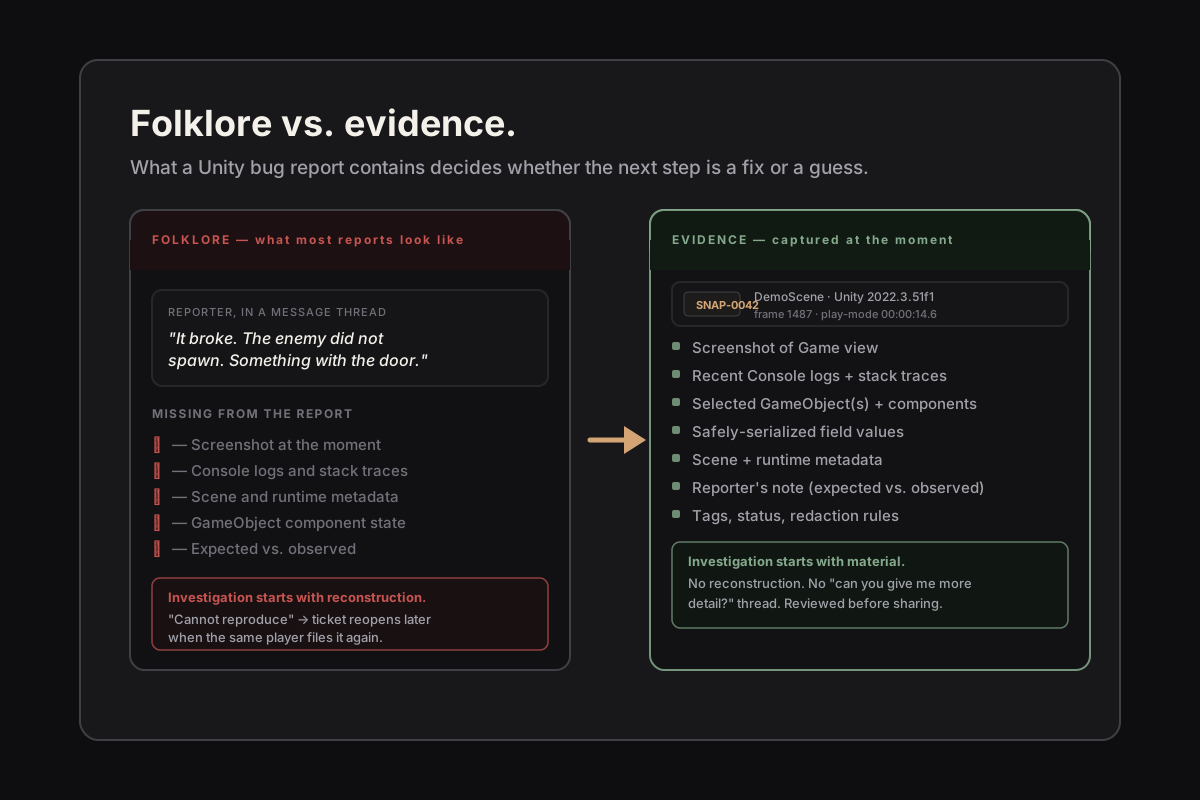
A typical Unity bug report begins as a sentence in a message thread: it broke, the enemy did not spawn, the score reset, something happened with the door. By the time anyone investigates, the scene has been reloaded, the Console has been cleared, the screenshot was never taken, and the only remaining artifact is a person's recollection of what they think they saw.
That is folklore, not evidence. Folklore is what a project produces when nobody captured the moment the bug was visible. Investigators are then asked to reproduce a state from a story — which is the slowest, least pleasant, and most error-prone way to start a fix. Most of the work of debugging in that situation is not debugging at all. It is detective work for a crime scene that has already been tidied.
The cost is real. Reproduction attempts that fail because a Transform value or a serialized field is slightly different. Fixes that solve a problem nobody can confirm was the actual report. Tickets that get closed as cannot reproduce and reopen six weeks later when the same player files them again.
What an evidence-first report looks like
An evidence-first report makes the next investigation step start with material. Concretely: a screenshot of the Editor or Game view at the moment the bug was visible, the recent Console logs with stack traces, scene and runtime metadata (Unity version, frame count, play-mode time), the relevant GameObjects with their component state, and a short note from the reporter about what they expected versus what they observed.
None of that is exotic. It is the same information any reasonable investigator would ask for. The hard part is not the list. The hard part is collecting it at the moment the bug is on screen, before the developer's instinct to keep playing erases the state that mattered.
When a report arrives with that material attached, the investigation starts from observation rather than reconstruction. The first question stops being what happened? and becomes why did this state lead to that outcome? That is the question debugging is actually good at.
Why this is harder than it sounds
The natural objection is that experienced developers already know to take screenshots and copy the Console. They do, sometimes. The problem is that bug capture has to compete with the bug itself for attention. By the time someone has reached for Alt+PrintScreen, the spawner has finished its bad frame, the animation has resolved, the soft-locked UI has reloaded itself, and the runtime state that explained the failure is gone.
Pausing the Editor helps in theory. In practice, Pause inside Unity has its own quirks: some systems keep running, some inspectors update on Edit Mode rather than Play Mode, and copying serialized values out of the inspector by hand is the kind of small task that the tester will rationally skip when they have ten more bugs to file. The cost of capturing evidence well must be near zero, or the project will keep producing folklore.
There is also the awkward fact that most Unity bugs do not happen on the developer's machine. They happen on a tester's machine, or in a QA build, or on a build farm, where there is no debugger attached and the person observing the bug is not the person who will fix it. The handoff between observer and investigator is exactly where context evaporates.
Capture has to happen at the moment
The discipline is simple: capture the evidence as a structured snapshot at the moment the bug is visible, before any further interaction. A one-key capture during Play Mode — active or paused — is small enough that even a tester with ten more bugs to file can afford to use it. A capture that requires opening menus, picking folders, naming files, or copying inspector values by hand will not survive the first wave of fatigue.
What the snapshot should contain is the boring, exhaustive list: a screenshot if one is reachable in the current pipeline, recent Console logs including warnings and stack traces, scene metadata, the active GameObject hierarchy or at least the selected GameObjects with their components, safely serialized field values, and the tester's note in their own words. The snapshot is the report the developer would have asked for, written down before anyone had to ask.
The snapshot also has to survive a Domain Reload, a scene change, an Editor restart, and ideally a project move. A captured artifact that disappears the next time someone presses Play is a worse outcome than a written note, because it pretends to be evidence and is not.
Review before export, and review before sharing
Captured evidence is raw material. Before it travels — to a teammate, to an issue tracker, to an AI assistant — somebody has to look at it. Was the screenshot of the right thing? Are there logs in there from an unrelated system that will mislead the investigator? Does the snapshot include serialized values from a script with secrets, NDA-covered text, or content under embargo?
This is the step BugLens treats as central rather than decorative. The captured snapshots live locally. They open in a dedicated Browser where the reporter can inspect them, tag them, mark status (Open, Investigating, Fixed, Archived), and decide what to export. Nothing leaves the machine on its own. The Markdown report, JSON export, and AI-ready prompt packs are produced on demand, after review, and the reporter is the one who decides whether and where to share them.
The structural reason for this is that a tool that uploads captures automatically is a tool that cannot be used on real projects. Studios under NDA, projects under embargo, and contractors with confidentiality obligations need internal tooling that does not phone home. Local-first capture, with the review step before any export, is what makes evidence-collection compatible with how Unity teams actually work.
Markdown for humans, JSON for tools, prompts for review
Once the snapshot has been reviewed, the export step has three honest shapes. Markdown is for a teammate or an issue tracker — readable, predictable, with the reporter's note at the top and the captured context below. JSON is for tools that want to ingest the snapshot programmatically: a fixed contract that does not assume an external schema or a third-party package.
The third shape — AI-ready prompt packs — is where most projects get this wrong. A prompt that says here is a bug, fix it, attached: forty-eight kilobytes of scene state is not a useful prompt. It is a guess that an AI assistant will read it carefully. The honest version is a small set of structured prompts: reproduction steps, likely cause, investigation checklist, test scaffold. Each prompt is short, framed around one question, and reviewed by a developer before it is pasted anywhere.
Prompts are advisory. They are not a substitute for the developer who reads the snapshot and understands the system. They are a way to get a faster first pass on questions like what would I check next? when the project does not have a senior engineer free for the next hour.
What evidence-first does to ticket flow
Once reports start arriving with evidence attached, two things change. The reproduction step shortens or disappears entirely, because the report already contains the scene context that would have driven the reproduction. And the ticket conversation stops being a slow exchange of can you give me more detail? messages, which is the part of bug triage that quietly eats engineering weeks.
The other change is harder to measure but more important: the team learns to trust the reports. A report that arrives with a snapshot of the actual state at the moment the bug was visible is taken seriously because there is something to look at. A report that arrives as a sentence is taken seriously in theory and triaged into a backlog in practice. Evidence is what moves a ticket from let me think about it later to I can look at this now.
What this does not solve
Evidence capture is not a debugger replacement. It does not step through code, it does not pause at a breakpoint and let you inspect a stack, and it does not infer the cause of a bug. Those remain the developer's job, with the developer's tools.
Capture is also not a deterministic replay system. It records the state and context that were visible at the captured moment, not the full scene graph or the simulation history that would let you re-execute the frame. That is a different, much larger product, and pretending a capture tool does it would be the same mistake the folklore reports make in the other direction.
And evidence does not guarantee a fix. A snapshot tells you what state existed. The reasoning about why that state was wrong is still work. The point is that the work starts with material, not with a story.
The discipline, stated plainly
Capture at the moment, review locally, export deliberately. That is the loop, and the value comes from doing it the same way every time so the reports become legible to anyone on the team who picks them up.
The deeper point is the one this article keeps circling. Debugging is mostly about reducing the gap between what was observed and what an investigator has to reason about. Folklore makes that gap large. Evidence makes it small. A bug report that arrives with a snapshot, reviewed and exported with intent, is the version of the report a developer can actually act on — which is the only kind of report that turns into a fix.