
Godot pathfinding / 2026-05-25 / 8 min read
Updated 2026-07-12 · Verified as of Godot 4.7
Multi-size agents in Godot: clearance maps without the headaches
Godot grid pathfinding treats every unit as one cell, so a 2×2 agent routes through gaps it can't fit. Clearance maps fix it with one grid for all sizes.
The problem: your pathfinder thinks every unit is one cell
Grid pathfinding in Godot, including AStarGrid2D, reasons about a single moving point. It asks whether a cell is walkable and how much it costs to enter, and it returns a sequence of cells. That model is correct for a 1×1 unit and quietly wrong for anything bigger.
The symptom is familiar to anyone who has shipped a game with mixed unit sizes. A 3×3 vehicle gets a perfectly valid one-cell path straight through a doorway it physically cannot enter. It either clips through the wall, jams in the gap, or wanders off while the navigation system insists everything is fine. The pathfinder did its job. Its job just did not include the agent's footprint. (You can poke this exact failure in the insufficient-clearance case of the PathForge failure-mode museum.)
The question this post answers: how do you make one grid serve a 1×1 scout, a 2×2 tank, and a 3×3 hauler, without three separate maps and without checking the whole footprint on every step of every search.
First, make sure it's actually a clearance bug
Four different bugs get blamed on unit size, and only one of them is this article's problem. Thirty seconds here can save you from building the right system for the wrong bug.
- Only large units take routes through gaps they can't fit; small units are fine.
Likely culprit: planning without footprint or clearance. Next: keep reading this article. - Even 1×1 units cut between diagonally touching wall corners.
Likely culprit:diagonal_mode, not unit size. Next: check the diagonal modes guide. - The path correctly avoids the gap, but the body still jams or grinds on walls.
Likely culprit: path following or collision setup, not planning. Next: check steering target spacing and collision shape against cell size. - Units fit individually but overlap or stack on the same cells.
Likely culprit: occupancy or local motion, not fit. Next: use reservations or occupancy for grid turns; use avoidance for continuous movement.
Confirm the footprint mismatch in two minutes
Take the path your large unit follows and, at each step, list every cell its footprint covers. For a 2×2 unit with a top-left anchor, that is the anchor plus (1, 0), (0, 1), and (1, 1). Check each cell against your obstacle data. If any step covers a solid cell, the route was planned for a point, and the first failing step identifies the narrow gap.
Run that first pass with diagonal movement disabled. If diagonals are part of your final movement contract, also validate the swept footprint between consecutive anchors — a diagonal step can pass the per-cell test and still clip a corner mid-transition.
Why this is harder than it looks
The naive instinct is to check, at each step of the search, whether the agent's full footprint fits at the candidate cell. For a 3×3 agent that is nine cell lookups per neighbour, per expansion, per query. Multiply by agents and by frequency and you have rebuilt the frame-spike problem from a different direction.
It is also not just about size. Real games change the grid: doors open and close, buildings go up, a destroyed wall opens a new route. Whatever structure you use to answer can a unit this big stand here has to survive those changes without a full rebuild each time. And it has to handle several sizes at once, because precomputing a separate walkability grid per size multiplies both memory and the bookkeeping you have to keep in sync.
So the real constraints are three: answer the footprint question in roughly constant time during the search, share one structure across all agent sizes, and update cheaply when the world changes.
The naive fixes, and where they hurt
Two patches don't touch the planner at all. Letting collision stop the body prevents clipping, but leaves the path pulling into the wall: the unit can jitter, grind, or wedge into a corner. Shrinking the collision shape until the body fits does the opposite: the unit now physically passes through by visibly overlapping the walls.
Checking the footprint only while following the path is a useful safety guard, but not a complete planner fix by itself. If the per-step rejection doesn't invalidate the route and trigger a replan, the unit stops while the planner keeps proposing the same gap; that is how units end up pacing in front of doorways.
The fixes below at least aim at the right layer — the planner. Each still has a cost:
Inflate the obstacles. Grow every blocked region by the agent radius and run normal pathfinding on the inflated grid. This works for exactly one size. With mixed sizes you would need one inflated grid per size, and inflating for the largest unit closes narrow routes that smaller units could legitimately use.
One grid per size. Precompute a separate walkability grid for 1×1, 2×2, 3×3, and so on. It answers fast, but memory grows with the number of sizes and every dynamic change has to be applied to every grid. The synchronisation cost is where this one quietly rots.
Footprint check during the search. Keep one grid and test the full footprint at each candidate cell. Correct, no extra memory, and the most common thing people ship first. It is also the slowest, because it redoes the same footprint math constantly and turns a cheap A* into an expensive one right where the frame budget is tightest.
Each of these is a reasonable first move. The version that scales keeps the single-grid memory profile of the third option and the constant-time query of the second.
Clearance maps: precompute the fit once
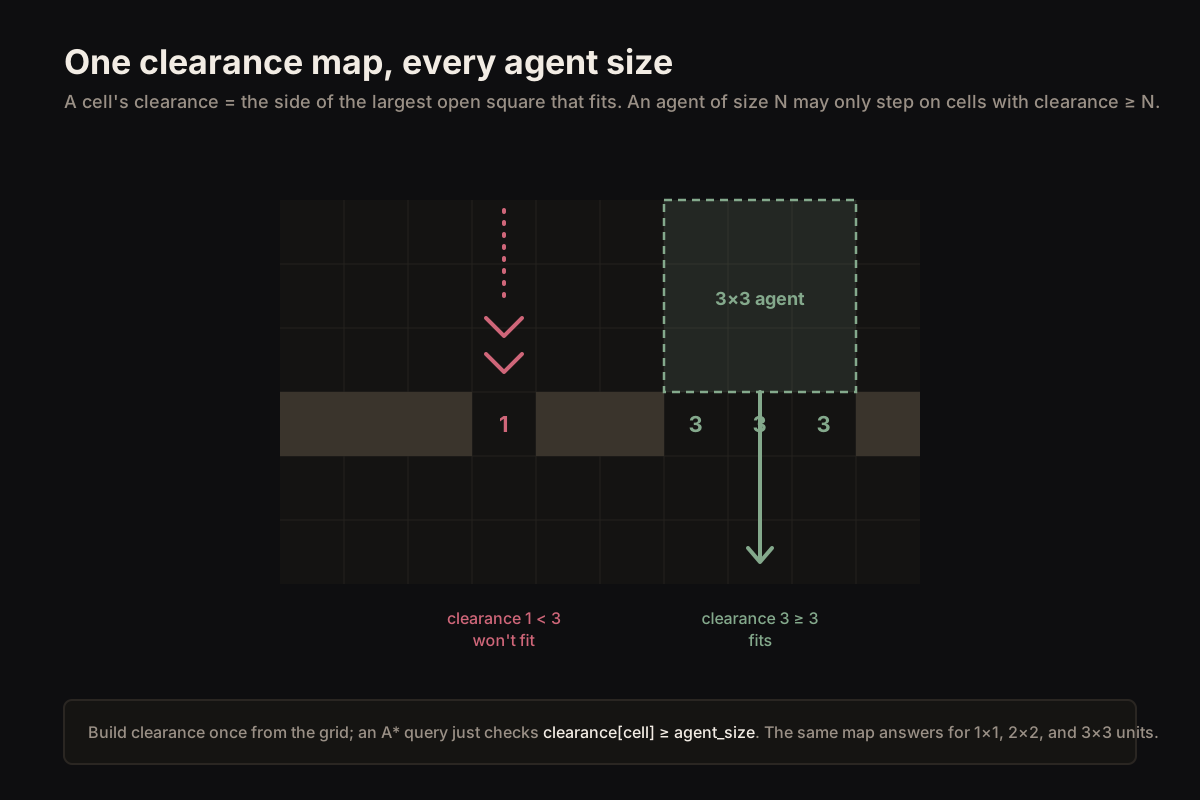
A clearance map stores, for every open cell, the side length of the largest open square that fits with its corner at that cell. A cell next to a wall has clearance 1. An open cell with enough room around it has clearance 3 or more. A blocked cell has clearance 0.
The point is that this collapses the footprint question into a single number. An agent of size N may stand on a cell only if that cell's clearance is at least N. One 3×3 lookup becomes one integer comparison, and the same map answers for every size: a 1×1 needs clearance ≥ 1, a 3×3 needs clearance ≥ 3.
Building it is one pass over the grid, computed bottom-right to top-left so each cell can reuse three neighbours it has already seen:
Querying clearance during the search
With the map built, the search barely changes. Wherever the A* expansion considers a neighbour, it first checks that the agent fits, and skips the cell otherwise. The footprint never has to be re-tested cell by cell; the clearance value already encoded it. The complete Annotated A* implementation for Godot adds that predicate to a deterministic min-heap search and verifies it against direct-footprint Dijkstra.
This is the property that matters: the expensive geometry was paid once, at build time, and every path query for every size now reads a single number per cell.
Dynamic obstacles without rebuilding the world
A clearance map would be useless for real games if every door toggle forced a full rebuild. It does not. When a single cell changes between blocked and open, only cells above and to the left of it can have their clearance affected, and only within a window the size of the largest clearance value nearby. Recompute that small box, not the grid.
In practice you mark a dirty region around the change and recompute just those cells with the same rule used at build time. The cost is proportional to what changed, which is exactly the property that keeps it inside a frame budget when a building drops or a wall opens mid-battle.
The tradeoffs
Clearance maps assume a square footprint. A 3×3 approximation is fine for many tanks, vehicles, and large monsters; genuinely rectangular units need width-height queries or orientation-specific masks, while L-shaped units need their own occupied-cell representation. That extra structure is a real cost worth naming rather than hiding. The square map also costs one integer per cell of memory, which is cheap, and a build pass, which is not free but is paid once.
The clearance value is also conservative by design: it guarantees a square of that size fits, which can occasionally refuse a tight diagonal squeeze a more expensive check would allow. For real-time games that trade is almost always correct — a unit that takes a slightly wider route is invisible; a unit wedged in a doorway is a bug report.
The navmesh side of this same problem is baked agent_radius: bake with a larger radius and narrow corridors disappear from the walkable polygons entirely. That one is measurable — in the PathForge verification scene, the same 44 px corridor stays connected baked at radius 8 and splits into two disconnected polygons at radius 24. Why is my path failing in Godot ships that proof as a runnable scene.
The deeper point is the same one that runs through production navigation: move the expensive work to where it is paid least often. Footprint geometry belongs at build and update time, encoded into the grid, not recomputed inside every path query while the frame clock is running.
Clearance only answers whether the body fits. The multi-tile movement layer applies that footprint convention to anchor placement, transitions, and rotation. When several units can fit but may claim overlapping cells, use footprint-aware reservations as the separate runtime ownership layer.
Frequently asked questions
Why does my 2×2 or 3×3 unit path through gaps it can't fit in Godot?
AStarGrid2D plans for a single point, not a footprint. It will happily route a 3×3 agent through a one-cell gap because nothing in the API knows the agent has a size. You have to encode size yourself — a clearance map is the standard way.
What is a clearance map in grid pathfinding?
A precomputed per-cell value: the side length of the largest open square that fits at that cell. An agent of size N may stand on a cell only if its clearance is at least N, which turns a nine-cell footprint test into one integer comparison.
Do clearance maps work with dynamic obstacles like doors and towers?
Yes. A single cell change only affects clearance within a bounded window above and to the left of it, so you recompute that small box instead of the whole grid. The update cost stays proportional to what changed.
Do clearance maps handle rectangular or L-shaped units?
Not directly — the clearance value guarantees a square fit. A square approximation is fine for most large units; genuinely rectangular or L-shaped footprints need a richer structure, and that extra cost is worth naming up front.
How do I tell if it's a clearance bug or a diagonal or collision problem?
Disable diagonal movement and footprint-test the returned path: list the cells the unit covers at each step and check them against your obstacle data. Solid cells inside the footprint mean the planner planned for a point — that is the clearance problem. A clean footprint that still jams points at path following or collision setup, while 1×1 units cutting between wall corners points at diagonal_mode.