
Godot pathfinding / 2026-07-06 / 12 min read
Updated 2026-08-05 · Verified as of Godot 4.7.1 stable docs and local artifact rerun on 2026-08-05
Why your NavigationAgent gets stuck in Godot: a diagnosis guide
Diagnose a stuck NavigationAgent2D in Godot: bake-radius mismatch, repath loops, avoidance push-off, unreachable targets, and callback traps.
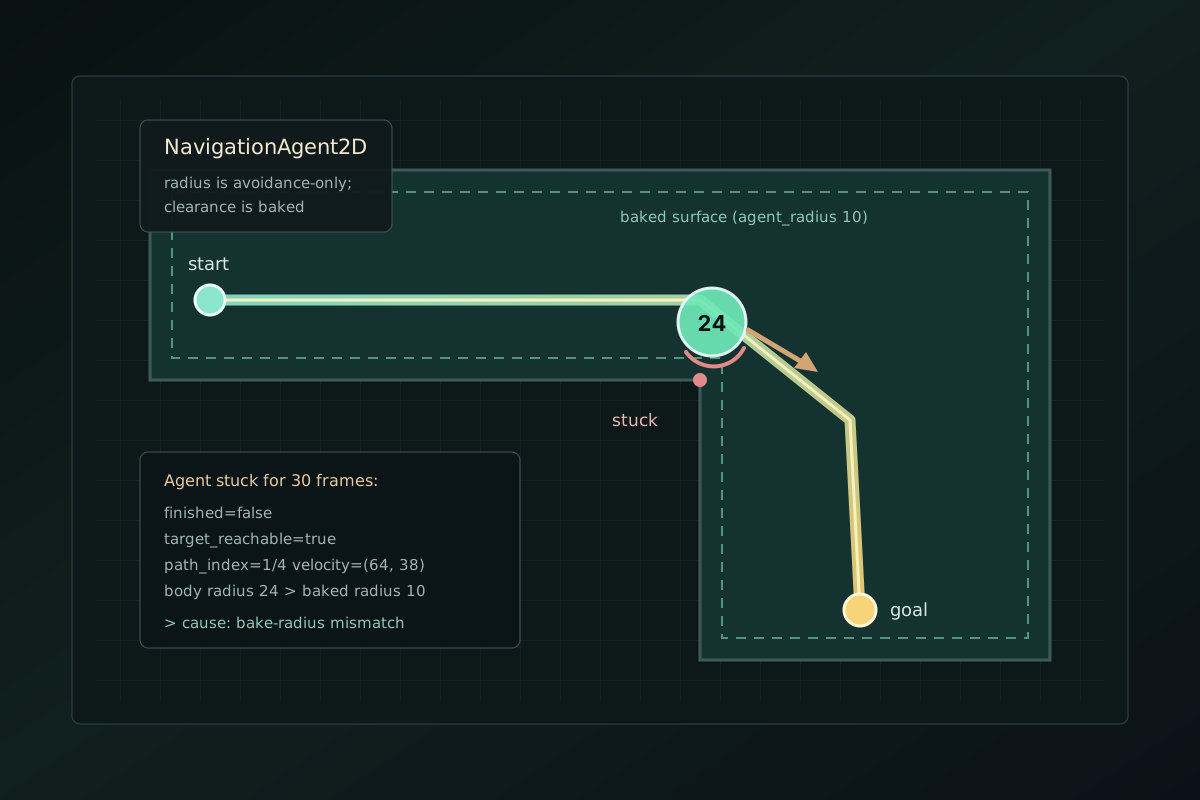
Stuck isn't one bug
The path exists. The agent starts walking. Somewhere between here and the target it stops — pressed against a corner, twitching between two waypoints, or standing in the open insisting it's done.
"Stuck" isn't one bug. It's four movement causes plus one freeze class, and each one leaves a different fingerprint.
To be fair to the docs: everything below is documented. It's just scattered across six property notes on the NavigationAgent2D class page, and none of them mentions the others. What this page adds is the order — probes first, causes second, settings last.
Scope check before anything else. If the path itself comes back empty, that's the empty-path checklist — a different problem. If the agent never moves at all, that's usually the movement contract from the NavigationAgent2D setup guide. This page is for the third case: it moves, and then it stops arriving.
Short answer
A stuck NavigationAgent2D almost always has one of these five causes, and every one of them shows up differently in the probes below:
- Bake-radius mismatch — the navmesh was baked for a thinner body. The agent's
radiusproperty does not affect pathfinding; clearance is baked into the navigation polygon. - Repath loop —
path_desired_distancetoo small for the body's speed, so the agent overshoots the same waypoint forever. - Avoidance push-off — avoidance shoves the body away from the route until
path_max_distanceforces a recalculation, then does it again. - Unreachable target — the agent walked as close as the map allows and finished at the last waypoint. That one isn't a bug.
- Callback trap — path-updating methods called from the agent's own signals, which the docs warn can recurse infinitely.
Run the probes before touching any setting
NavigationAgent2D carries more diagnostic surface than most projects ever call. One function reads all of it:
What each probe tells you
And turn on debug_enabled = true while you're at it. Seeing the path is half the diagnosis — several causes below are visible before any number prints.
is_navigation_finished()— whether the agent considers the trip over. The docs' definition matters: if the target is unreachable, navigation still finishes — "when the last waypoint of the path is reached".is_target_reachable()— whetherget_final_position()lands withintarget_desired_distanceof the target. This is the one-call unreachable-target detector.is_target_reached()— whether the body actually got withintarget_desired_distance. Finished and reached are not the same thing, and the gap between them is cause 4.get_current_navigation_path_index()— which waypoint the agent thinks it's moving toward. Watch it over a few seconds: a frozen index is the repath-loop fingerprint.get_final_position()vstarget_position— the docs put it plainly: "It may not always be possible to reach the target but it should always be possible to reach the final position." A large delta means the map can't take you where the gameplay wants you.
The fingerprint table
Match what the probes print against the pattern, then jump to the matching cause.
| Probes show | Likely cause |
|---|---|
| Body pressed against geometry, debug path hugs the corner it's caught on, velocity nonzero | Bake-radius mismatch (cause 1) |
Path index frozen, path_changed firing repeatedly while standing | Repath loop (cause 2) |
| Body drifts sideways off the drawn path, worse in crowds, path redraws periodically | Avoidance push-off (cause 3) |
finished=true, target_reached=false, target_reachable=false | Unreachable target (cause 4) |
| Frame hitch or stack overflow instead of a standing body | Callback trap (cause 5) |
finished=true and the body trembles in place | Standing jitter (footnote below) |
Cause 2: the repath loop
path_desired_distance decides how close the body must get to a waypoint before the agent advances to the next one. The docs describe both failure directions in one property note. Too low, and "the NavigationAgent will be stuck in a repath loop because it will constantly overshoot the distance". Too high, and it "will skip points on the path, which can lead to it leaving the navigation mesh".
The overshoot arithmetic lives in the setup guide and I won't re-derive it here — the one-line version is: distance per physics frame is speed divided by tick rate, and that number must stay under path_desired_distance.
The fingerprint: the path index never advances, and path_changed keeps firing while the body stands in place, orbiting or trembling around a waypoint it can't satisfy.
The fix is proportion, not magic values: raise path_desired_distance (default 20.0) until the frame-step arithmetic clears it, or cap the speed. And resist fixing it by cranking the threshold to 200 — that's how you get the other failure direction.
Cause 3: avoidance pushes, path_max_distance snaps
The avoidance system is more isolated than most people assume. The official tutorial says it outright: "Avoidance exists in its own space and has no information from navigation meshes or physics collision." And two lines later: "Avoidance does not affect the pathfinding."
So the safe velocity that comes back from velocity_computed will happily aim your body off the walkable surface — it's dodging circles, not respecting maps. The agent tolerates that deviation up to path_max_distance (default 100.0), which the docs define with the cause built into the sentence: deviation "can happen due to trying to avoid collisions. When the maximum distance is exceeded, it recalculates the ideal path."
In a doorway crowd, that loop becomes visible: push, deviate, snap-repath, push again. Two agents can hold each other in that cycle indefinitely.
Three mitigations, one sentence each. Give important agents a higher avoidance_priority — the tutorial says higher-priority agents ignore lower-priority ones, which breaks doorway deadlocks. Keep path_max_distance proportionate to your level geometry, so a shove triggers a repath before the body is two rooms away. And if steering wobble in open fields is the real complaint, simplify_path is the documented lever — the docs name it as mitigation for exactly that class of issue.
When the same trigger appears across hundreds of otherwise healthy agents, continue with the crowd repath-governor guide. It separates application request reasons from path_changed, measures the off-path inference, and bounds how many target assignments dispatch in one tick.
One boundary sentence so this section doesn't grow into the wrong article: avoidance never rewrites the route by itself — that whole boundary is avoidance vs pathfinding. Deeper avoidance tuning is its own future topic.
Cause 4: the target is unreachable — and the agent is right
If the click landed outside the walkable surface, the agent does exactly what it's documented to do: it walks as close as the map allows and finishes. "If the target is unreachable, navigation ends when the last waypoint of the path is reached."
The probe pattern is unambiguous: is_navigation_finished() true, is_target_reached() false, is_target_reachable() false. Nothing here is broken — the disagreement is between the gameplay's idea of the destination and the map's.
Two honest fixes. Clamp the target onto the map before assigning it — the map_get_closest_point() snippet is in the setup guide. Or design for "walk toward and report": let the agent finish at the final position and surface the is_target_reachable() result to the gameplay layer, so a unit can say "can't get there" instead of silently standing at a wall.
Cause 5: the freeze class — path updates inside signal callbacks
This one doesn't leave a standing body; it leaves a hitch or a stack overflow. The class docs carry the warning: several methods, get_next_path_position() included, can trigger a new path calculation — and "calling these in your callback to an agent's signal, such as waypoint_reached, can cause infinite recursion".
The pattern that triggers it looks innocent: react to waypoint_reached by peeking at the next position, which triggers a path update, which fires the signal again. The fix is placement, not cleverness: do path work in _physics_process(), or defer it with call_deferred() / CONNECT_DEFERRED if it must start from a signal.
The standing jitter footnote
If the trip is over but the body trembles in place, you're probably still calling get_next_path_position() after is_navigation_finished() turned true. The docs ask you to stop for exactly this reason — repeated path updates jitter the standing agent. Gate the whole movement block on is_navigation_finished(); the clean loop is in the setup guide.
Ship the watchdog
Everything above assumes someone noticed the agent was stuck. In a real project, "stuck" is usually a playtester's vibe, three days later, with no reproduction. This is the cheap insurance:
Stuck becomes a log line
Net movement under a pixel for half a second while navigation isn't finished — the probes print with the fingerprint attached. Stuck stops being a bug report and starts being a log line.
The downloadable scene ships with the watchdog wired into all five cases. The public verification receipt was rerun on Godot 4.7.1 stable on 2026-08-05, so you can inspect and repeat every check.
Measurement-gap: this artifact is a five-case correctness harness plus a runnable scene smoke, not a timing benchmark. It verifies diagnostic fingerprints and watchdog behavior; it does not measure path-query latency, crowd throughput, or frame time, so no Dataset schema is emitted.
When the symptom belongs to another page
Some stuck-adjacent symptoms have their own pages; this table is the hand-off.
| Symptom | Where it's covered |
|---|---|
| The agent never moves at all | NavigationAgent2D setup and the movement contract |
| The path comes back empty | Why is my path failing in Godot? |
| An obstacle steers movement but the route line never changes | Avoidance vs pathfinding |
| Maps, regions, baking, server sync | NavigationServer2D in Godot 4: the complete guide |
Break it on purpose
The five cases in the downloadable scene are the five sections above, reproducible on purpose: a corridor baked too thin, a threshold that loops, a doorway crowd, a target off the map, and a signal callback that would recurse. Each one trips the watchdog and names itself in the console. PathForge is the larger direction behind this cluster: navigation failures that arrive as named facts instead of vibes.
If any of this behaves differently in your Godot version, I want to know. The page is pinned to Godot 4.7.1 stable and the receipt is small enough to rerun.
Frequently asked questions
Why does my NavigationAgent2D get stuck on corners?
Usually a bake-radius mismatch. The agent's radius property is avoidance-only — the docs state it does not affect pathfinding. Bake the NavigationPolygon with an agent_radius at least as large as the body's collision radius.
Does NavigationAgent2D.radius affect pathfinding?
No. It's documented as the avoidance agent's body only. Pathfinding clearance comes from NavigationPolygon.agent_radius at bake time, with different navigation maps per actor size.
What is a repath loop in Godot navigation?
A cycle where the agent constantly recalculates its path instead of advancing. The two documented triggers: path_desired_distance too small for the body's speed (constant waypoint overshoot), or avoidance repeatedly pushing the body past path_max_distance.
Why does my agent jitter in place after arriving?
The movement loop keeps calling get_next_path_position() after is_navigation_finished() turned true. The docs recommend stopping path updates once navigation finishes; gate the loop on it.
What's the difference between is_navigation_finished and is_target_reached?
Finished means the trip is over — which also happens when the target is unreachable and the agent ends at the last waypoint. Reached means the body actually got within target_desired_distance of the target. Finished-but-not-reached is the unreachable fingerprint.
How do I check if the target is reachable?
Call is_target_reachable(): it reports whether get_final_position() lands within target_desired_distance of target_position. Pair it with a target clamp via NavigationServer2D.map_get_closest_point() when the target must always be on the map.
Why does avoidance push my agent off its path?
Avoidance exists in its own space — the tutorial states it has no information from navigation meshes or physics collision, and does not affect pathfinding. The safe velocity can point off the route; past path_max_distance the agent recalculates.
How do I detect a stuck agent automatically?
A watchdog: if net movement stays under a small epsilon for N physics frames while is_navigation_finished() is false, log the agent's probes. The article ships the pattern and a verified scene with it wired in.