
Godot pathfinding / 2026-07-02 / 10 min read
Verified as of Godot 4.7 stable docs and local artifact verification on 2026-07-02
NavigationAgent2D Setup and Common Gotchas in Godot
Fix NavigationAgent2D not moving, first-frame empty paths, early finished states, jitter, and avoidance wiring in Godot 4.7, with runnable proof.
The answer, up front
You added a NavigationAgent2D, set target_position, pressed Play, and the character didn't move.
That's usually not a Godot bug. It's the contract.
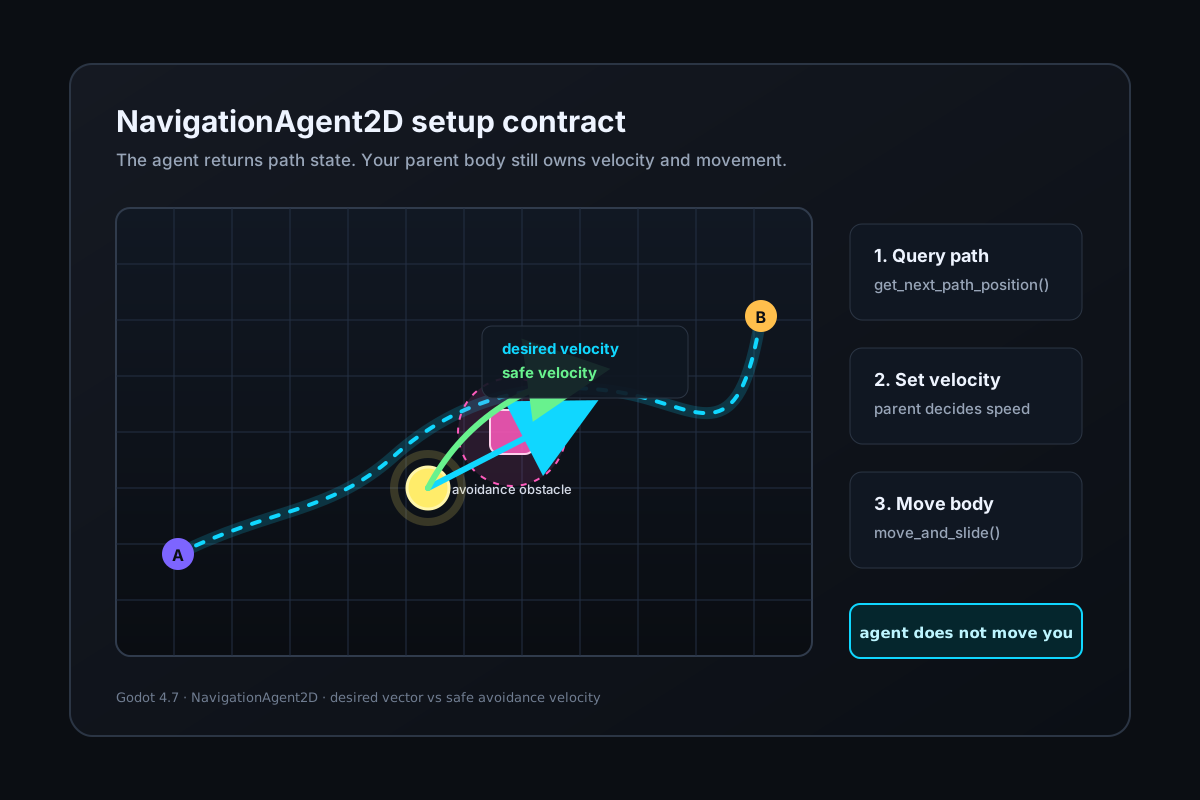
NavigationAgent2D is a path-following and avoidance helper. It doesn't move the parent node for you. The agent gives your script the next path position. Your script still owns velocity and the actual move_and_slide() call.
If the unresolved question is whether you need an agent, a grid, or an authored graph at all, start with 2D pathfinding in Godot: grid, graph, or navmesh. This page begins after the continuous-space choice has already been made.
For maps, regions, baking, layers, server sync, and direct queries, use NavigationServer2D in Godot 4: the complete guide. This page stays on the node-level movement contract.
If you are here because
The agent has a target but the body doesn't move.
The path is empty or weird on the first frame.
The agent stops before the clicked target and says finished.
The body jitters or orbits around path points.
velocity_computed fires but nothing moves.
An obstacle steers movement but the route line doesn't change.
The movement contract: why the body is not moving
Rule: NavigationAgent2D reports path state; your parent body script still moves the body. Many NavigationAgent2D bugs are category mistakes. If the body doesn't move, don't start by tuning path_desired_distance. First check whether your script ever assigns velocity and calls move_and_slide().
Break it yourself in the downloadable scene: remove the move_and_slide() call from basic_navigation_agent_2d.gd. The target still exists. The agent still has path state. The body stays still.
| Responsibility | What owns it |
|---|---|
| Target point | Your code assigns agent.target_position |
| Path-following state | NavigationAgent2D |
| Next point to move toward | agent.get_next_path_position() |
| Parent body movement | Your CharacterBody2D script |
| Local avoidance safe velocity | velocity_computed(safe_velocity) |
| Global path query/map behavior | NavigationServer2D and navigation data |
Minimal scene tree
Use this shape. The navigation region gives the server walkable data. The character body is the object you actually move. The agent is the helper node under that moving body.
The article artifact uses the same shape, with two bodies: one basic path-following body and one avoidance-enabled body.
Minimal path-following script
This is the whole contract. The agent gives you next_position; you move the body.
The map_get_closest_point() call handles a common stuck report where the clicked target is outside the navigation mesh.
Gotcha: the first physics frame
Rule: wait for the navigation map before the first path query.
This one is in the official docs, and people still hit it constantly. Navigation maps are synchronized on the physics frame. If you set up regions, bake a polygon, change layers, or enter a new scene and immediately query the map in _ready(), the query can run before the map has a usable synced iteration.
The first wait gives physics a turn. The second wait checks that NavigationServer2D.map_get_iteration_id(map) is no longer 0.
If that wait never finishes, don't fix the agent yet. Check whether your NavigationRegion2D exists, has a navigation polygon, is enabled, and is on the layer the agent uses. That lower-level diagnosis belongs in the NavigationServer2D guide and the path failure triage checklist.
Break it yourself: remove _wait_for_navigation_map() from the artifact. Startup behavior becomes version/map-sync sensitive, which is the honest shape of this bug in real projects.
Gotcha: call get_next_path_position once
Rule: call get_next_path_position() once per physics frame while the agent is navigating.
get_next_path_position() updates path-following state; it is not just a passive getter. It can also trigger path calculation.
Call it once in _physics_process() while the agent is still navigating. Don't call it from navigation callbacks such as waypoint_reached. That's how a simple setup turns into recursive path updates or one-frame weirdness.
The finished check gates the whole loop.
Gotcha: jitter and orbiting need a number
Rule: distance per frame should not exceed path_desired_distance. The useful first number is distance_per_frame = speed / physics_ticks_per_second.
If the body can move farther in one physics frame than the distance used to advance path points, it can overshoot a waypoint and orbit around it.
In the downloadable scene, 180 px/s / 60 ticks = 3 px/frame against path_desired_distance = 16, so it is safe. The deliberate breakpoint is 3000 px/s / 60 ticks = 50 px/frame, which exceeds 16.
For Godot 4.7, the documented NavigationAgent2D defaults are path_desired_distance = 20.0, path_max_distance = 100.0, and target_desired_distance = 10.0. Those values need to make sense for your speed, physics tick rate, collider size, and navigation mesh scale.
Break it yourself: set the artifact agent speed to 3000.
Avoidance wiring
Rule: assign agent.velocity to request velocity_computed, then move the body from the callback.
Avoidance changes the movement contract. The agent no longer only reports the next path point. It also takes your desired velocity and emits a safer velocity.
Movement happens in one place: _on_velocity_computed(). The finished branch feeds zero velocity to the avoidance simulation and returns. It doesn't call move_and_slide() a second time.
The most useful avoidance debugging question is: did I assign agent.velocity in the frame where I expected velocity_computed to move the body?
Break it yourself: remove velocity_computed.connect(...) from the artifact. The script still computes a desired velocity, but no callback moves the parent with safe_velocity.
Avoidance is not repathing
Rule: avoidance changes local safe velocity, not the global path route.
A NavigationObstacle2D or avoidance-enabled agent can change local movement velocity. It doesn't automatically rewrite the global path route. If your route line stays the same while the body steers around something, that's the expected boundary.
For the focused proof, see NavigationObstacle Avoidance vs Pathfinding in Godot.
Download the minimal scene
The article artifact is a small Godot 4.7 source project. basic_navigation_agent_2d.gd contains the basic movement loop, avoidance_navigation_agent_2d.gd contains the avoidance wiring loop, and verify_navigationagent2d_setup.gd writes the receipt JSON.
The movement logic is the article's setup contract. The scene adds visual markers, counters, and verification fields around it so the claims can be checked.
Verification receipt
The local receipt was generated with Godot 4.7-stable on 2026-07-02. This is a behavior receipt for the setup contract, not a performance benchmark.
| Check | Result | Notes |
|---|---|---|
| Scene opens | passed | The project loads and runs headless. |
| Basic mode reaches target | passed | The body moved using parent velocity and move_and_slide(). |
| Avoidance mode reaches target | passed | The avoidance body moved from velocity_computed(safe_velocity). |
| Avoidance emits safe velocity | 113 events | The callback received non-zero safe velocities. |
| Off-mesh target clamps to navmesh | (40,40) -> (106,130) | The clamped target has a path. |
| Normal distance budget | 3 px/frame <= 16 | The demo speed is within path_desired_distance. |
| Overshoot breakpoint | 50 px/frame > 16 | The deliberate 3000 px/s breakpoint exceeds the distance budget. |
Symptom table
Use this as the quick triage pass before you move into deeper NavigationServer2D or PathForge-style diagnostics. For the stuck family specifically — corners, repath loops, avoidance push-off — the stuck diagnosis guide goes deeper.
| Symptom | Likely cause | First fix |
|---|---|---|
| Agent has a target but the character doesn't move | You expected NavigationAgent2D to move the parent | Assign parent velocity and call move_and_slide() |
get_next_path_position() returns the current position on startup | Map is not synchronized yet, or no path exists | Wait for map iteration; then debug region/layers |
| Agent stops before the clicked target and says finished | Target is outside the navmesh | Clamp with NavigationServer2D.map_get_closest_point() |
| Agent jitters at the goal | You keep querying after navigation finished, or distances are too tight | Gate the loop with is_navigation_finished() |
| Agent orbits around waypoints | Distance per frame exceeds the path point advance budget | Check speed / physics_ticks_per_second <= path_desired_distance |
velocity_computed never moves the body | Avoidance not enabled, signal missing, or no agent.velocity assigned | Use the avoidance wiring loop |
| Agent looks stuck or cuts corners near walls | Runtime radius/shape and baked navigation clearance disagree | Use the stuck diagnosis guide; bake radius is the first suspect |
| Obstacle steers movement but route line doesn't change | Avoidance is local velocity, not pathfinding | Read the avoidance-vs-pathfinding article |
| Direct server path is empty | Region/layers/sync/map data problem | Debug the server query before tuning the agent |
2D and 3D mapping
The same contract exists in 3D: get the next path position, compute movement, and move the parent body yourself.
Don't copy 2D numeric defaults into 3D without checking the 3D class reference. The concept is shared; the values and scene scale differ.
| 2D | 3D |
|---|---|
NavigationAgent2D | NavigationAgent3D |
CharacterBody2D | CharacterBody3D |
Vector2 velocity | Vector3 velocity |
NavigationServer2D | NavigationServer3D |
NavigationRegion2D | NavigationRegion3D |
Closing
The downloadable scene is there so you can break each setup rule on purpose: remove parent movement, query too early, click outside the navmesh, overshoot the waypoint budget, or disconnect avoidance. PathForge is the larger direction behind this cluster: fewer mystery path failures, more concrete receipts.
If any of this behaves differently in your Godot version, I want to know. The article is tied to Godot 4.7-stable and the receipt is deliberately small enough to rerun.
Frequently asked questions
Why is my NavigationAgent2D not moving my character?
Because NavigationAgent2D does not move the parent node. It reports path-following information. Your CharacterBody2D script still needs to assign velocity and call move_and_slide().
Why is my NavigationAgent2D path empty on the first frame?
The navigation map may not have synchronized yet. Wait for at least one physics frame and, for server queries, wait until NavigationServer2D.map_get_iteration_id(map) is no longer 0.
Why does my agent stop before the clicked point and still finish?
The clicked point may be outside the navmesh. If the target is unreachable, the agent can finish at the last reachable waypoint. Clamp click targets with NavigationServer2D.map_get_closest_point() before assigning target_position.
Should I call get_next_path_position() in _process() or _physics_process()?
Use _physics_process(). The method updates the agent's internal path-following state and should be called once per physics frame while the agent is navigating.
Why does my NavigationAgent2D jitter near the goal?
Usually because the loop keeps calling get_next_path_position() after navigation is finished, or because target_desired_distance and path_desired_distance are too tight for the body's speed and physics tick rate.
Why does my agent orbit around waypoints?
Start with the distance budget: speed divided by physics_ticks_per_second. If that is greater than path_desired_distance, the body can overshoot a waypoint in one physics frame.
Why does velocity_computed not move my body?
Check four things: avoidance_enabled is true, the signal is connected, the agent has a navigation map, and your script assigns agent.velocity in the frame where you expect movement.
Does NavigationObstacle2D make NavigationAgent2D reroute?
No. Avoidance changes local safe velocity. It does not, by itself, rewrite the path query. Use the NavigationObstacle avoidance vs pathfinding article for that boundary.
Do I need NavigationAgent2D for a one-shot path?
No. For a one-shot path, route preview, or validation check, query NavigationServer2D.map_get_path() directly. Use NavigationAgent2D when an object needs continuous path-following state or avoidance.
Does this apply to NavigationAgent3D too?
Yes. The movement contract applies to NavigationAgent3D too: get the next path position, compute movement, and move the parent body yourself. Re-check the 3D defaults and Vector3-specific settings before copying code. Build the verified 3D version.