A seafloor with relief
Assign a Sprite2D or TextureRect as the bed source. Its texture and placement stay connected to the water as you move the source or replace its artwork. The renderer follows the view ray through the water to the shaped bed, so slopes, ledges, and walls affect which part of the underwater terrain is visible.
Independent bodies of water have their own projection centre, with adjustable tilt, direction, and perspective. You can share the projection settings between basins while each retains its own centre. Camera movement and zoom preserve the authored projection.
Objects at their own underwater depth
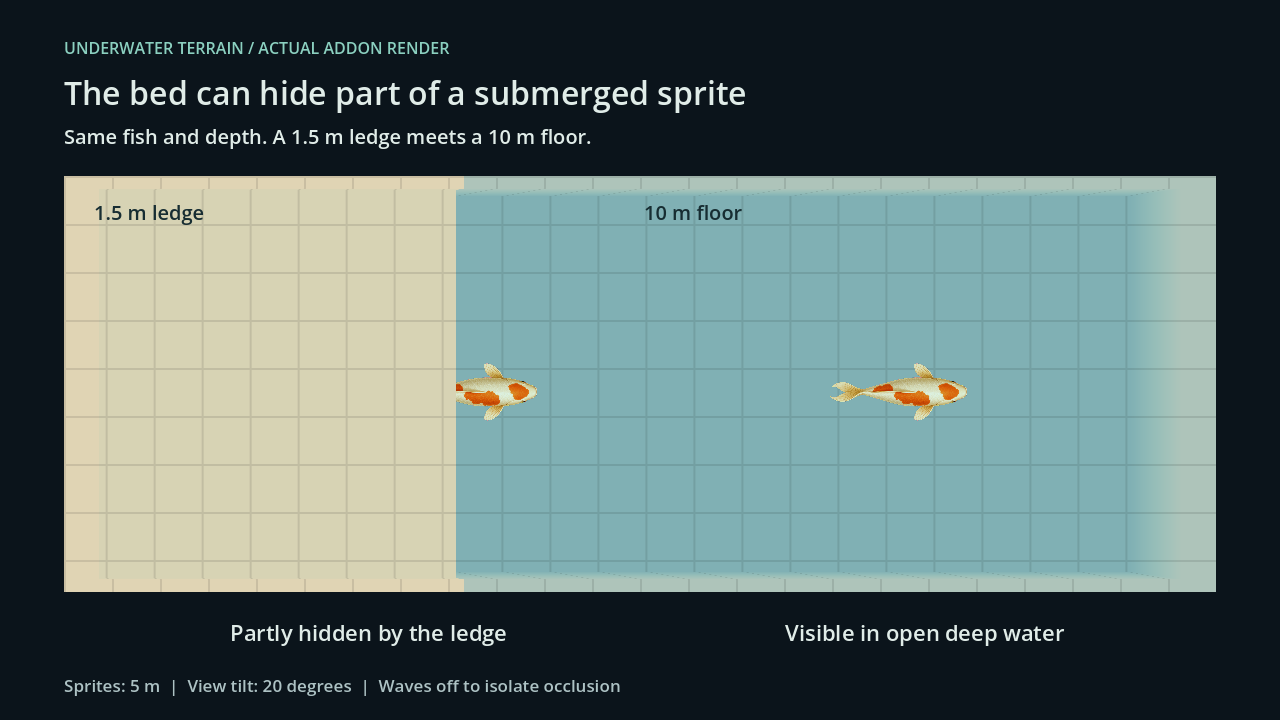
Place fish, plants, submerged ruins, or other sprites at individual depths. They use the same projection and wave refraction as the bed, with the same absorption, water veil, and depth blur. A nearer part of the seafloor can hide all or part of a sprite behind it.
Keep your existing controller. The addon handles how the submerged sprite appears in the water, while your code controls its position and movement.
Control how the depth looks
Tune shallow and deep colours, or supply a colour gradient over depth. Adjust absorption, scattering, bed visibility, wet-bed darkening, and depth blur to move between clear shallows and water that obscures the bottom.
Surface lighting adds stylized sky reflection, sun glint, and animated caustics. Optional Light2D support connects the water to your scene's lighting. Self illumination and molten material controls support lava and other luminous surfaces. These controls work alongside the authored depth and material preset.