
Godot pathfinding / 2026-07-19 / 15 min read
Verified as of Godot 4.7.1 stable
2D Pathfinding in Godot 4: Grid, Graph, or Navmesh?
Choose and set up 2D pathfinding in Godot 4 with AStarGrid2D, AStar2D, or NavigationServer2D, using verified grid, graph, and navmesh examples.
Runnable Godot 4.7.1 comparison
Try all three 2D pathfinding representations
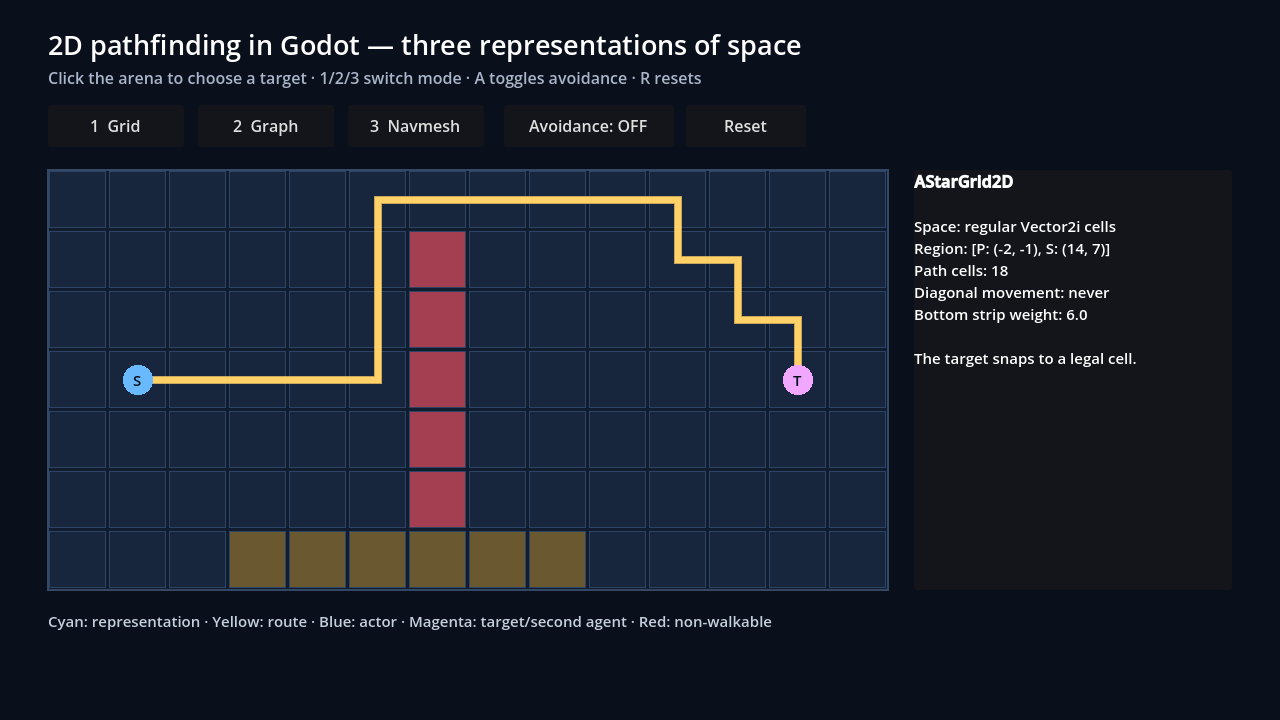
Switch between AStarGrid2D, an authored directional AStar2D graph, and NavigationServer2D polygon routing in the same arena. Click to change the target, then enable avoidance to see local steering without a global repath.
Loads only after launch. Requires WebAssembly and WebGL 2.
HTML transcript
- The scene opens in AStarGrid2D mode with regular Vector2i cells, a solid vertical wall, a weighted lower strip, and a route to the target.
- Buttons 1, 2, and 3 switch between the cell grid, six authored AStar2D points with a one-way edge, and continuous NavigationServer2D polygons.
- Clicking the arena snaps to a legal grid cell, selects the closest graph point, or normalizes the requested navmesh target to the map.
- In navmesh mode, A enables a second agent. Their safe velocities change locally while the displayed global route remains unchanged; R resets the current mode.
Fallback coverage
- The poster is a real Chromium capture of this exact Godot Web export.
- The downloadable source ZIP contains the standalone project, visible scene, controller, and headless verifier script.
- The source verification receipt records 15 passing checks, including a clean extracted-package rerun.
- The separate Web receipt binds the browser export hashes to that exact source ZIP and records the browser interaction smoke.
The three representations of space
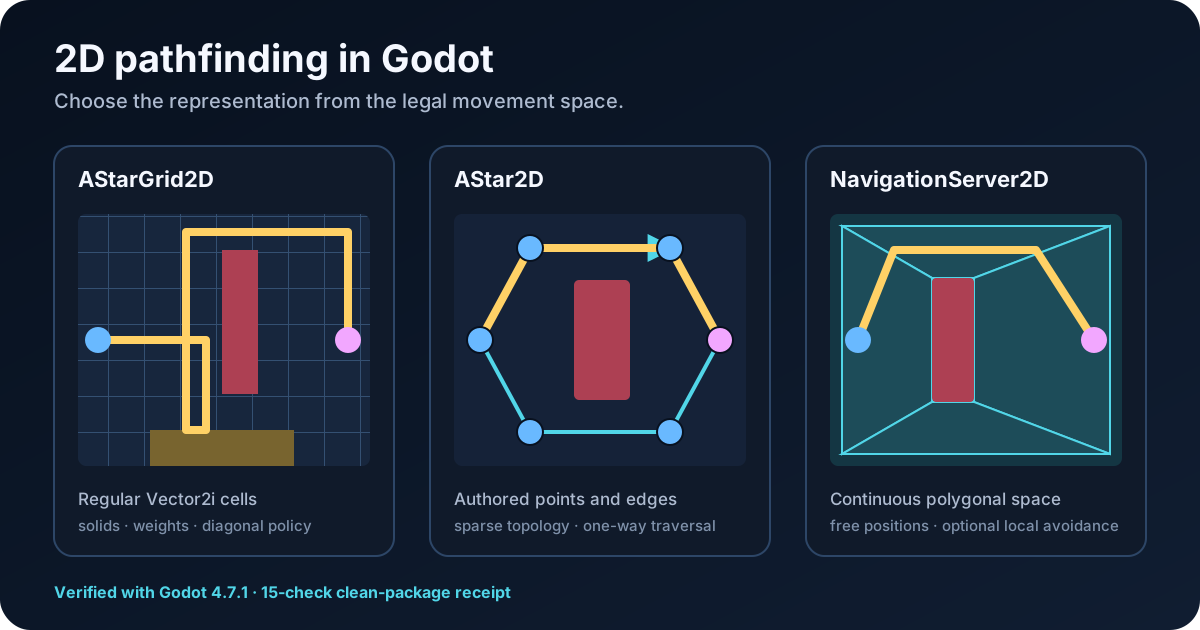
Godot has three practical built-in representations for ordinary 2D pathfinding. The useful difference is not the node name. It is where the actor is legally allowed to stand.
AStarGrid2D is a ready-made regular grid. Its cells are addressed with integer Vector2i IDs such as (12, 7). Godot creates the ordinary neighbour connections; you decide which cells are solid, what they cost, and whether diagonal movement is legal. It is not literally your game's two-dimensional array, and it does not read a TileMapLayer automatically.
AStar2D is a custom graph. You add points anywhere in 2D space, give them stable integer IDs, and connect the pairs that are legal. The points do not need to form rows, columns, or a complete surface.
NavigationServer2D works with navigation maps made from polygonal walkable regions. An actor can stand anywhere inside the valid area rather than only on a cell or waypoint. NavigationAgent2D is the scene-facing helper that follows those paths and can optionally participate in local avoidance.
If units must end on exact cells, do not start with a navmesh because it looks convenient in the editor. If they can stop anywhere in a room, do not turn the floor into ten thousand tiles just to give A* something to read.
The downloadable Godot 4.7.1 project runs all three approaches over one small arena. It is a correctness comparison, not a speed test.
Choose the movement model before the node
Pathfinding does not decide your movement rules. It answers a route query over rules you already encoded.
A tactical unit may occupy (12, 7), pay two action points to enter mud, and be forbidden from cutting a diagonal corner. Those are cell rules. They map cleanly to AStarGrid2D.
A train may travel from station A to station B but not stop in the field between them. A platform enemy may jump from one ledge marker to another only when a scripted traversal exists. Those are graph rules. They fit AStar2D.
A top-down character may stand at any pixel inside an irregular room and steer around another moving character. That is continuous walkable space. It fits a 2D navigation mesh. The grid-versus-navmesh guide owns the deeper production tradeoff.
Keep pathfinding, path following, and avoidance separate
These jobs are easy to blend together because NavigationAgent2D puts a friendly node around more than one of them.
AStarGrid2D.get_id_path() and AStar2D.get_point_path() return paths but move nothing. NavigationAgent2D also moves nothing by itself: read get_next_path_position() and move its parent body. A NavigationObstacle2D affects avoidance velocity, not the global path, unless it is deliberately used as bake input and the mesh is rebuilt.
A cyan line crossing a wall is a representation or query problem. A correct line with a stationary body is a movement-controller problem. A correct line with two bodies shoving each other into a doorway is an avoidance or crowd-resolution problem.
- Pathfinding: returns a route through the legal representation.
- Path following: moves a body toward the next point and decides when it has been reached.
- Avoidance: adjusts local velocity around nearby agents or obstacles.
The two-question decision tree
Start with the legal positions. Then ask whether a continuous-space actor also needs local real-time steering.
- Must actors occupy regular cells? Yes: use
AStarGrid2D. No: continue. - Can actors stand anywhere inside a continuous walkable area? Yes: use
NavigationServer2Dand optionallyNavigationAgent2D. No: if legal positions are authored points and connections, useAStar2D. - Do continuous-space actors need local real-time steering around each other? Enable avoidance only for the actors that need it. It does not replace the global route.
When to use the forgotten AStar2D
AStar2D is an explicit weighted graph in 2D space. It does not scan the scene, read collision shapes, or infer which waypoint connects to which. Add the points, connect the legal pairs, and keep those IDs stable if other game data refers to them.
It fails as a design choice when the graph is really a regular grid in disguise. Manually generating one point per tile and four or eight connections per point adds topology bookkeeping that AStarGrid2D already owns.
The verified fixture stores its graph points in the same world-space coordinate system used for clicks and drawing. A production scene can use local space instead; pick one boundary and keep it consistent. AStar2D does not know which one you meant.
This is also a better starting point for a 2D platformer than a flat navmesh when jumps, drops, ladders, and one-way ledges must become explicit edges with custom execution. The AStar2D complete reference covers weights, disabled points, partial paths, custom costs, and runtime topology audits.
- Patrol networks where guards move only between named posts.
- Subway or road graphs where stations and junctions matter.
- Room-to-room roguelike routing where the question is which door leads where.
- Platformer graphs with directed jumps, drops, ladders, and one-way ledges.
- Point-and-click movement constrained to authored waypoints. Free movement to any pixel in an irregular room is a navmesh case instead.
Performance bottlenecks and dynamic worlds
Do not reduce this comparison to “AStarGrid2D is C++ and navmesh is expensive.” That mixes a path query with a topology rebuild. The useful question is what work the game requests when the world changes.
For a tile-locked building game, a new wall usually maps to a few AStarGrid2D.set_point_solid() calls. Changing solidity or weight scale does not require another update(); structural properties such as region or cell_size do.
For AStar2D, disable a waypoint when the point itself is unavailable. Disconnect or reconnect an edge when the traversal between two still-valid points changes. The class cannot infer either rule from physics geometry.
For a navmesh, decide whether the blocker is soft or hard. Another moving actor is usually an avoidance concern. A closed door or player-built wall that must make the route illegal is navigation topology: change region or polygon data, or rebake the affected polygon. A background-thread bake still has parsing, baking, synchronization, and map-update cost.
The Navigation Process monitor covers navigation-server updates and avoidance, but Godot documents that it does not include path-query performance. Measure queries separately. The frame-spike guide owns budgets and profiler workflow; the runtime grid-update guide owns point edits versus structural rebuilds.
There is no honest universal “fastest” row. That requires equivalent maps, query sets, update patterns, agent counts, and measured builds.
- Path-query cost: query count and how much grid, graph, or mesh each request searches.
- Topology-update cost: solidity edits, connection edits, region changes, or rebakes.
- Path-following cost: controller work for each moving actor.
- Avoidance cost: per-frame work for registered avoidance agents and obstacles.
| Representation | When a hard wall appears | Main update cost |
|---|---|---|
AStarGrid2D | Mark the affected cells solid | Small explicit point edits; set_point_solid() does not require update() |
AStar2D | Disable points or disconnect affected edges | Proportional to the authored graph changes you make and later restore |
| Navmesh | Change region/polygon data or rebake when route legality changes | Geometry parsing, polygon baking, synchronization, and changed-region work |
| Navmesh avoidance | Publish agent or obstacle velocity for a temporary local detour | Per-frame avoidance work; the global path remains unchanged |
Summary matrix: the cheat sheet
Use this matrix as a starting point, not a permanent architecture. Hybrid systems are normal: a strategy game can use a room graph for long-distance planning, a grid for tactical legality, and local steering for the last few pixels.
| Representation | Legal positions | Best fit | Hard blocker | Avoidance | Common misuse |
|---|---|---|---|---|---|
AStarGrid2D | Regular Vector2i cells | Tile-locked tactics, roguelikes, tower defence, board movement | Mark affected cells solid | No | Rebuilding after every point edit or assuming it reads TileMapLayer |
AStar2D | Arbitrary points with authored edges | Patrols, roads, stations, room graphs, directed platformer traversal | Disable points or reconnect edges | No | Generating a dense regular grid by hand |
NavigationServer2D + NavigationAgent2D | Continuous positions inside polygonal regions | Free top-down movement and irregular rooms | Change region/polygon data or rebake | Optional RVO through the agent | Expecting the agent to move its parent or avoidance obstacles to repath |
Build the AStarGrid2D version
Use AStarGrid2D when the board itself is a grid and cell identity matters. Godot creates the points and ordinary neighbour connections; you declare the region, diagonal policy, solid cells, and weights.
Configure the grid shape, call update(), then apply solids and weights. A structural rebuild clears point solidity and weights, so replay those layers after a dirty update.
The proof deliberately starts its grid at (-2, -1). The unweighted route uses the lower opening; a weight of 6 on the lower strip moves the verified route to the upper opening.
Adapt the grid to TileMapLayer data
The TileMapLayer and AStarGrid2D are separate structures. Painting a wall does not automatically make a point solid. Copy one explicit rule such as a walkable custom-data flag into the query grid after update().
The full TileMapLayer-to-AStarGrid2D guide owns negative origins, custom data, runtime updates, and failure cases. The AStarGrid2D reference owns heuristics, diagonals, jumping, and partial paths.
Convert coordinates at one boundary
get_id_path() expects grid IDs. Your actor and mouse use world positions. Put both conversions in named helpers instead of scattering arithmetic through the controller.
This preserves a negative get_used_rect() origin. Normalizing every tile coordinate to zero is optional bookkeeping, not an AStarGrid2D requirement.
Normalize the target, then move the parent yourself
A click may land outside the navigation polygon. Clamp it to the map, assign it only when the target changes, and keep get_next_path_position() in _physics_process().
Setting target_position does not move the body. Your controller still owns velocity, acceleration, collision response, animation, and stopping distance.
Do not call path-update methods from waypoint_reached or another agent callback. The class reference warns that this can trigger recalculation and recurse. The physics step is the boring place that works. The NavigationAgent2D setup guide goes deeper on reachability, jitter, and distance tuning.
Avoidance is optional, and it is not repathing
Enable avoidance only when the actor needs local steering around other avoidance agents or obstacles. It adds work and another movement contract.
With avoidance enabled, send desired velocity to the agent and move the body with the velocity_computed result.
NavigationObstacle2D does not make the agent calculate a different global path. It constrains avoidance velocity. If a closed door or tower must make a route illegal, mark grid cells solid, change graph connections, or update navmesh/region data. The avoidance-versus-pathfinding guide owns that distinction.
Common symptoms and the first thing to inspect
For a longer empty-path investigation, use the Godot no-path report guide or the runtime navigation debug panel.
| Symptom | Check first |
|---|---|
| The grid path ignores painted walls | Verify TileMapLayer data was copied into set_point_solid() after update() |
| Grid paths are shifted by one tile | Print the world → local → map conversion and used rect |
| AStar2D takes an impossible shortcut | Audit authored connections and bidirectional flags |
| AStar2D chooses the wrong nearby waypoint | Inspect coordinate space and IDs returned by get_closest_point() |
| The first navmesh path is empty | Wait for synchronization and confirm a region has usable polygon data |
| The path exists but the body does not move | Move CharacterBody2D yourself from the next path position |
| The body catches on walls | Compare collision size with baked polygon clearance |
| A moving obstacle is avoided but the route line is unchanged | Expected: avoidance changes velocity, not the global route |
| Many actors cause spikes | Measure query count, map detail, repath frequency, avoidance count, and duplicate work |
When the built-ins stop being the whole answer
The built-in classes are enough for many games. You need another layer when the game asks for rules the representation does not own.
Do not replace a built-in because a first tutorial was awkward. Replace or wrap it when the game rule is clear and the missing contract has a name.
This article is part of the maintained Game Pathfinding guide, which routes deeper grid, graph, navmesh, tactical, crowd, and diagnostic questions to their dedicated pages.
- Multiple footprint sizes over one grid.
- Scheduled query budgets across large crowds.
- Hierarchical planning over very large worlds.
- Deterministic reservations for simultaneous turns.
- Shared flow fields or Dijkstra maps.
- Structured failure reports instead of empty arrays.
- Runtime topology edits with explicit ownership and replay.
Run the verified three-mode starter
The lazy-loaded browser export above runs the same three-mode scene without requiring the editor. It is an interaction proof, not a replacement for the downloadable project or its headless verifier.
The downloadable project puts all three representations in one Godot 4.7.1 scene. Grid mode snaps to valid cell centres. Graph mode follows six authored points and exposes the one-way 1 → 2 edge. Navmesh mode accepts any reachable point inside the polygon. The avoidance toggle adds a second agent and shows safe-velocity adjustment without changing the fixed global route.
Download the source ZIP and inspect its machine-readable verification receipt. The ZIP contains the visible scene, its controller, a standalone project.godot, and the headless verifier.
The receipt reports 15 passes on Godot 4.7.1: negative-origin conversion, valid solid and weighted routing, directional graph routing, explicit invalid-target diagnosis, synchronized navmesh queries, endpoint normalization, parent movement, avoidance behavior, scene smoke, and the extracted-package rerun.
The final ZIP is 11,188 bytes with SHA-256 8ff236be11cf03bd0f4d24b4cd98da99aafd72a74007776f118324b0058877d7. Measurement-gap: this verifies representation and behavior. It does not compare throughput or claim that one stack is universally faster.
Frequently asked questions
What should I use for 2D pathfinding in Godot?
Use AStarGrid2D for regular tile or cell movement, AStar2D for authored waypoints and connections, and NavigationServer2D with NavigationAgent2D for free movement inside continuous polygonal areas.
Is AStarGrid2D better than NavigationAgent2D?
They solve different layers. AStarGrid2D finds routes through regular cells. NavigationAgent2D consumes a navigation map and helps one actor follow a continuous path, with optional avoidance. Choose the representation before comparing helpers.
Does NavigationAgent2D move the character automatically?
No. Read get_next_path_position(), calculate velocity, and move the CharacterBody2D yourself. With avoidance enabled, submit desired velocity and move with the velocity_computed result.
Can AStarGrid2D read a TileMapLayer automatically?
No. Read the TileMapLayer used rect and tile custom data, configure the grid, call update(), then apply solid cells and weights explicitly. Build the TileMapLayer bridge.
When should I use AStar2D instead of AStarGrid2D?
Use AStar2D when legal positions form a sparse authored network such as patrol nodes, roads, stations, room connections, or directed platformer traversals. Do not manually recreate a dense regular grid with it.
Does NavigationObstacle2D block pathfinding?
Not when used only for runtime avoidance. It changes safe velocity, not the global route. A hard blocker must change the navigation mesh or region data, or be represented in the grid or graph topology. Compare avoidance with pathfinding.
Should a 2D platformer use NavigationAgent2D?
Usually not as the whole solution. Gravity, jumps, drops, ladders, and one-way ledges are directed traversal actions. An authored AStar2D graph or custom traversal graph represents them more explicitly.