
Godot pathfinding / 2026-06-08 / 8 min read
Verified as of Godot 4.6 / PathForge development build
Pathfinding failure modes in Godot: why no path is not enough
When Godot returns an empty path, ask which assumption failed: start, goal, blocker, clearance, terrain rule, stale data, or disconnected region.
The direct answer
Godot returns an empty path when a path query is impossible, invalid, or run against navigation data that has not synchronized yet, not only when no route exists.
When Godot pathfinding returns an empty path, the useful question is not simply "why no path?" The useful question is: which Godot system returned no path, under which assumptions, and which cheap facts were not checked before the query?
For AStarGrid2D, an empty result usually means a grid request failed: a solid start, invalid goal, solid goal, missing update() after grid parameter changes, clearance mismatch, terrain rule, or disconnected walkable component. For NavigationServer2D or NavigationAgent2D, the same symptom may mean the NavigationServer map has not synchronized yet, a region or navigation layer update is pending, the target was projected onto an unexpected region, or an obstacle was treated as a path blocker when it only affects avoidance rather than pathfinding.
That is why no path is not enough. A production navigation workflow should return the failed assumption: ASTARGRID_START_SOLID, GOAL_SOLID, INSUFFICIENT_CLEARANCE, UNSYNCED_NAVIGATION_MAP, REGION_BAKE_MISSING, NAVIGATION_LAYER_MISMATCH, or DISCONNECTED_REGION.
Empty path is a result, not a diagnosis
An empty path array is technically useful. It tells the caller not to move. It does not tell the developer whether the query was impossible, malformed, unsynchronized, or using the wrong movement model for the game.
This is where many Godot projects lose time. The bug report may say AStarGrid2D empty path, get_id_path returns empty array, get_point_path returns empty array, or Godot NavigationAgent empty path, but those phrases still describe a symptom. A blocked start, a target outside the grid, a closed door, a 3x3 unit trying to enter a 1-cell corridor, and a NavigationServer map with no synced iteration can all look like no path from the outside. When the map has a route but the agent body still looks stuck, use NavigationAgent2D setup and common gotchas instead.
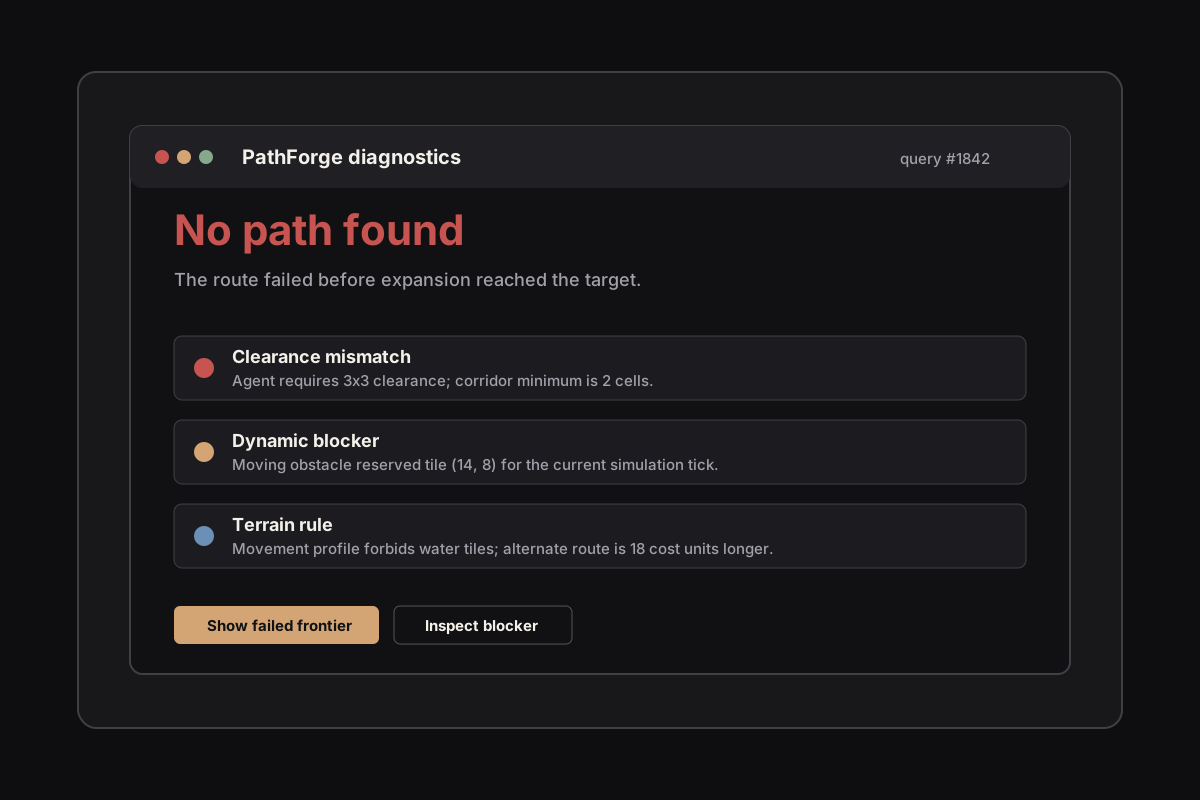
A useful debug layer turns one symptom into named failure modes. That is also the job of the PathForge Failure-Mode Museum: keep the common cases explicit enough that each article, demo scene, and runtime navigation debug panel can point to the same vocabulary. From the article body, use the live visual cases when you need to see a reason code instead of just naming it.
The failure modes worth naming first
Start with the failures that can be checked before or immediately after a query. They are not glamorous, which is exactly why they should be automated.
AStarGrid2D start solid: if the start point is solid, get_id_path() and get_point_path() can return an empty array even when start and goal are the same point. This is the solid-start failure that deserves a name before anyone starts rewriting the solver.
AStarGrid2D API mix-up: if you are coming from AStar2D, do not look for is_point_disabled() or set_point_disabled() on AStarGrid2D. In AStarGrid2D, the matching API is is_point_solid() / set_point_solid(). The concept is the same for diagnostics, but the class vocabulary is different.
Goal invalid or solid: the target may be outside the grid, on a solid cell, in forbidden terrain, or on the wrong navigation layer. This is not a search failure; it is a request that should have been rejected before search.
Grid state not updated: AStarGrid2D.update() is required after changing grid parameters such as region, cell_size, or offset. Point solidity and weight changes do not need update(), but changing the grid shape does. A diagnostic should distinguish dirty grid parameters from no connected route.
Unsynced NavigationServer map: in NavigationServer workflows, an empty path can mean the map has not synchronized yet. On the first frame, or immediately after region, map, agent, or navigation-layer changes, the navigation map may not represent the scene state you think it represents.
Missing or unbaked navigation region: after the map has synchronized, an empty region set is a different failure from not synced yet. A NavigationRegion2D may be missing, disabled, assigned to the wrong map, or not backed by a usable NavigationPolygon.
Avoidance mistaken for pathfinding: a NavigationObstacle2D can affect navigation mesh baking or constrain avoidance velocities. It does not, by itself, make a live path query route around a runtime blocker.
A tiny diagnostic contract
The first version does not need a complex UI. It needs a contract: every failed query should return a reason code, the Godot system that produced it, the cell or region involved, the movement profile used for the query, and any sync or metadata facts that explain the result.
For the newer 8-field JSON and Markdown wrapper around this vocabulary, use Godot no-path reports. This page remains the failure-mode taxonomy owner.
The snippet below is an illustrative sketch, not a drop-in addon script. Helper functions such as report(), agents_near(), and invalidate_path() belong to the surrounding project.
Check the cheap facts before search
A pathfinder should not spend time proving a query is impossible when the impossible part is visible in constant time. Validate the start, validate the goal, validate the movement profile, validate sync state, and only then run the actual search.
A failed query is not only a debugging problem. It can also be a performance problem. Reachable targets often exit early; unreachable targets may force the search to explore far more of the navigation graph. Godot's AStarGrid2D docs specifically warn that allow_partial_path with a solid target can take unusually long.
In a local 64x64 Godot 4.6.2 micro-benchmark on Windows with an AMD Ryzen 5 2600X, validating and rejecting a GOAL_SOLID request before search averaged 7.31 usec. A raw AStarGrid2D.get_id_path(start, solid_goal, allow_partial_path=true) query averaged 381.34 usec in the same capture, about 52x slower.
The same benchmark recorded 161.02 usec for a disconnected-region diagnosis and 3.94 usec for a NavigationServer2D unsynced-map guard. These are narrow scene measurements, not broad PathForge performance claims, but they show why cheap facts belong before search.
Use path metadata as raw diagnostic material
Godot already exposes lower-level path query metadata for NavigationServer workflows: region and link types, RIDs, and owners. That is not yet a user-facing diagnosis, but it is the raw material for one.
A production workflow should turn those IDs into messages like path stops at locked DoorRegion_03 or target projected onto a region excluded by this movement profile.
Make clearance failures visible
Multi-size agents are one of the easiest places to misread a path failure. The map may genuinely contain a corridor from start to goal, and a smaller unit may use it successfully. The large unit fails because the corridor is too narrow; this is a clearance map problem, not because pathfinding is broken.
Either way, a clearance failure should name the bottleneck cell. The developer should not have to inspect every wall by hand.
Dynamic blockers should identify themselves
Dynamic blockers are another place where a blank result hides the useful fact. If a tower, door, unit reservation, or destructible wall changed the grid, the failed query should be able to point at the change that mattered.
This requires bookkeeping: blocker id, changed cell, changed layer, affected movement profiles, and which cached paths or connected regions were invalidated. The concrete tower-defense version is validate the placement before committing the blocker.
Current evidence
This article now has a runnable Godot 4.6 mini project attached as a SoftwareSourceCode validation asset. The scene demonstrates the shared failure-reason vocabulary for AStarGrid2D and NavigationServer2D cases, and the embedded clip is a real capture from the PathForge for Godot development diagnostics workspace.
The attached Dataset is intentionally narrow: a local diagnostic micro-benchmark for this development diagnostics scene, not a product-wide PathForge performance benchmark. Broader performance claims should wait for dedicated benchmark scenes and repeated measurements. The same capture, the candidate larger scenes, and the measurement policy live in the PathForge benchmark lab.
The production habit
The useful habit is small: every path failure gets a name, a location, the Godot system that returned it, and the rule that made it fail. Once that exists, the UI can be plain, the first scene can be simple, and the debugging value is still obvious.
That is the line between a pathfinder and a navigation workflow. A pathfinder returns a result. A workflow helps a tired developer understand why the result is correct, unsynchronized, impossible, or caused by a rule they forgot was active.
Frequently asked questions
Why does Godot pathfinding return an empty path?
Usually because the start or goal is invalid, a solid point blocks the request, a blocker changed the map, the requested agent does not have enough clearance, the terrain rules forbid the route, the NavigationServer map has not synchronized, the navigation layers do not match, or the endpoints are in disconnected regions.
Why does AStarGrid2D.get_id_path() return an empty array?
In Godot 4.6, get_id_path() can return an empty array when the start point is solid or when no valid route exists. Check the start cell, goal cell, bounds, solid flags, dirty grid parameters, and allow_partial_path behavior before treating it as a solver bug.
Why does AStarGrid2D.get_point_path() return an empty array?
get_point_path() follows the same underlying AStarGrid2D request constraints as get_id_path(). If the start is solid, the goal is invalid or solid, the grid parameters are dirty, or the endpoints are disconnected, get_point_path() can also return an empty array.
Can NavigationObstacle2D block pathfinding?
Not as a live pathfinding blocker by itself. NavigationObstacle2D can affect navigation mesh baking when configured for baking, and it can constrain avoidance velocities for avoidance-enabled agents. Runtime path connectivity still belongs to the navigation mesh, map/region data, or your own grid/blocker model.
Do I need a benchmark for a diagnostics article?
Not for the diagnostic taxonomy itself. This article includes a narrow local micro-benchmark for the attached development diagnostics scene; broader PathForge performance claims should wait for dedicated measured benchmark scenes.