
Godot pathfinding / 2026-07-17 / 15 min read
Updated 2026-08-24 · Verified as of Godot 4.7.1 stable
3D Pathfinding in Godot 4: Navmesh, Agents, and When You Need A*
Set up 3D pathfinding in Godot 4 with NavigationRegion3D, NavigationAgent3D, click-to-move, navmesh baking, and the AStar3D decision.
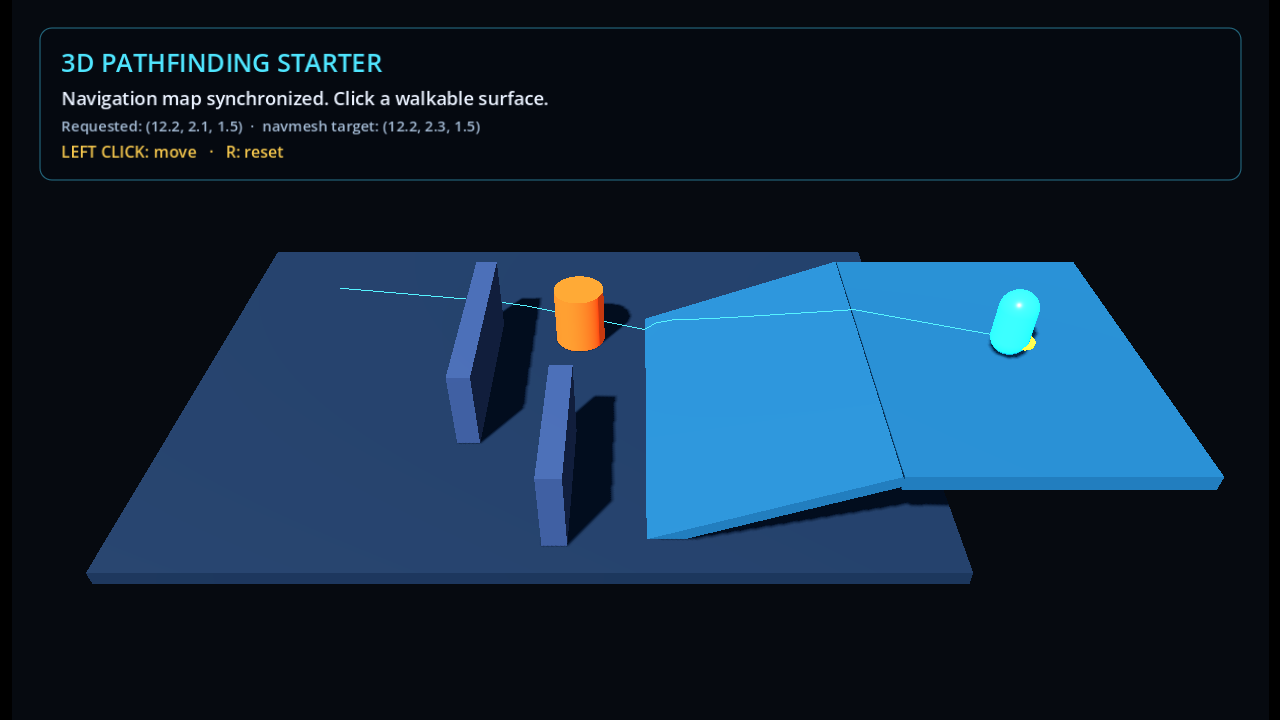
Runnable Godot 4.7.1 scene
Try the baked 3D navigation scene
Click a walkable surface to move the capsule. The cyan line is the navmesh path; the orange obstacle changes local steering without rebuilding that path.
Loads only after launch. Requires WebAssembly and WebGL 2.
HTML transcript
- The authored scene opens with a capsule on the lower floor and a target on the upper platform.
- A cyan line shows the baked navigation path across the level and up the ramp.
- Left click chooses another world-space target and clamps it to the closest navmesh point.
- The orange obstacle supplies velocity for local avoidance; the cyan path remains unchanged.
Fallback coverage
- The poster is a real Chromium capture of the exact Godot Web export.
- The source ZIP contains the editor-visible scene, saved navmesh, and tutorial scripts.
- The visible article includes the same target, movement, grounding, and avoidance code.
- The source and Web receipts bind the clean project package and browser export separately.
The direct answer
For a grounded character moving across floors, ramps, stairs, and bridges in Godot 4, bake a NavigationMesh inside a NavigationRegion3D. Add a NavigationAgent3D to the character, assign target_position, call get_next_path_position() once per physics frame, and move the parent CharacterBody3D yourself.
Use AStar3D when movement is constrained to explicit points: voxel cells, stacked tile positions, waypoints, or a coarse lattice in open space. A GridMap can store those cells, but it doesn't create or connect the AStar3D graph for you.
This tutorial builds the first case. The downloadable scene has an authored floor, walls, a real ramp, an upper platform, click-to-move, a visible path, and one moving avoidance obstacle. It was tested as a physics scene, not just as a path query.
| Your movement space | Use |
|---|---|
| Grounded movement over authored 3D geometry | NavigationMesh + NavigationAgent3D |
| Voxels, tiles, waypoints, or other predefined 3D positions | An explicit AStar3D point graph |
| Fully volumetric flight or swimming | An explicit 3D graph or a purpose-built volumetric solution |
Build the starter in this order
The scene tree is ordinary on purpose. Everything in it is authored before Play. The scripts handle targets, movement, the changing path line, and reset state.
| Step | Add | Working result |
|---|---|---|
| 1 | NavigationRegion3D and authored level geometry | The floor, ramp, upper platform, and walls are visible in the editor. |
| 2 | A NavigationMesh resource | The level has a saved baked walkable surface. |
| 3 | CharacterBody3D with NavigationAgent3D | A grounded body can follow one target across the ramp. |
| 4 | Physics-step mouse raycast | Left click produces a world-space target. |
| 5 | Closest-point normalization and path line | The target is clamped to the navmesh and the route is visible. |
| 6 | Optional avoidance obstacle | Local steering reacts to motion without changing the global path. |
Keep the three radii separate
Three settings can all look like "the agent radius" in an inspector pass. They don't do the same job.
The bake radius should cover the physical body with a small margin. The avoidance radius can be a little wider because it controls preferred spacing, not doorway legality.
If the mesh was baked for a smaller body than the collision capsule, the path can pass a corner that physics can't. If the bake radius is too large, narrow doors disappear from the navmesh entirely. Debug the baked surface and the collision shape together.
| Setting | Starter value | Owner |
|---|---|---|
CapsuleShape3D.radius | 0.48 | Physics collision |
NavigationMesh.agent_radius | 0.50 | Bake-time wall and ledge clearance |
NavigationAgent3D.radius | 0.55 | Local avoidance only |
Raycast the click during the physics step
Mouse input arrives outside the physics callback, but direct_space_state is meant to be queried during physics processing. Store the screen position, then consume it in _physics_process().
The ray query uses the level's collision layer and excludes the player.
Move the CharacterBody3D yourself
NavigationAgent3D computes path information. It doesn't move the parent body. The controller asks for one next point, flattens the steering direction onto the grounded plane, applies acceleration, and moves with move_and_slide().
Keep get_next_path_position() in the physics loop. Calling it from signals such as waypoint_reached can retrigger path updates and recurse.
Tune the grounded execution, not only the path
The grounded details matter. floor_snap_length, gravity, and the body's maximum floor angle must agree with the physical ramp. The first artifact version had a valid navmesh route that entered the vertical side of a ramp collider. The path was mathematically fine; the body couldn't execute it. Making both ramp transitions physically flush fixed the real scene.
The other useful tuning result was path_desired_distance = 0.65. With a smaller value, this accelerated body passed too far around a waypoint and kept correcting toward it. Set the distance from the controller's speed, acceleration, and stopping behavior instead of copying one universal number.
Avoidance changes velocity, not the path
The orange cylinder is a NavigationObstacle3D. It moves every physics frame and publishes the velocity that the avoidance server needs for prediction.
The cyan path stays unchanged while the body steers locally. That's expected. Avoidance doesn't rebake the navmesh, choose a new route, or understand the physics collider.
Drive the body with the safe velocity
The player sends its desired horizontal velocity through agent.velocity. The velocity_computed signal returns a locally safer velocity.
Avoidance can still trap an agent against a wall when a moving obstacle is placed in a narrow passage. Use a real navigation change when the object must make the route illegal. The avoidance-versus-pathfinding guide owns that larger decision.
When you actually need AStar3D
Use AStar3D when the legal positions and edges are explicit game data.
AStar3D doesn't inspect a GridMap and discover the graph. Add each point, connect the legal pairs, disable or reconnect points when the world changes, and move the actor according to the returned point path.
For a small engine-independent grid baseline, the Godot and Unity A* starter projects show the search and movement pieces separately. They use 2D cells, but the graph ownership is the same. This article doesn't stretch that example into a volumetric tutorial it hasn't built.
- A voxel world where each block position can be occupied or disabled.
- A dungeon made from stacked tile layers.
- Fixed 3D waypoints with one-way or authored connections.
- A flying or swimming lattice with discrete neighbors.
- Turn-based 3D movement with exact per-node costs.
Run the verified starter
The prepared download contains the exact authored scene and scripts shown in this article. Download the Godot 4.7.1 source project, then inspect the machine-readable verification receipt beside it.
The receipt records the exact ZIP hash, source-file hashes, the 20 workspace checks, a clean extracted-project import, and the final package rerun: 21 named checks in total.
Measurement-gap: the proof covers the authored scene, saved bake, connected upper-platform route, grounded ramp traversal, target clamping, visible path, and avoidance wiring. It doesn't claim a crowd benchmark, runtime rebaking performance, or a general solution for volumetric movement.
This page is part of the maintained Game Pathfinding guide, which routes grid, graph, navmesh, shared-field, tactical, and diagnostic questions to the page that owns each implementation.
Frequently asked questions
Does Godot have built-in 3D pathfinding?
Yes. NavigationServer3D finds paths over navigation maps built from baked navigation meshes. NavigationRegion3D holds a region's mesh, while NavigationAgent3D provides a scene-facing path and avoidance helper. You can use the system from GDScript or C# without an add-on.
Should I use a navmesh or AStar3D for a 3D game?
Use a navmesh for grounded movement across continuous authored geometry. Use AStar3D when movement is limited to predefined points such as voxels, waypoints, stacked tiles, or a 3D lattice. Fully volumetric movement still needs a graph or another volume-aware representation.
Why does NavigationAgent3D return an empty path on the first frame?
The navigation map may not have synchronized its region data yet. Defer the first target and wait for at least one physics frame. If setup is more dynamic, also verify that the map has a registered region and usable navigation data before sending the query.
Does NavigationAgent3D move the CharacterBody3D automatically?
No. The agent returns path positions and, when enabled, a safe avoidance velocity. Your controller still updates velocity, applies gravity and floor rules, and calls move_and_slide().
Why does my 3D character get stuck on corners or ramps?
For corners and doorways, compare the physical collision radius with the navmesh bake radius. For ramps, inspect the collider transition as well as the baked overlay. A valid path can still approach a vertical lip or side face that the physics body can't climb.
Does NavigationObstacle3D make the agent find another path?
No. Avoidance changes local velocity; it doesn't alter the navigation path. Use changed navigation data, a link rule, or another route-validity mechanism when an obstacle must make a corridor unavailable. Compare avoidance with pathfinding.