
Game pathfinding / 2026-07-16 / 16 min read
Verified as of Godot 4.7.1 · Unity 6000.5.1f1
A* Pathfinding in Godot and Unity: Free Starter Projects
Download MIT-licensed A* grid pathfinding projects for Godot GDScript, Godot C#, and Unity C#, with authored scenes and verified source.
Complete source projects
Download the project that matches your editor
Each ZIP is free, MIT-licensed, and opens to an authored scene before Play. The receipt beside it records the exact source hashes and ten public checks.
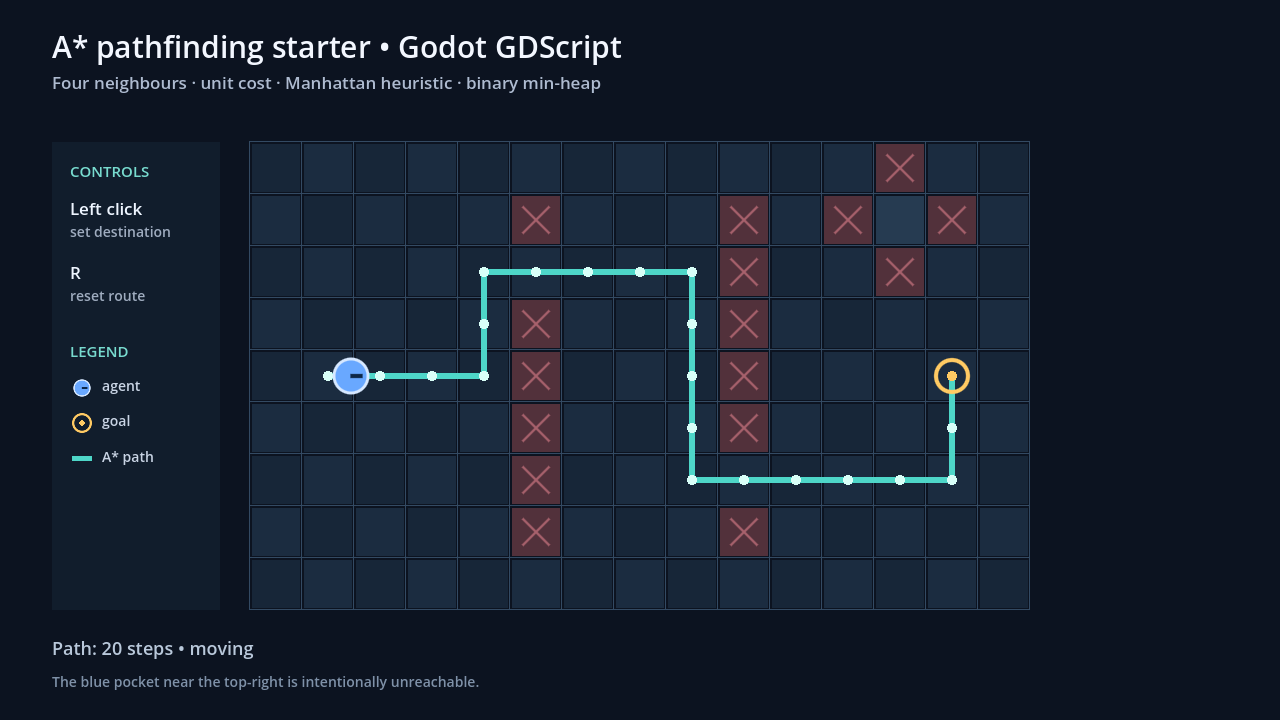
Godot Standard
Godot GDScript
A complete GDScript example project with an authored editor-visible scene, stable heap-based A*, click-to-move input, reset, and a deliberate no-path target.
- Requirement
- Godot 4.7.1 Standard
- Open
res://scenes/articles/astar_starter_gdscript.tscn- Download
- 12.5 KB ZIP
- License
- MIT
Quick start
- Open project.godot in the Standard editor.
- Run the authored main scene and click an open cell.
- Edit the Board node or astar_grid.gd to make the first change.
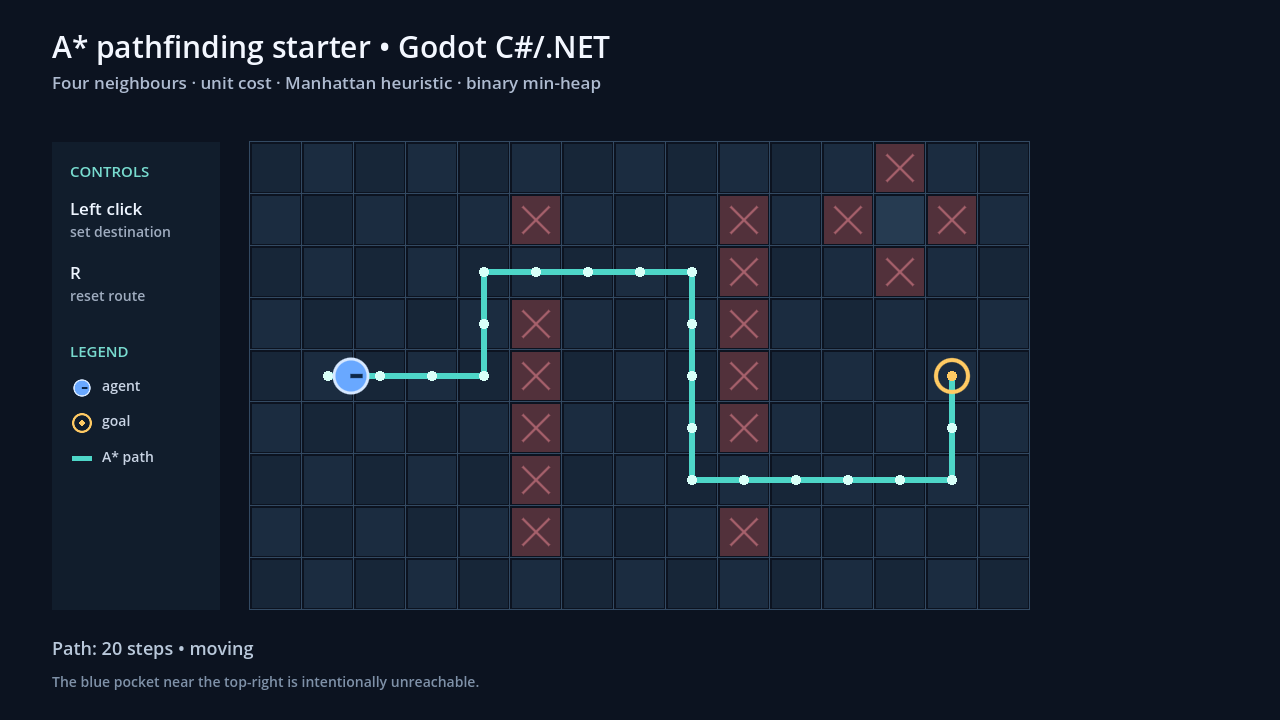
Godot .NET
Godot C#/.NET
The same practical grid contract in C#, with an authored scene, a separate pure-search class, click-to-move input, reset, and the visible no-path case.
- Requirement
- Godot 4.7.1 .NET · .NET SDK 8+
- Open
res://scenes/AStarStarterCSharp.tscn- Download
- 14.0 KB ZIP
- License
- MIT
Quick start
- Open project.godot in the Godot .NET editor.
- Restore/build, run the authored scene, and click an open cell.
- Edit the Board node or Scripts/AStarGrid.cs.
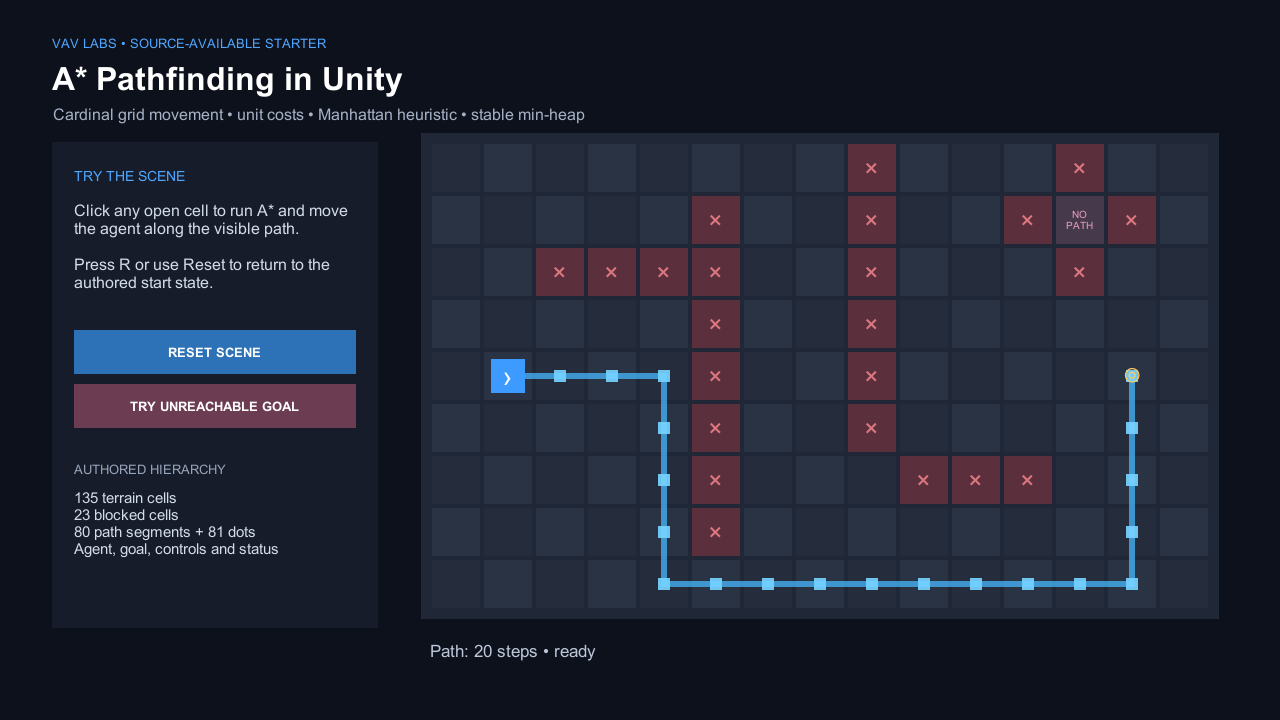
Unity project
Unity C#
A small Unity C# grid pathfinding source project with serialized terrain and route objects, a moving agent, click input, reset, and an unreachable target.
- Requirement
- Unity 6000.5.1f1
- Open
Assets/AStarStarter/Scenes/AStarStarterUnity.unity- Download
- 74.2 KB ZIP
- License
- MIT
Quick start
- Open the extracted folder as a Unity project.
- Open the authored scene, press Play, and click an open cell.
- Edit the controller Inspector fields or Runtime/AStarGrid.cs.
Interactive GDScript proof
Run the A* starter scene in your browser
Launch the exact Godot GDScript scene behind the first download. Click an open cell to calculate a new route, click the isolated blue pocket near the top-right to see the no-path state, and press R to reset. The 7.1 MB Brotli WebAssembly payload loads only after you choose to run it.
Loads only after launch. Requires WebAssembly and WebGL 2.
HTML transcript
- The scene starts with an agent at cell (1, 4), a destination at (13, 4), and a visible 20-step cardinal route around the blocked cells.
- Clicking a walkable grid cell recalculates the A* route and moves the agent along the returned cell anchors.
- The blue cell at (12, 1) is isolated. Selecting it clears the route and shows the visible message “No path to (12, 1)”.
- Pressing R restores the original start, destination, and route.
Fallback coverage
- The poster preserves the complete initial state when WebAssembly or WebGL 2 is unavailable.
- The source ZIP contains the authored scene, GDScript search, controller, README, verifier, and MIT license.
- The machine-readable Web receipt binds the export hashes to the exact downloadable source ZIP.
The direct answer
Use the GDScript download with the Standard Godot editor, the Godot C# download with the .NET editor, or the Unity C# download for an explicit Unity grid. Each free MIT-licensed project opens to a real authored scene with blocked terrain, a visible A* route, one destination, and an agent that follows the returned cells.
No plugin, account, or installer is required. Extract the ZIP, open the listed scene, press Play, and click another open cell. The blue pocket near the top-right exercises the deliberate no-path branch; the source and Inspector fields remain available for the first change.
What the three downloads give you
All three projects use a 15 × 9 grid with the same recognizable wall layout, start cell, default destination, and isolated no-path cell. The scene APIs and coordinate conversions are native to each engine. Exact source structure and exact route tie-breaking do not need to match.
- Walkable and blocked terrain.
- One agent and one destination marker.
- A visible route drawn over the grid.
- Click-to-change destination input.
- Movement along the returned cell anchors.
- Reset without reopening the project.
- An intentionally unreachable target.
- A verifier that checks both the pure search and the runnable scene.
- A README and an MIT license inside the ZIP.
What to change first
Start with the authored scene and its controller before changing the search. A different terrain layout should not require rewriting the heap, and a different path color should not change path legality.
| You want to change | Godot GDScript | Godot C#/.NET | Unity C# |
|---|---|---|---|
| Grid size and blocked cells | astar_starter_gdscript.tscn → Board Inspector | AStarStarterCSharp.tscn → Board Inspector | AStarStarterUnity.unity → controller Inspector |
| The A* search | scripts/articles/astar_starter/astar_grid.gd | Scripts/AStarGrid.cs | Assets/AStarStarter/Runtime/AStarGrid.cs |
| Start, goal, input, or movement | scripts/articles/astar_starter/astar_starter_gdscript.gd | Scripts/AStarStarterController.cs | Assets/AStarStarter/Runtime/AStarStarterController.cs |
| Agent speed | AGENT_SPEED in the scene controller | AgentSpeed in the scene controller | agentSpeed in the controller Inspector |
| Path appearance | PathLine and PathDots nodes | PathLine and PathDots nodes | Authored path segments and path dots in the scene |
The A* baseline used by the downloads
The grid gives every legal cardinal step a cost of 1. The heuristic is Manhattan distance: abs(goal.x - cell.x) + abs(goal.y - cell.y). The stable binary min-heap orders frontier entries by known path cost plus estimated remaining cost.
For each improved neighbor, the search records the new cost and its parent. When the goal is popped, following those parents back to the start produces the cell path. An invalid, blocked, or unreachable endpoint returns an empty path.
This baseline is intentionally plain. It gives you one complete loop to modify without introducing terrain weights, diagonals, smoothing, or engine navigation services at the same time.
Every code block below is copied from the exact hash-bound file in its download, with only the surrounding class or function indentation removed.
A* pathfinding in Godot with GDScript
Open project.godot with the Standard Godot 4.7.1 editor. The project starts at res://scenes/articles/astar_starter_gdscript.tscn. The authored hierarchy contains separate Board, PathLine, PathDots, Agent, Goal, and UI nodes. Small @tool renderers keep the board, route, and markers visible in the 2D editor before the game runs.
The scene controller converts the click to a grid cell, calls AStarGrid.find_path(), updates the existing path nodes, and advances the agent from one returned anchor to the next. Press R to restore the initial route. Clicking the blue pocket near the top-right produces the visible no-path state.
The machine-readable receipt records Godot 4.7.1-stable, the source hashes, nine workspace checks, the scene smoke, and the extracted-package rerun that becomes the tenth public check.
A* pathfinding in Godot with C# and .NET
Use the Godot 4.7.1 .NET editor, not the Standard-only build. The project targets net8.0; restore and build it with an installed .NET SDK 8 or later, then open res://scenes/AStarStarterCSharp.tscn.
The .tscn is fully authored. Its [Tool] board and marker scripts keep the scene readable in the 2D editor, while runtime state stays in AStarStarterController.cs. The pure search is in Scripts/AStarGrid.cs.
The verifier restored and built the project with zero warnings and zero errors, then loaded the real scene through the Godot .NET editor. The receipt also records the net8.0 target and a green movement/no-path scene smoke.
Godot 4 C# projects do not support Web export. Choose the GDScript starter if a browser build is part of your next step.
A* pathfinding in Unity with C#
Open the source project with Unity 6000.5.1f1, then open Assets/AStarStarter/Scenes/AStarStarterUnity.unity.
The Unity scene is serialized before Play. Its hierarchy contains 135 terrain cells, 23 blocked cells, 80 reusable path segments, 81 path dots, an agent, the destination, controls, and status UI. The runtime updates those existing objects; it does not create the base demonstration after you press Play.
Press Play and click any open cell. TRY UNREACHABLE GOAL exercises the empty-path branch; RESET SCENE or R restores the initial state.
The PlayMode suite contains eight synchronous search checks and one real-scene test. The clean extracted ZIP repeated the same suite. The receipt records all ten public checks and the final scene hash.
Add the next pathfinding feature
The projects stop at a four-neighbor, unit-cost baseline. Choose the next guide from the gameplay rule you need to add, not from the name of another algorithm.
| Next requirement | What changes | Continue with |
|---|---|---|
| Roads, mud, danger, or unit-specific terrain | Replace unit step cost with a documented entry-cost policy. | Weighted terrain pathfinding |
| TileMapLayer or Unity Tilemap data | Import bounds and walkability into the pure grid boundary. | TileMap to navigation grid |
| Doors and runtime blockers | Give blocker state one source of truth and an invalidation policy. | Runtime grid updates |
| Large or multi-cell units | Test clearance and footprint legality, not only the anchor cell. | Clearance maps · footprint execution |
| Many agents sharing one destination | Reverse the query and reuse one shared field. | Flow fields in Godot |
| An empty path with no diagnosis | Separate invalid endpoints, blocked endpoints, and disconnected space. | Path failure guide |
| A different navigation model | Choose among a grid, graph, navmesh, or shared field. | Game pathfinding start page |
What the verification proves
The receipts do not establish performance, engine ranking, code-size superiority, exact output parity, or suitability for every project.
Measurement-gap: these starter projects publish correctness and authored-scene checks, not a cross-engine performance benchmark. Runtime speed depends on the graph, workload, engine integration, and the changes you make after download.
| Project | Verified in the workspace | Verified again after extraction |
|---|---|---|
| Godot GDScript | Shortest length against independent BFS, obstacle avoidance, cardinal adjacency, endpoint guards, heap order, visible route, movement, and no-path state. | The same nine IDs reran; package check added as public check 10. |
| Godot .NET/C# | Restore/build, the same core search checks, authored hierarchy, movement, and no-path state. | Clean restore/build with zero warnings and errors; the same scene smoke reran. |
| Unity C# | Eight core PlayMode tests plus the real authored-scene PlayMode smoke. | Clean project import and the same nine-test suite; package check added as public check 10. |
Frequently asked questions
Which A* starter ZIP should I download?
Use Godot GDScript with the Standard editor, Godot C# when your project already uses the .NET editor, and Unity C# for an explicit grid inside Unity. The three projects teach the same small pathfinding contract without requiring the same engine APIs or source layout.
Do I need the Godot .NET editor for the GDScript version?
No. The GDScript project runs in the Standard Godot 4.7.1 editor and has no .NET requirement.
Can the Godot C# starter export to Web?
No. Godot 4 C# projects do not currently support Web export. Use the GDScript starter if browser export is required.
Does the Unity starter require a pathfinding plugin?
No. Its explicit grid, A* search, path rendering, and movement code are included in the source project. It uses Unity uGUI and the Unity Test Framework, with no third-party runtime package.
Can I replace the demo terrain with TileMapLayer or Unity Tilemap data?
Yes. Keep the pure search independent and replace the authored blocked-cell list with data imported from your tile layer. Normalize coordinates, bounds, and walkability before calling the search. See the Godot TileMap-to-grid boundary.
Why does the example use Manhattan distance?
The baseline allows only four cardinal neighbors at unit cost. Manhattan distance is an admissible estimate for that movement model and is easy to inspect. If you add diagonals or unusual costs, review the heuristic and corner contract together.
What does an empty path mean in these projects?
It means an endpoint is invalid or blocked, or the destination is unreachable through legal cells. The deliberate isolated target lets you see that state. In a larger game, return a named failure reason when the gameplay layer needs to distinguish those cases.
Should I use this starter or built-in navigation?
Use the starter when you need an explicit cell graph and want direct ownership of its rules. Use Godot's navigation-server stack or Unity AI Navigation when continuous movement over walkable geometry already matches the game. Use the game-pathfinding decision router.