
Godot pathfinding / 2026-07-08 / 13 min read
Updated 2026-07-19 · Verified as of Godot 4.7.1 stable docs and navigation probe verifier checked on 2026-07-19
Building a navigation debug panel in Godot
Build a runtime navigation debug panel in Godot 4: built-in debug toggles, NavigationServer2D stats, and a click-to-probe tester that explains failed paths.
The missing question
Godot ships useful navigation debug tools. Use them first: Debug → Visible Navigation in the editor, NavigationServer2D.set_debug_enabled(true) at runtime in debug builds, per-agent path drawing through NavigationAgent2D.debug_enabled, and navigation counters in the debugger monitors.
Those tools answer what the navigation map looks like. When a path comes back empty, the better question is narrower: why did this exact query fail?
The gap matters because the built-in visuals have documented blind spots. Navigation debug drawing is based on SceneTree navigation nodes, so worlds built directly through NavigationServer APIs can be real but invisible to Visible Navigation. The Navigation Process monitor also doesn't include pathfinding query cost, because path queries operate on map data outside the server process update.
So the panel below doesn't replace Godot's debug tools. It sits beside them and asks the server the facts that screenshots can't answer.
APIs and the expanded artifact were checked on 2026-07-19 against Godot 4.7.1 stable. If your engine version disagrees with one of these verdicts, I want to know.
What the panel should say out loud
A useful runtime navigation panel has three jobs: show the counters that catch dead worlds, show whether the map has synchronized, and probe one start/goal query with a verdict a teammate can paste into an issue.
The downloadable proof scene ships a drop-in NavDebugPanel node. The headless verification JSON proves nine behavioral cases in Godot 4.7.1: the original five failure facts plus path length, raw region metadata, NavigationLink segment metadata, and a JSON report round trip. A tenth receipt check records the clean extracted-package rerun and binds it to the exact ZIP.
Measurement-gap: this artifact is a correctness and scene-smoke harness, not a timing benchmark. It proves the verdict semantics; it doesn't claim PathForge runtime throughput.
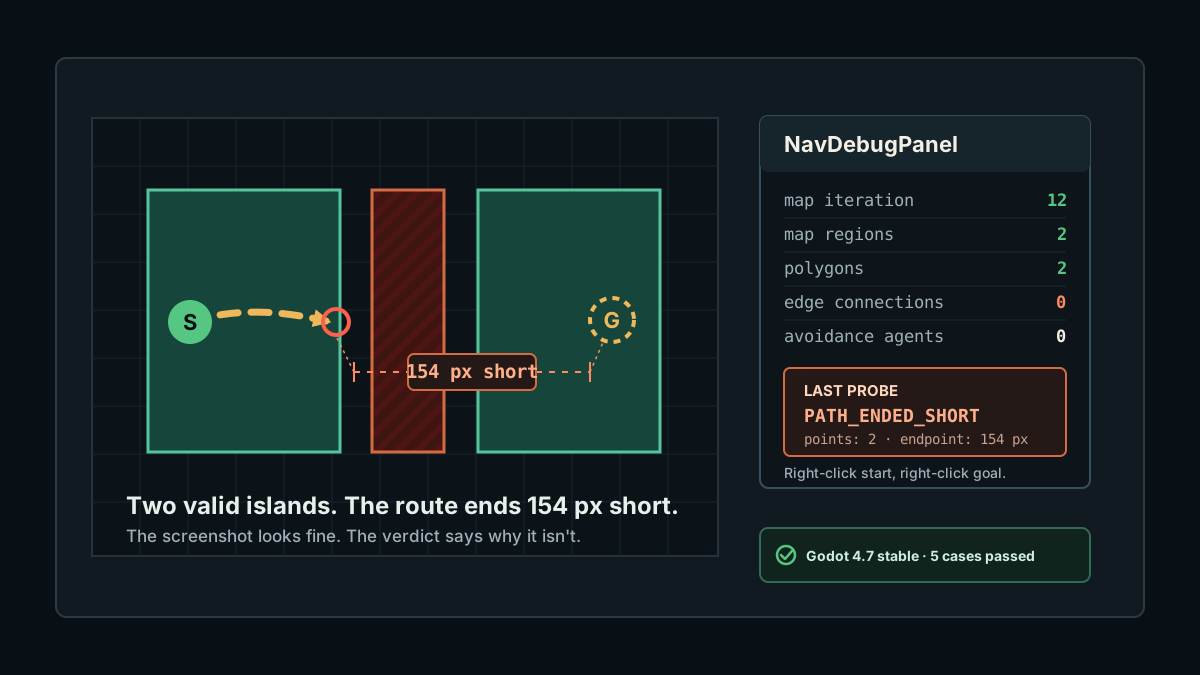
That last point is important. AStarGrid2D.get_id_path(..., allow_partial_path=true) can return a grid path ending short. NavigationServer2D.map_get_path() has no allow-partial flag, but the verified disconnected-island case returned two points and ended 154 pixels from the requested goal. The panel treats that as PATH_ENDED_SHORT instead of pretending the server and grid APIs share semantics.
Read counters before tuning agents
Start with counters, not movement settings. If the map has no polygons, path_desired_distance, avoidance priority, and steering code aren't relevant yet.
The panel reads the active world's navigation map plus server process info. The exact code in the download adds a CanvasLayer readout and refreshes it four times a second; this is the core of the fact collection:
Interpret the readout
map iteration id = 0 means the map has never synchronized. This is the classic same-frame bug: you add or change navigation data and query before the server has processed it. In normal gameplay, wait at least one physics frame after changing navigation data before treating the result as final.
regions = 0 means nothing is registered on that map. Stop debugging the agent; the world isn't there.
regions > 0 but no closest-point owner means the region exists but contributes no usable polygon surface for the query. In the proof scene this is reported as REGION_BAKE_MISSING.
edge connections = 0 with multiple intended regions means the regions may be separate islands. Check the actual gap and the map's edge connection margin before calling it an agent bug.
avoidance agents means agents processing avoidance, not every NavigationAgent2D in your game. An agent with avoidance disabled can still follow a path and still be absent from that counter.
Godot 4.7.1 fixes one misleading counter case
If you're testing on 4.7-stable and the avoidance-agent count grows after pausing and resuming the tree, upgrade before diagnosing an application-side leak. Godot 4.7.1 fixes navigation agents being added to the avoidance simulation unconditionally after pause/resume.
That fix doesn't change what the counter means: it still counts avoidance agents, not every NavigationAgent2D node and not path queries. It removes one engine-side reason the number could be higher than the scene you were looking at.
Probe start and goal
The panel's right-click probe is intentionally boring. It rejects the world-state failures first, snaps both endpoints to the closest navigation surface, and only then calls map_get_path().
That order prevents the worst debugging loop: seeing an empty path, then spending an hour adjusting the wrong object.
Copy the probe, not only the screenshot
A useful navigation bug report should survive after the scene has changed. Keep the report JSON-safe: positions become {x, y}, RIDs become their numeric IDs, and the report records the map iteration beside the path result.
RID numbers only identify resources during the current run, so pair them with path_owner_ids and the current map iteration. The copied report is a same-session receipt for a teammate or issue; it is not a persistent resource database.
Keep timing claims separate too. Godot's Navigation Process monitor measures map updates, regions, agents, and avoidance. The official debug guide says it does not include pathfinding query time. The panel's own timer measures the query you actually issued; the NavigationAgent2D crowd guide owns the repeated-query performance diagnosis.
Keep AStarGrid2D separate
Grid failures deserve the same panel vocabulary, but not the same assumptions. AStarGrid2D has no built-in debug drawing and its partial-path flag is on get_id_path() / get_point_path(), not on NavigationServer2D.
The cheap checks still come first: dirty grid, start outside, start solid, goal outside, goal solid. Only after those pass should you call allow_partial_path and inspect whether the last returned cell equals the requested goal. On grids, two valid cells split by a wall should surface as PARTIAL_PATH; an empty result after those guards means something upstream is stale or inconsistent.
If the grid itself is the suspect, start with the TileMap-to-navigation-grid build step and the AStarGrid2D glossary entry. The debug panel's job is to turn those facts into a runtime verdict.
Use it with the existing checklist
The panel is a runtime instrument, not a new taxonomy. Once it says GOAL_SOLID, DISCONNECTED_REGION, UNSYNCED_NAVIGATION_MAP, or REGION_BAKE_MISSING, send the issue to the empty-path checklist for the full fix path.
For NavigationAgent2D movement bugs, draw the path and run the probes from the stuck-agent guide. If the path exists but the body stops arriving, that's a movement diagnosis, not a map diagnosis.
For pure NavigationServer2D setup, keep the NavigationServer2D guide open. It covers region creation, baking, map sync, links, obstacles, and direct server queries in more depth.
The companion PathForge playground case mirrors the same debug-panel story in the browser so you can share the failure state without sending a Godot project.
What not to ship
Don't ship this panel in release builds. It's a debug-build tool that calls debug-only and diagnosis-only APIs, writes text, and may expose map internals you don't want in production.
Don't turn every verdict into an automatic fix. A panel that says START_OFF_NAVMESH shouldn't silently move the character. It should tell you that the gameplay target and navigation surface disagree.
For timing, treat the proof JSON as a correctness receipt, not a benchmark. If you need query performance, build a separate harness with fixed maps, repeated iterations, warmup, and versioned data.
Frequently asked questions
How do I debug why a Godot navigation path fails?
Start with built-in Visible Navigation, then read NavigationServer2D facts: map iteration id, region count, polygon count, endpoint snap distance, and map_get_path() output. If iteration id is 0, wait for sync. If region or polygon data is missing, fix the map before tuning the agent.
Why does Visible Navigation show nothing for my NavigationServer2D map?
Godot's navigation debug visuals are based on SceneTree navigation nodes. If you build the map directly through NavigationServer APIs without NavigationRegion2D nodes, the server data can exist while the built-in visual debug view doesn't draw it.
What does map_get_iteration_id() = 0 mean?
It means the navigation map has never synchronized. Querying a path in the same frame that navigation data was created or changed can hit this state and produce misleading results.
Does NavigationServer2D.map_get_path() support partial paths?
It doesn't expose an allow_partial_path parameter like AStarGrid2D. In the verified Godot 4.7 disconnected-island case, map_get_path() returned two points but ended 154 pixels short of the requested goal, so the panel compares the final point against the target and reports PATH_ENDED_SHORT.
Why is AStarGrid2D allow_partial_path dangerous with a solid goal?
A solid or invalid goal should be rejected before search. The Godot docs warn that partial-path searches to disabled or unreachable targets can take unusually long, and the proof scene verifies the last-cell semantics separately.
How do I find which NavigationRegion2D or NavigationLink a path used?
Run the query through NavigationPathQueryParameters2D and NavigationPathQueryResult2D with metadata enabled. path_types distinguishes region and link segments, while path_rids and path_owner_ids identify the server resources and SceneTree owners for each path point.
Does Godot's Navigation Process monitor include pathfinding query time?
No. It measures NavigationServer map updates, regions, agents, and avoidance work. Godot's official debug documentation states that pathfinding operates on the map data independently and is not included. Measure the query itself when diagnosing path-request spikes.